
Section 1 - Setting up Organic Groups
Create Group Content type
Why do we need to do this?
This enables you to create groups in the Create Content area. The reason that we do not see a "create groups" link but have to make a "create groups" content type is that Organic groups require a lot of flexibility, for example, you may want to create a group type for sport types and a group type for Administration. Both of these content types will allow for two different group types.
To create a new content type called Sports Groups, do the following
❑ Go to Content types >> Add content type
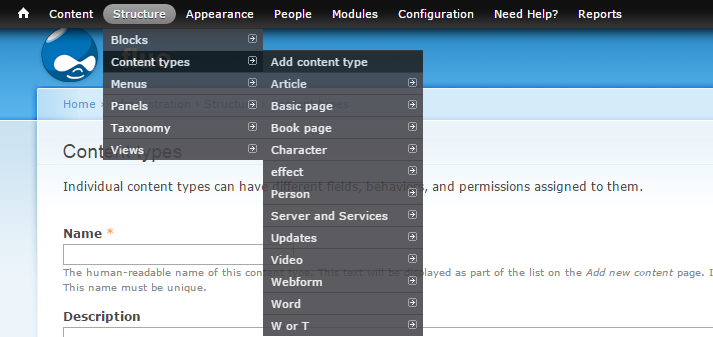
❑ Complete the details for your sports group such as name, type, description
❑ In the Organic Groups settings area, assign this content type to "Group" and save.(You cannot assign the content type "Group Content" unless you have a "Group" set up first.)
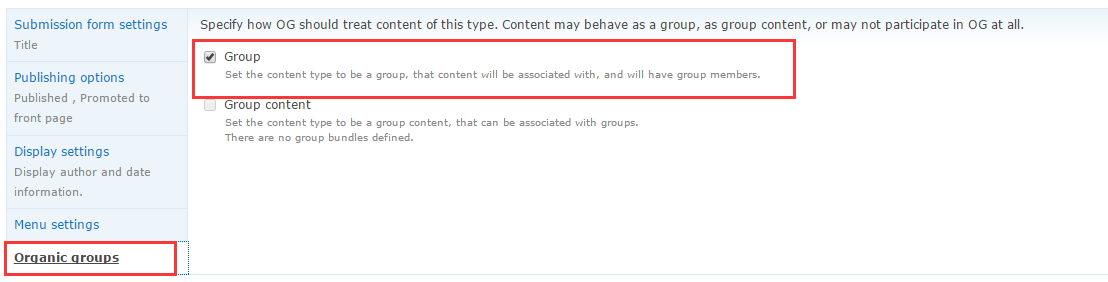
❑ Ignore other settings for this tutorial
❑ Note: Cant see the Organic Groups settings? - your setup up is not correct...check the required modules are installed correctly and repeat this step.
❑ Leave the other content type settings as default
❑ Save this content type. It will be displayed in the Content types list as Sports Groups.
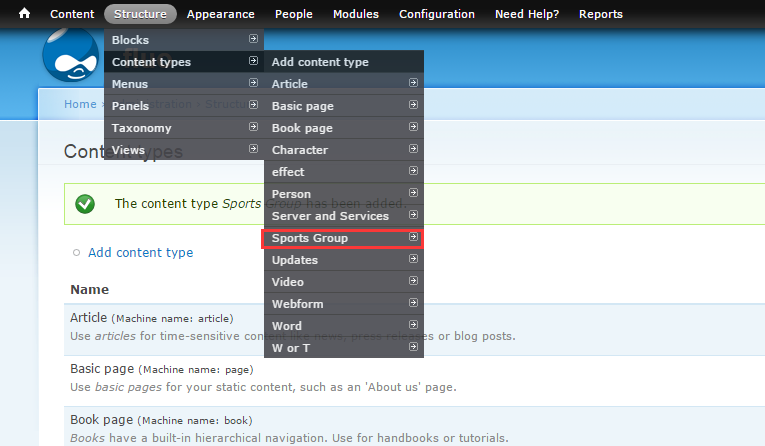
Next: Setting up Organic Group blocks to manage your groups.
Help improve this page
You can:
- Log in, click Edit, and edit this page
- Log in, click Discuss, update the Page status value, and suggest an improvement
- Log in and create a Documentation issue with your suggestion
