
Section 4 - Enable content to be used by your groups
Allocate content types to allow you to post content to your newly created group by doing the following:
D7:
Create new content type
❑ Go to Structure >> Content types >> Add Content Type.
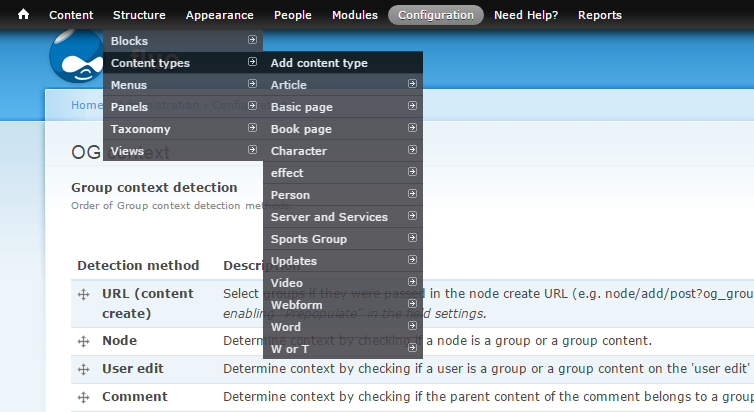
❑ Fill out the fields
❑ On the bottom of the page, click the Organic Group tab, check Group content, click "save content type".

Now this content type is added to the content and you can create pages that will appear in your group page.
Change already existed content type into Group Content
❑ Go to Structure >> Content types and pick the content type that you want to create in Sports group, click on that content type.
❑ Go to the bottom of the edit page and click the Organic Group tab, check Group content, and click "save content type".
Note: Currently we only have Sports Group set as a group node
Now this content type is changed and the nodes created with this content could be seen in Sports group.
D6:
❑ Go to Admin >> Organic Groups >> Organic Groups Configuration. A list of content types is displayed showing what content types are allocated to Group communication.
Note: Currently we only have Sports Group set as a group node
Lets add the page content type to our Organic group to allow us to post pages to our group.
❑ Click the Page edit link and in the Page Content type settings, select the standard group post option from the Organic groups options.
You will now be able to create page content for the Soccer Group.
Next: Section 5 - Posting content to your groups
Help improve this page
You can:
- Log in, click Edit, and edit this page
- Log in, click Discuss, update the Page status value, and suggest an improvement
- Log in and create a Documentation issue with your suggestion
