

 The 2026 Drupal Business Survey is open. Your response will help shape the future of the Drupal business ecosystem.
I have read readme.txt from top to bottom.
I am using the fbmodule on a live site as a canvas page (iframe). The applicaiton is working but the Facebook Devel Info Block always shows Page Status = Not a canvas page.. Also the setting for "Theme for canvas pages:" does not work, irrespective of what is set there the canvas page uses the default theme.
Finally there no chance for fb users to connect with the site or become a app-user. When users go to my app then in their fb-app-settings the application appears but users are not registered with drupal. In my settings the following is checked "If user has authorized the app " and "Map account when both local uid and Facebook id are known". I also activated "Add connect button to user forms. If user has connected, show the user's name and profile picture. X Registration form X Login form". The Login block is shown but thre is no link for facebook users to connect.
I am using successfully the fb 2.0 on a working facebook connect site. Maybe I have a misunderstanding in using fb 3.0 for a canvas iframe pages, because I have no idea how to let facebook users seeingmy iframe become user of my app (=connecting?) and becoming a drupal account.
Thanks for any advice in advance.
| Comment | File | Size | Author |
|---|---|---|---|
| #5 | immagine.PNG | 132.42 KB | romina |

Comments
Comment #1
scoorch commentedI checked the settings of my facebook applicaiton at facebook.com and to my surprise saw there tha the Canvas Call URL is http://www.mydomain.com/ without any path behind it. Is this ok? I checked in drupal the "Set Application Properties Automatically" option so think that upon saving my facebook app settings there (and waiting some minutes) facebook should have the right canvas call URL set automatically?
Comment #2
Dave Cohen commentedOne of facebook's lovely changes in the newest libraries is they no longer pass any extra parameters to iframe canvas pages, unless the user has authorized the app. So for the last two years the drupal callback could detect that a canvas page was requested, but for the last two weeks it cannot (even longer than two weeks if you enabled the "new sdks" migration, but now there's no choice).
Go to the app settings on facebook. Under migrations, make sure the "Canvas Session Parameter" is enabled.
On drupal server, edit your setttings.php and include fb_url_rewrite.inc. So the settings.php will end with something like...
Then on drupal go to the edit page of your application, and click submit (even if you make no changes). This will update the canvas callback URL on facebook's server. Please let me know if that solves it.
Comment #3
Dave Cohen commentedMake sure you've update modules/fb to a recent copy of fb-6.x-3.x-dev before making the changes described above.
Comment #4
scoorch commentedThanks a lot, it works insofar as Page Status = Serving Canvas Pages and the Facebook Connect button is shown on user/register.
What I noticed is that once a user connects the user/register page or any other page the user is visiting is reloading again and again infinitely, maybe a wrong redirect. I think this is a different problem and needs some investigations from my side.
Comment #5
romina commentedI'm having the same problem even if Page Status = Serving Canvas Pages:
the setting for "Theme for canvas pages:" does not work and there is no link for facebook users to connect in the login block.
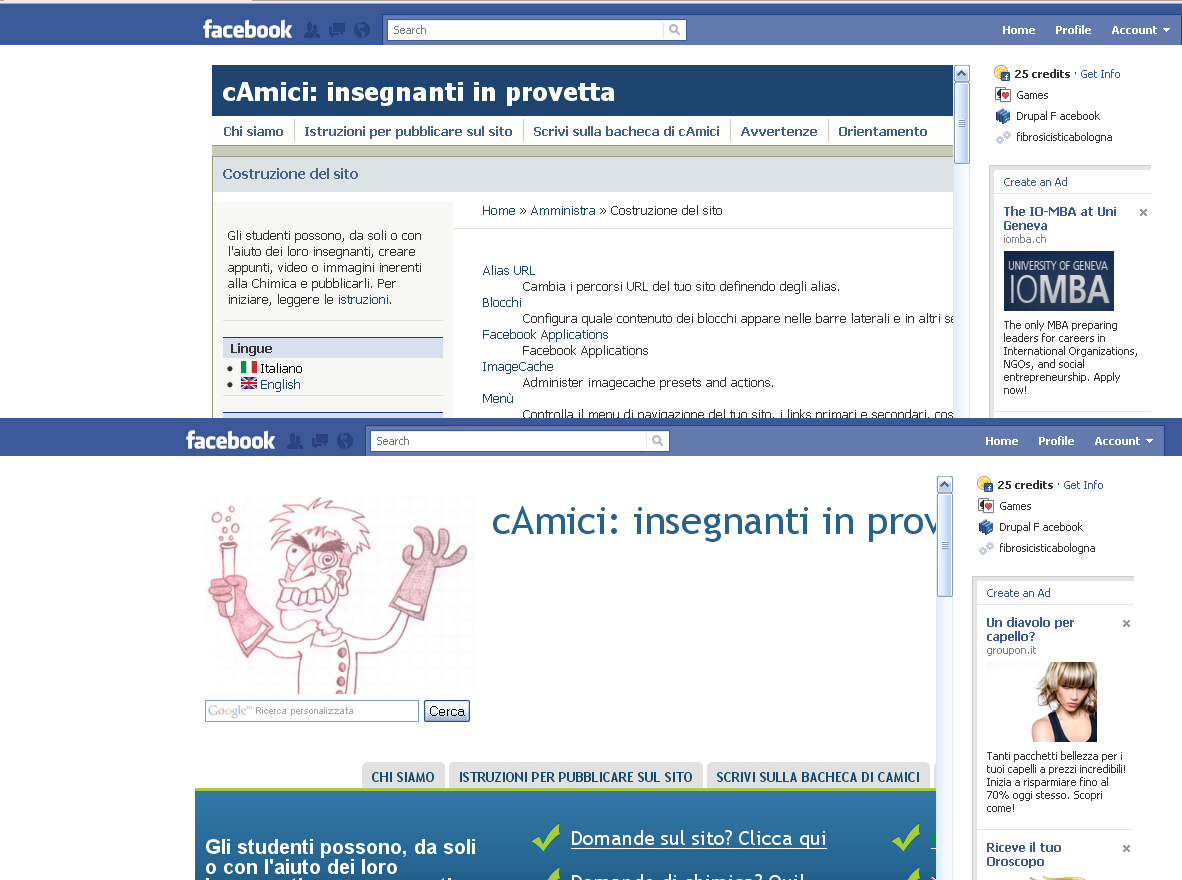
I tried your solution but it doesn't work. I notice a strange behaviour: when I go in administration section the theme is fblike (set for canvas) but when I click on other pages they are acquia marina (my theme) rendered (see screenshot).
An other question Dave: how can I put my left sidebar like yours in drupalforfacebook.org? If you look my screenshot I have both sidebar and content on the center. Sigh! Update (03/11/2010): answer= http://drupal.org/node/952984
Comment #6
romina commentedSome more informations:
when anonimous goes to my app both in IE8 and in Firefox the theme is fblike (set for canvas). When I try to login as admin, IE8 reload again and again infinitely the page while Firefox load the page but the theme is not that set for canvas (even if Page Status = Serving Canvas Pages). Beside it shows that I am connected 25 times!
When I logout the theme is still wrong and come back to fblike only clearing Firefox cache. If I login as a simple user the theme is right (that set for canvas) in all pages both in IE8 and in Firefox and IE8 load the page as it should. Romina
Comment #7
Dave Cohen commentedDoes this help? http://drupal.org/node/923818
Comment #8
romina commentedNo...
The question is complex for me.
As concerns the infinity reloading in IE8, fixed with the new release.
As concerns canvas not showing canvas theme in Firefox I have this behaviour:
If I log in facebook as administrator canvas pages are wrong. If I log in facebook as a normal user canvas pages are perfect. If I visit myapp as anonymous canvas pages are perfect. Thank you for trying, Romina
Comment #9
jghyde commentedI read the README.txt.
Using a CVS checkout of HEAD (24 Nov 2010)
I am duplicating this error. The theme I selected for fb canvas isn't working. Instead, I get the site's Web theme.
Another problem that may be related... When I visit the fb app as a logged in account on the site's fbconnect, the canvas page creates another (a second) user account for the logged in facebook user. For example, I have user/1 mapped to my facebook account. When visiting the canvas page, it creates user/2 (username_2) mapped to the same facebook account. It gives me a dsm error about two accounts mapped to same fbu.
try for yourself:
site: http://www.sanangelolive.com/
fb app: http://apps.facebook.com/sanangelo/
This appears to be cookie-related??
I am going to attempt a clean install tomorrow.
Comment #10
jghyde commentedTested with a new install and the canvas theme works. Enabled CTools and Context and it appears to work as well.
On facebook.com, edit application, "Advanced" tab, selected "Migrations", enabled all options except 'JSON Encoding Empty Arrays'.
Comment #11
jghyde commentedJust fixed the problem with my site. Apparently, you need to take the Facebook app out of the sandbox mode. After enabling the site as LIVE, the FB theme worked.
Joe Hyde
Comment #12
jghyde commentedI found one use case where the canvas theme doesn't switch. If you are not logged in your web site serving the theme and not logged in on facebook, the canvas theme is the default site theme and not the fb canvas theme.
Possible work-around is to create a front page to the fb app canvas front page with a diff page.tpl.php in the site's default theme and require a fbconnect before showing the app.
Comment #13
Dave Cohen commentedmake sure you include fb_url_rewrite.inc as described in README.txt.
After you make that change, edit your app and submit the changes. This will sync the settings with facebook.
Comment #14
jghyde commentedall of that checks good with the fb_url_rewrite.inc. I'm using the latest CVS release of 3.0. Not logged in FB and Not logged in the Drupal site renders the site theme, not the fb theme on the app.
Comment #15
Dave Cohen commentedThere's a "migration" that needs to be enabled on the facebook application form. (see "remote settings" link on drupal admin page). The one about "oauth 2.0" or whatever they call it.