

Active
Project:
Fast Gallery
Version:
6.x-5.3
Component:
Miscellaneous
Priority:
Normal
Category:
Support request
Assigned:
Unassigned
Reporter:
Created:
26 Jul 2010 at 12:34 UTC
Updated:
26 Jul 2010 at 21:09 UTC
Jump to comment: Most recent file

Comments
Comment #1
rapsli commentedflv is not supported at the current version. about jpg files, should actually work?! are you using imagecache?
Comment #2
jyrkipes commented>flv is not...
ok
Does it fail if there are other than just folders and/or jpg -files? For example mentioned flv-files and some xml-files from previous gallery experiments.
I'm using imagecache, have done several flush, flush internal cache, rebuild/clear DB/, etc cycles too.
Comment #3
rapsli commentedoh ;) ... the path to your gallery should be relative to your site path
Comment #4
jyrkipes commented>the path to your gallery should be relative to your site path
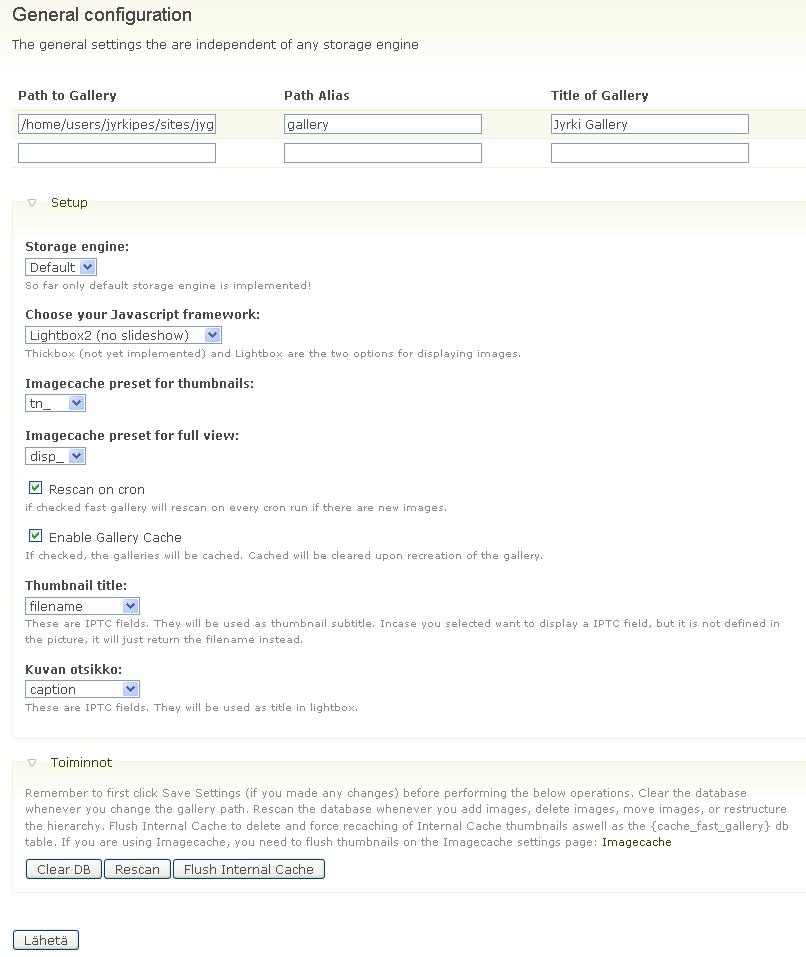
Let's assume files are in /home/jyrki/html/gallery
If I set path to /home/jyrki/html/gallery I get what I described above.
My Drupal is set to reside in http://mysite.com/drup/
Gallery folder is visible as http://mysite.com/gallery
If I set path to /gallery or gallery or /gallery/ or gallery/ I get "This path does not exist."
But then I tried (as you point out :) ) set it to ../gallery , and guess what, now I get image titles and placeholders for them, but no thumbnails still. So we're getting there ! Thanks!
Edit In Place seems to work too.
Meanwhile I've also gone thru settings of GD2 (removed) Imagemagick (in use right now) Lightbox2 (it's not lite anymore) and checked ImageCache settings but so far no luck.
Is there any simple debug switch available I could use or do I need to go for some printf_debugging to see where it fails?
Comment #5
jyrkipes commentedand finally, I moved gallery to ....../drup/gallery and now everything works!
However, some path consistency check appears to be needed. Most likely there are different ways of handling path between FastGallery/LightBox2 or just within FastGallery itself.