

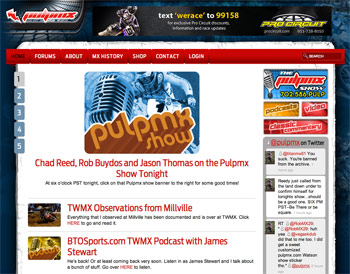
 PulpMX.com was launched in early 2009 as a place for well-known motocross columnist Steve Matthes to post his musings about the sport and its history. Originally conceived of as a modest site, it was built in early 2009 using a stock theme with a handful of custom images, the FCKeditor and IMCE modules to provide a built-in visual editor, and little else. Over time it had grown organically as needs developed: CCK, Filefield, and SWF Tools for posting audio interviews in a built-in player, for example. In early 2010 PulpMX also took on discussion forums from a site that was no longer able to host them, so an existing phpBB installation was also imported.
The site was developing a growing following and it was becoming obvious that it needed an overhaul to better reflect the character of the site, and provide more cohesive and initiative navigation among the quickly expanding areas of the site. Says Steve:
Originally I had gotten Tooth and Nail to design me a basic site for blogs and photos, what they gave me was way better than I had thought I needed. The traffic and the new media things that I was doing (podcasts, slide shows and a live internet show) demanded that I get something new and fresh. I was now big-time I suppose.
New Design: Fluid vs. Backward Compatible
Longtime motocross designer Dawn McClintock developed a compelling new layout that really reflected the character of PulpMX, especially the degree to which the site glorifies motocross in decades past. When it came time to adapt the design to to a custom theme, however, it became clear that we had a choice on our hands: either continue to support aging browsers like Internet Explorer 6, or make the theme fluid and able to adapt itself to screen of varying widths.
Ultimately the decision was made the added flexibility would make the site better suited to a variety of devices (including the smaller screens of mobile devices) that were likely to increase in usage, while users of aging browsers will continue to decline.
In particular, the new design makes frequent use of the variable transparency support in 24-big PNGs, but which the older browsers do not display properly. While it might be possible to develop some alternate styling, the decision was made that such resources would be better spent on developing a mobile-optimized theme, which a high priority for future development. Instead, the IE 6 Update module has been used to advise IE 6 users to update their browser.
Updating the Editor
On a day-to-day basis the site gets little-to-no technical support, so it is critical that adding and editing content requires minimal technical expertise. The older FCKeditor was replaced with CKeditor embedded through the WYSIWYG module. It is a substantial upgrade and has made the editing interface noticeably faster, plus it added the ability to have all unnecessary formatting automatically removed when it is pasted in from a word processor.
The only challenge was implementing the Templates as they had worked within FCKeditor. Templates are critical as they allow Steve to place visuals within his text in a predetermined format, including a place for a caption. WYSWYG doesn't currently support the Templates button, and the existing module that aims to add it in doesn't do so for CKeditor. Two one-line changes were needed to ckeditor.inc, the file that tells WYSWYG what options to make available in the interface.
Drupal as a Rich Media Hub
Steve Matthes works hard at giving his audience perspectives on motocross in a variety of media, including video, audio interviews, and a live, online call-in show. We wanted the new website to act as the central focus for all these.
Video
For video we created a workflow with Feeds and Embedded Media Field where Steve can post his videos directly to YouTube, but they are automatically posted to PulpMX as well. We're hoping that in time Feeds may also support mapping the YouTube thumbnail to the imagefied that displays a preview on the home page as well. Instead, the site currently uses a default image, which can manually repaved of time allows.
Audio
PulpMX is already well known for a number of audio features: brief interviews with current pro motocross riders and team managers from track, podcasts that are typically in-depth interviews with current and past MX celebrities, and an online call-in show that discusses recent developments in the moto industry. Once again, a goal in the design of the site is to the update of all of these as simple as possible.
Interviews
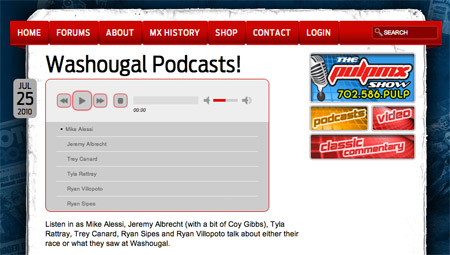 Interviews can be easily posted as Filefield enclosures, and multiple files can be added to a single post. Steve is a big fan of his new iPad, so we set out to find a solution that would allow people to play the audio directly on the page, but one that was compatible across browsers, even those that don't have Flash. SoundManager2 in particular showed some real promise, but for IE in particular it seemed to require a newer version of Flash than many of of our visitors had installed, which meant that they could see the player but not use it. Also, while the 360 player is visually compelling, it does take up a lot of space on screen. jPlayer is less flashy but also seemed to have more modest Flash requirements. We couldn't find a supported way to use a custom UI so we ended up having to hack in a custom graphic treatment, but we've opened up an issue for the jPlayer module in the hopes a future version may allow for a theme to override the default styling. The jPlayer website actually provides PSD templates to facilitate the creation of the necessary graphics, so the only missing piece is a supported method to use the custom graphics within Drupal.
Podcasts
The existing site hosts a number of podcast feeds, and it was our hope to use Drupal as the hub of this workflow. Ideally Steve should be able to record his MP3s, upload them, and then specify the information to go into the various tags. Drupal would configure the XML feed and write the ID3 tags, and the new content would appear on the site and in iTunes simultaneously. Ideally.
After looking into the options available, we found that there seem to be two modules that are currently built for this purpose: Filefield Podcaster and iTunes. Both attempt to solve a similar problem, but using different methods. The iTunes module seems to support a larger array of tags, but neither supported the full array that were already being used, in a software application dedicated to podcasting. The larger issue, however, was the ID3 tags in the MP3 file itself. The dedicated application that had been part of the previous workflow would automatically update these tags to contain the same information. Ultimately we decided that if Drupal couldn't do both of these then it wouldn't actually be saving any time. The Audio module does support writing ID3 tags, but its 6.x release is officially labelled as unstable. We've decided to stay with the manual process until such time as either Filefield Podcaster or the iTunes module support writing ID3 tags, or the Audio module has a stable release.
Over the next few weeks we do hope to work at developing the code necessary to make all of this work, and if it turns out as we hope we do intend to share the code with the appropriate module maintainers.
Forum Integration
The final major piece to address was the discussion forums. In the switch over from phpBB there had been some features lost, even though the Drupal version was using Advanced Forum to provide more parity. In particular, the Markitup editor we were using to provide easy BBCode functionality was lacking three buttons that are very important for forums: smileys, picture, and quote. The first one was relatively easy to add with the Smileys module (though it's unfortunate it couldn't appear as an actual button on the editor), while the other two required some tinkering with the WYSIWYG code that integrated Markitup.
Also, a common complaint with the old version of the forums was images that would overlap the sidebars. It was difficult to control with user-generated content, especially when dealing with externally hosted images. The solution we arrived at was a few lines of jQuery that resize the image to fit within the available space.
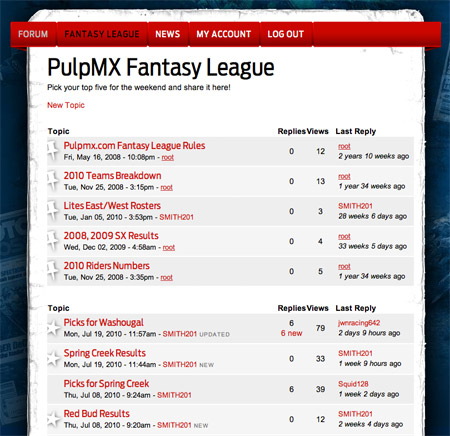 A bigger issue was the layout of the forum page. The default forum layout wasn't familiar to people who frequented other popular motocross forums. While it sounds as though the Drupal 7 offerings will be much better in this respect, in the meantime the best solution was to structure the forum display using Views. We were able to get most of the way there using a standard table-based view, combining columns to achieve the structure we were looking for. Most forums also provide icons so users can quickly scan the list to find new and updated posts, so the last hurdle was providing a method for this kind of visual feedback. One option might have been adding some kind of dummy column and use PHP to rewrite the output to an img tag, based on the rest of the row's data. Ultimately, however, we decided we could get the effect we needed by adding a class to the relevant table cell.
One piece we couldn't find an elegant solution for handling was sticky posts. Often on a forum it's useful to designate a post as "sticky", meaning that it will stay at the top of the list. Drupal has a built-in flag for this, but when we structured the view based on sticky status, that field data was no longer available at the theme level for the table. Eventually we resorted to a jQuery workaround. Views puts the grouping field into the table's caption, so we had jQuery hide the caption extract its contents of the caption and convert it into a class, then add that class to the parent table. It all works perfectly, though of course a solution that didn't require Javascript would be preferable.
Taking the Podium
The updated site has been hailed by motocross fans and pros alike as a huge improvement. Says Steve:
I'm super-pumped on my new site, it's colorful, refreshing to look at and has an ease of use that's amazing. The site is night and day better than the old one and the reception that it's gotten within the industry has been great. Everything on the site be it written word, podcasts, shows, photos or scans is easy to get to and everything is where it's supposed to do. Cosmetically, it's about a million times improvement for me, so much so that some readers were comparing it to the industry leaders, the ESPN's of the motorcycling world.
It's a testament to the power of Drupal that a small development team could turn around such a massive overhaul within a short development window. We want to thank everyone who contributes to core in one way or another, as well as the huge effort that goes into contrib modules. Speaking of which, here's a rundown of some of the modules that made the new PulpMX such a success:
Content and Media Handling
- CCK
- FileField
- Imagefield
- Imagefield Crop
- Embedded Media Field
- Feeds
- jPlayer
- Views
- IE6 Update
- Token
- Pathauto
- Transliteration
Administration and Editing
- Better Formats
- Content Type Menu
- WYSIWYG
- IMCE
- WYSIWYG IMCE Bridge
Discussion Forums
- Advanced Forum
- Author Pane
- Captcha
- Comment Notify
- Smileys
- User Stats
- BBCode

Comments
.
Ok, I'm confused...
What you have there now on the site looks even less like a typical forum's topic listing than what Advanced Forum gives you to start with.
Michelle
"Typical" is subjective
It was done to synthesize best practices from some popular motocross-specific forums. We actually had complaints about the default structure of Advanced Forum. The one thing that would have been nice would be to show the Avatar of the user who posted the last comment, but we couldn't find a way to make that available in Views.
.
Odd... What were they complaining about? AF is far from perfect but I haven't heard complaints about the topic lists before. And I keep flipping between yours and AF's and the main difference is your site is missing the topic icons and some of the extras like the topic legend. The listing itself is almost identical. I have to say I don't get it. Seems like you went through extra work to re-invent the wheel.
Michelle
No accounting for taste
I agree, I thought the default AF structure was fine too. The only thing I wasn't that jazzed about was the icons, but I certainly wouldn't have overhauled the whole structure just for that.
FWIW, I was reading a thread about the new forum structure for Drupal 7. Sounds pretty amazing.
.
Considering you could have just dropped the icon field out of AF's topic listing view, yeah, that would have been a lot easier than creating a view from scratch. :)
Do you have a link to the thread? I haven't been following D7 closely and didn't realize they'd done anything much with the forums.
Michelle
Icons for Auth Users
I did some digging to see if I could find the thread, but no luck so far. I could have sworn it was a topic about some patches that ultimately been committed, but even in the issue queue for forum.module it didn't jump out at me.
As for the icons, they are there, but from a UI standpoint I thought it was too noisy to show an icon next to each and every topic. To my thinking you only need to show an icon to highlight topics that are unusual in some way. If you look at the screen capture above, you can see that new/updated and sticky posts each have specific icons. The former is only meaningful (or visible) if you're an authenticated user, so as an anonymous visitor you wouldn't see them.
.
Ah, that might have been a little tricky to do with AF's topic list view but not impossible. Frankly, I still don't get it. You say your users complained about AF and then you basically re-invent AF. Doesn't make any sense to me but it's your site. *shrug*
Michelle
Tooth & Nail Design
Dawn McClintock and Martin Anderson-Clutz are a great team.
These guys know their job. Excellent design.
Two one-line changes were
Could you please tell more how to edit ckeditor.inc in order to show up some ckeditor feature which WYSWYG interface doesn't provide ?
I would also be interested in
I would also be interested in this changes. With such a simple fix, it would be worth contributing back to WYSIWYG for inclusion.
Patch Posted
The maintainers of WYSIWYG seem to want to see the templates issue addressed as part of a larger initiative to make the module support advanced configuration (including the templates themselves) without editing any files. While I agree with the sentiment, the thread in question has been moved to the 7.x branch, so I posted a patch that implements the changes we made to ckeditor.inc.
Note that as described in the post there, we also set the default to not replace the content. Also, it would be ideal if someone could find a way to use a separate (possibly theme-defined) templates file, but in our development we weren't able to make that work, and resorted to editing the templates file within the ckeditor library. I hope God didn't have kill any kittens because of that. :-(
Rounded Images
Hi, great work!! I love your theme.
I am a newbie and was wondering how did you make the rounded images. Did you use any image tool to make rounded borders BEFORE you uploaded them OR is it possible in one of the modules you used? I have the same requirement.
Thanks
CSS3
Actually the rounded images are done using the CSS3 border-radius properties (technically you have to use browser-specific ones currently). As such, they don't look rounded in IE (at least in versions lower than 9) but it's a much more lightweight solution than actually creating different images.
Technically you could probably put them into the image directly using Imagecache Actions if you absolutely had to have an IE-compatible solution.
Cool...
Thanks Martin, I have a looooong way to learn man...
nice work
Great looking site. Congrats.
Nice job on this site by the
Nice job on this site by the way, It's one of my favorites in the Industry. I'm an ex-pro motocross racer myself, and happen to also be a software developer now. I'm a big fan of Steve's podcasts, and have watched this site grow.
One thing i've noticed is that you use a completely separate multi-site to achieve forum.pulpmx.com, which necessitates a separate login, since you're not sharing the database between default/forum.pulpmx.com, you could share tables (users table, et al). I say this because, had previously created a user on the site for commenting on some blogs, more recently I found that I needed to establish another username on the forum.pulpmx.com site because it was separate.
Check out this URL:
http://acquia.com/blog/migrating-drupal-way-part-iii-managing-multiple-s...
Under "Taking multisite a bit further", you could share the users table and have a single sign on.
But keep up the good work, Steve really cuts to the chase with an industry thats among the most fickle in the world, his site always has the best dirt.
Chris Hunter
Trickier with existing subdomains
Thanks for the feedback Chris. As it happens, that is a request that has been made a number of times (more than once by Steve himself) and is definitely on the to-do list.
The challenge that we're faced with in this instance is how to merge two existing installations. I've synchronized logins across subdomains before, but always in cases where one subdomain was being created as a blank slate.
Each of the subdomains has several hundred users, so merging the subdomains would require merging the users tables, and then updating the uids for all the user-related data on one of the subdomains. The main site has almost three times as many users, but ironically it may actually be a better candidate to have its user ids change, as the scope of user-generated data is much more modest there. I can probably just look at the comments-related tables there.
As you probably read above, the forums were imported from a previous site, and the dilemma at the time of import was that it would have required significantly more time (and probably a fair bit of down time on the main site) to do the import into an installation that was using tables shared from the main site. As it was, the import had to be done a number of times to ensure we had all the settings right. With shared tables, you have to restore two databases before you can try the import again.
At the time it was decided that given the time and resources available it was better to just get the forums live, but it does make for a more difficult task after the fact.
I hear you, I just went
I hear you, I just went through a major database migration myself from Joomla/SMF to Drupal/AF - http://www.phillymtb.org. We had over 1000 users, and had to recreate all the public/private forum functionality, then had to migrate all the users/posts. Not to mention the AEC to CiviCRM for memberships/recurring payments, It was ugly for sure. I feel your pain, data migrations are something nobody enjoys (except maybe Moshe Weitzman).
I'm sure you have thoughts on this, but one way would be to write a custom bootstrap script to riffle through the user table you want to eliminate.
- you can setup the settings.php file to connect to multiple databases
- foreach user in the default pulpmx.com database, select within the forum.pulpmx.com user table for email (which sounds like the more ideal home for users) and get the new user_id,
- then run an update statement on the www sites comment/node tables to update the old user id's to what you found (if anything)
- if there was no match, create a user object, and pass it to user_save() method on the forum database
- Something like that, meh.
I look forward to seeing what you guys come up with next! If you are thinking about mobile apps, I'd be interested to chat with you guys. I've done some Android/iPhone dev on top of Drupal Services ala Greatbrewers.com methodology.
Twitter and Facebook Modules
How did you get the Twitter and Facebook blocks in your front page?
Are they twitter and Facebook apps or modules written for Drupal?
Thanks,
Mike
Just Blocks
Both are custom blocks.
The Facebook was a simple paste in of the code generated automatically by the Facebook page provided them for making like buttons.
The Twitter block was done by using the juitter plugin with a couple of drupal_add_js and drupal_add_css calls. Twitter actually provides their own widgets that perform a similar action. Using juitter allowed us to hack, I mean customize, the display structure.