

 Come together with the global Drupal community in Rotterdam, 28 Sept – 1 Oct 2026. Sessions, contribution, connection, and Early Bird savings until 8 June.
Hi,
I have installed the module, but at the client side while configuring live writer, throws error at step 7(Select provider)
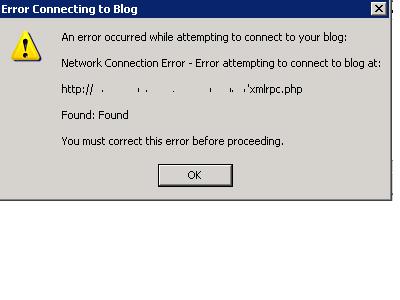
the error that pops up is:
" An error occurred while attempting to connect to your blog
Network connection error -error attempting to connect to blog at:
http://site.com/xmlrpc.php
Found:Found
you must correct this error before proceeding ".
the xmlrpc.php file is in root directory and contains this..
include_once './includes/bootstrap.inc';
drupal_bootstrap(DRUPAL_BOOTSTRAP_FULL);
include_once './includes/xmlrpc.inc';
include_once './includes/xmlrpcs.inc';
xmlrpc_server(module_invoke_all('xmlrpc'));
any help in this..?
| Comment | File | Size | Author |
|---|---|---|---|
| #4 | Error.JPG | 16 KB | madhusudan |

Comments
Comment #1
jrglasgow commentedAssuming that the rest of Drupal is installed in the root directory as well... I don't see any reason why it shouldn't be working.
Are there any errors in the PHP error log?
Comment #2
madhusudan commentedyes rest of the drupal is installed in root directory only. I have installed in /var/www/drupal6/ and my site is
http://mysite.com/drupal6/
the Apache logs shows this...
The above log says 2 errors, 302 and 632, well as i know 302 is "moved temporarily " error. what is 632 error..?
i think the 302 error is because
i am using CAS(single sign on) module. is this the problem..? does live writer supports this..?
Comment #3
jrglasgow commentedThe 632 is the size of the response, 632 bytes.
and CAS could be the problem. I have never used it so I couldn't say whether WLW_blogapi is incompatible with CAS. It all depends on how CAS does the authentication. Most likely it is the problem though.
Comment #4
madhusudan commentedi removed CAS module completely. but still the same error..
I have attached the Error screen-shot.
Comment #5
jrglasgow commentedThis is an error that I have not seen before.
To continue any more with trouble shooting I would need to know the domain and have an account on the site so I can configure Windows Live Writer on my local system.
If you are willing to have me do this please set up an account and send me the info through the contact form