Active
Project:
SimpleMenu
Version:
6.x-1.9
Component:
Code
Priority:
Normal
Category:
Bug report
Assigned:
Unassigned
Reporter:
Created:
28 Jul 2010 at 06:21 UTC
Updated:
1 Jul 2011 at 11:33 UTC
Jump to comment: Most recent file


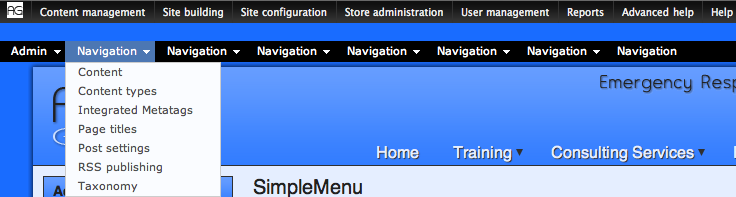
Using multi-menu, and enabling some child menus of Administer (like same top level items of the admin_menu module) all top level items are correct menu trees, but named "Navigation". Should this be able to work or is this an expected bug? I can't find anything on this.
I'd like to have a custom menu in the top level along with similar to admin_menu, and if this is not possible, I'll have to move my custom items into "Administer".
| Comment | File | Size | Author |
|---|---|---|---|
| #3 | simplemenu.png | 39.41 KB | echoz |

Comments
Comment #1
AlexisWilke commentedHi echoz,
The menu that includes the administration menu is called Navigation. I also thought that was strange when I first started with Drupal. It has changed in Drupal 7.x if you want to know... there are now two menus similar to Navigation (except administration) and another one with the Administration items (called Manage or something like that.)
What you are trying to accomplish, I think is moving the Administration links from their default location to another menu. That's doable except that each time you're going to install a new module, you'll get that new module menus "in the wrong place."
In any event, you may want to create TWO custom menus. One with your "navigation" items and one with your "administrative" items.
Thank you.
Alexis
Comment #2
echoz commentedI'm very familiar with drupal's menu structure. I'm describing what happens when I chose child menu items of (Navigation /) Administer in the multi select. I have more to report. I said all top level items are correct menu trees, but named "Navigation". They are not linked correctly though, they all link to the simplemenu settings page. Also there is no js files being written. I recently ran version 1.8 on the same multisite, so I observed how your module writes the js + css directories to the files diectory. This is not happening in 1.9. Could this be the issue?
Comment #3
echoz commentedI figured a screenshot would help. That's the admin menu above and the simplemenu below, for which the items should be named similarly.
In the muti_menu select, I've chosen child menus of Administer (Content management, Site configuration, User management, Reports etc). These menu trees are correct but their top levels are all named "Navigation" and all link to - admin/settings/simplemenu
And there are no simplemenu js files or the css file being written to the files directory. The menus work fine.
Comment #4
AlexisWilke commentedHmmm... I guess that's a bug. 8-}
The code handling the multi-menu must be using the name of the menu instead of the parent item name when available.
The JS not being created would come from your settings. I thought that by default it would be created. If not that's a bug too. In 1.9 I have an additional test though, if you use Private Files, then the JS & CSS are not cached since they would not anyway be visible from the outside (not without extra work at least--D7 resolves that with private://... and public://...! Really cool.)
Thank you.
Alexis
Comment #5
echoz commentedsorry, my internet went out for a bit - my error on the js files - it's writing the js files to another one of the multisite I cloned it from, so that part is not an issue. The bug exists though, yes thanks for this great module and your work on it.
Comment #6
Dublin Drupaller commentedsame issue here. anyone found a workaround?
Comment #7
Dublin Drupaller commenteddisregard my previous message #6. works as expected...I made a mistake setting up a new menu.