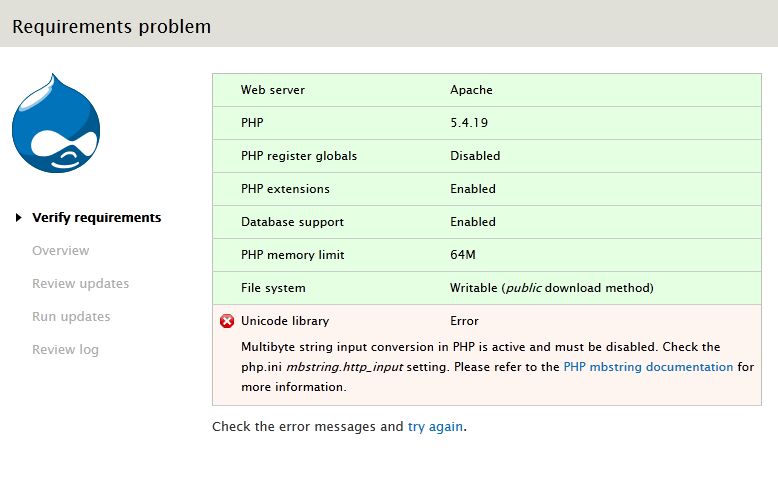
Drupal requires that mbstring must be disabled to run properly. Actually, if you have it enabled, you will have the following message on your setting page:
Multibyte string input conversion in PHP is active and must be disabled. Check the php.ini mbstring.http_input setting. Please refer to the PHP mbstring documentation for more information.
I was wondering, as it is a requirement, why not force it to the required values in the settings.php file, together with the other "ini_set" entries. Just like this:
ini_set('mbstring.http_input', 'pass');
ini_set('mbstring.http_output', 'pass');
Well... I'm not aware of any side effect of it, but maybe I'm wrong.
Regards,
Frederico Caldeira Knabben
----
http://www.fckeditor.net
"Support Open Source Software"


Comments
Comment #1
Steven commentedThese values must be set before PHP is started... we could htaccess to set them. But that would only help people with htaccess ability. Feel free to make a patch. We also need to disable function overloading.
Comment #2
FredCK commentedOk, the htaccess patch would be much better. Just add the following lines to the root htaccess of Drupal for each PHP related "IfModule" block:
The following lines could also be added to the settings.php for those without htaccess:
But Steven said "These values must be set before PHP is started"... so, these changes settings.php will not be areal fix, right? Is there any explanation?
Well... I can't provide a patch for it, but the above lines will make it easy to implement it.
Thanks again.
Comment #3
netbjarne commentedAs this problem showed its face in 4.7.3, I was helped by these lines in settings.php on my 3 drupal sites:
ini_set('mbstring.http_input','pass');
ini_set('mbstring.http_output','pass');
Now, that I'm testing the CVS version of Drupal 5.0, I am presented with the error:
Again the two lines mentioned, put into settings.php, saved my day.
If this is the most correct sollution, I suggest its implemented in the shipping settings.php. If its NOT the correct sollution, I would also like to now, especially why it isn't, why I shouldn't use it, and what I should to insted. I don't think most users have access to the php.ini file on their host, so I expect this issue to affect quite some people if being ignored.
Best regards
Bjarne
Comment #4
Steven commentedhttp_input affects how data such as GET and POST is processed. By the time PHP starts executing, $_GET and $_POST have already been created, and will not magically change just by calling ini_set(). All you do is trick Drupal into believing the problem is not there.e
Comment #5
FredCK commentedI agree with Steven's comment... this is why I believe the htaccess patch would be nice. In this way those with htaccess support will be ok with it right out of the box... for the others, the php.ini advice is ok.
Comment #6
authentictech commentedWell, I have access to the .htaccess file in the root directory of the Drupal installation but the fix as described by FredCK - adding the suggested lines for each PHP related "IfModule" block - did not work for me. I added the suggested lines to settings.php which at least removed the error message if not fixed the problem.
Comment #7
coreb commentedMoving out of the "x.y.z" queue to a real queue.
Comment #8
notsleepy commentedNone of these worked for me as there is one more setting mbstring.encoding_translation that needs to be overridden to continue with Drupal 5.0 installation. Place these three lines in a new .htaccess file in the root to get around this problem at install:
php_value mbstring.http_input pass
php_value mbstring.http_output pass
php_value mbstring.encoding_translation 0
Comment #9
markj commentedThis didn't work for me. I'm running Drupal 5 on FC5 (ppc), PHP 5.1.6, apache 2.2.3.
Comment #10
Steven commentedChanging title to match the issue.
To those testing the values: make sure AllowOverride is set in your Apache configuration. If you can turn on Clean URLs, you can be sure it works.
Comment #11
markj commentedConfirming that on my setup, AllowOverride is set to All (I can't test clean URLs because I can't install Drupal. The following error occurs when I hit install.php :
Incompatible environment
The following error must be resolved before you can continue the installation process:
Multibyte string input conversion in PHP is active and must be disabled. Check the php.ini mbstring.encoding_translation setting. Please refer to the PHP mbstring documentation for more information. (Currently using Unicode library Error)
Comment #12
moshe weitzman commentedthose 3 settings resolved my client's problem too. here is a patch. since it has worked for several people already, i set to RTBC.
i think this should be backported after commit to HEAD.
Comment #13
moshe weitzman commentednow, with a patch
Comment #14
dmetzcher commentedForgive me if this question seems stupid. This is the first time that I am attempting to install Drupal, and I got this error. I see that Moshe has posted a patch, but, frankly, I have no idea what to do with it. Is there a tutorial where I can find more information on this subject, or can someone describe exactly what to do with this patch. I attempted to create an .htaccess file at the root of my site with the contents of the patch file, but I get a server error when I attempt to visit my site. Removing the .htaccess file gets rid of the server error.
Any help that can be provided would be very greatly appreciated.
Thanks!
Comment #15
dmetzcher commentedNevermind...
I added this to .htaccess and got it working.
php_value magic_quotes_gpc 0
php_value register_globals 0
php_value session.auto_start 0
php_value mbstring.http_input pass
php_value mbstring.http_output pass
php_value mbstring.encoding_translation 0
Comment #16
wmmead commentedI was also able to get Drupal to install by changing my .htaccess file with the info listed in comment #15. However, I am concerned about what sorts of problems will crop up in the future with this sort of solution. Can anyone tell me what else I need to do, or what other problems I might encounter by doing this?
This installation of Drupal is for a client on their shared hosting site, so I doubt I will get any access to php.ini file
Comment #17
underpressure commentednone of the methods listed worked for me all I get is an error that say "zero file size"
my host said try a custom php.ini file but I have no idea whaty to place in the file.
Comment #18
moshe weitzman commentedno sense in holding this back. there are no drawbacks that i know of for the .htaccess solution. doing this in settings.php can be a bad idea, as mentioned earlier.
Comment #19
underpressure commentedOk, I haven't tried the settings.php solution because of the mentioned problems. But the other solution (none of them) have worked for me. Can someone give a detailed explanation or show a copy of their .htaccess
Comment #20
drummComment #21
paulitikill commentedThis drove me crazy, so for those out there that couldn't get the above to work in 5.1, placing the following AT THE TOP of your appropriate .htaccess section seems to work:
Comment #22
usera commentedediting the .htaccess files did not solve my problem. continued to give me the problem till i created a php.ini file... Question is do I need to put this in every directory or just the root directory? my php.ini file only works in the folder it's located in.
Comment #23
Steven commentedThis is a good safeguard and should have no side-effects elsewhere. Tested locally, and seems to work fine.
Committed to HEAD. Should probably be backported too.
Comment #24
Steven commentedComment #25
drummCommitted to 5.
Comment #26
(not verified) commentedComment #27
dynv commentedWarning
Here's the drawback from not paying attention to the following warning:
Quoted from this comment in "Unicode library" in Status report?:
VeryMisunderstood
Not so good workaround
Here's the drawback from using the settings.ini
ini_set('mbstring.http_input','pass');ini_set('mbstring.http_output','pass');workaround from the first two comments from Drupal 5.X Installation problems 'mbstring' error:VeryMisunderstood
rosgar
Solution
Do as the warning stated and demand your host to install the library. Some hosts might feel entitled to their conservative ways but there's some that will be happy to accommodate you and you can use this for leverage if the demand is not met.
I also documented this on my website: http://williamcarrier.com/en/page/mbstring-warning
Comment #28
lias commentedMy techark host tech pointed me here and I'm assuming techark hosting will have this installed. This setting should set register_globals off for techark - I'll try this solution and after this one http://drupal.org/node/280724#comment-1048260
Actually, I'm not sure what part of this topic applies to turning off register_globals, techark is being quite vague in their support answers.
Comment #29
saiedar commentedadd those two line and it will work perfectly ....
ini_set('mbstring.http_input','pass');
ini_set('mbstring.http_output','pass');
:)
Comment #30
sbrattla commentedFor unknown reasons, my server just doesn't know how to parse the default .htaccess file. Even though the default .htaccess file has all settings and their values neatly aligned, the server i am on doesn't accept space/tab between the setting and its value. After having struggled for a long while, i discovered that there could only be a single space character between "php_value mbstring.http_input" and "pass". Adding extra space/tab to align all values caused the server to skip parsing that setting.
So, if you experience that some of the settings in your .htaccess file gets ignored, try to remove all uneccesary space and tab characters.
Comment #31
Swooperz commentedI can confirm that simply adding the two lines to the settings.php file worked flawlessly for me on php5 and apache:
ini_set('mbstring.http_input','pass');
ini_set('mbstring.http_output','pass');
Add it below the other similar lines and hopefully it will work for you too. ;)
Comment #32
chandanasl commentedI had the same problems. Tried to include the stuff to .htaccess file. Did not work.
But your method to adding these lines to settings.php in sites/default/settings.php worked we.. Yes of course. It worked. Thanks.
Comment #33
sistematico commentedI have the same problem, none of the above worked.
Comment #34
marcingy commentedComment #35
matiaslezin commented#8 worked for me on Drupal 7.15.
Comment #36
nabuzant commentedOn my shared host, I had to create a
php.inifile inpublic_htmlwith the following content:Comment #37
EddyMS commentedI have this same problem in Drupal 7
---------------------
Multibyte string input conversion in PHP is active and must be disabled. Check the php.ini mbstring.http_input setting. Please refer to the PHP mbstring documentation for more information.
---------------------
#8 doesn't work for me in Drupal 7
I don't see the php.ini file,
Is this issue resolve yet? any recommendation ?
Comment #38
hotpowerz commented#36 solved my problem!
Comment #39
JimJS commentedDrupal kept telling me that mbstring.http_input needed to be disabled. However the value was set to pass. The problem I was having was not mbstring.http_input it was actually not having a value for mbstring.http_output. Setting php.ini as follows worked for me. (I am on a local install)
mbstring.http_input = pass
mbstring.http_output = pass
Comment #40
SolidSnakeGr commentedHello, I am running Drupal 7.31 on Debian Jessie testing release, my PHP version is 5.6.0RC4 (cli) and I was getting this error.
Adding the following two lines in my /sites/default/settings.php solved the issue :
However, now I'm getting this warning for which according to what I've googled there is no solution yet :
Has anyone figured out another way to bypass the mbstring error on my setup?
Any help would be much appreciated!
Thanks in advance!
SOLVED EDIT:
Since there has been no reply yet and I have solved my problem, I'll simply edit my post to share what I did.
There are 2 ways to disable the mbstring.input and mbstring.output as said in the previous posts.
1. To add the lines :
..at the end of the file : [drupal folder]/sites/default/settings.php
This however is causing the warning I described in my post, regarding using the deprecated "ini_set" function (in the latest versions of Drupal), and therefore is not the acceptable solution.
2. The second way is to edit the .htaccess (hidden) file located at the root directory of Drupal.
However to make this work we must let apache2 server know that this file exists and that it should be used.
Previously I was editing the file normally but still mbstring.input and mbstring.output were not being disabled.
To do this you need to change some settings on the apache configuration file.
In my case it was located at : /etc/apache2/apache2.conf
This is what you need to make sure looks like this :
( Note : This step takes for granted that your Drupal root directory is within /var/www/. if not please change it accordingly)
And also make sure that this setting follows below it :
AccessFileName .htaccessTo load the new settings you need to reload (to avoid any downtime) or if on local setup restart the apache2 server :
sudo /etc/init.d/apache2 reloadNow it's time to check the .htaccess file in your Drupal root directory. It is a hidden file so you can see it for example using "ls -a".
Here's what needs to be checked :
and also a bit lower than that :
These should do the trick..
Btw, a simple way to check if the .htaccess is used by apache2 server at all would be to add a garbage line at the end of it and try to open the site to see if that breaks. Example :
This is a garbage line.. !@#$%^&*()_+Make sure you remove this line immediately afterwards..
Comment #41
hkoosha commentedUnfortunately solution #40
php_value mbstring.http_output ......only works if using mod_php which is not the case for fastcgi I'm using with apache 2.4.I think nginx users would have the same problem too.
Comment #42
berdirYou're looking for #2332295: Unicode requirements check not working with PHP 5.6 I think.
Comment #43
jordilopezamat commented#40 worked for me in a local Debian Jessie scenario :-)
Comment #44
twodFor automatic crosslinking...
Comment #45
twodForgot to hide a few old and now irrelevant patches...
TBH, I think this is a duplicate of #2332295: Unicode requirements check not working with PHP 5.6 as I don't see this issue at all after applying that patch, even under FPM/FastCGI, though I haven't confirmed with an older PHP version in FastCGI mode.
Comment #46
eshaan commented#21 by @paulitikill worked perfectly, thanks!
Comment #48
Abbass commented#36 WORKED FOR ME ON AN ONLINE HOST!!!
Comment #49
goviedo commentedThank you very much to solution #40. Works like a charm. It is not neccesary the ini_set lines on settings.php
Comment #50
djassie commentedFor lando -
For
.lando.ymlput PHP-5.6And then
lando rebuild -yNow, it will work as intended, without much hiccups.
If you want to - install older Drupal versions, sometimes - you may need to copy petty files like
.htacessto make it work.In
Drupal 7.23even afterlando rebuildit gave mbstring error, requires to copy the htacess file