

 Come together with the global Drupal community in Rotterdam, 28 Sept – 1 Oct 2026. Sessions, contribution, connection, and Early Bird savings until 8 June.
Hi
I've just installed the new backup module (for 4.7) for a drupal 4.7.2 installation and get the following error message
System program "mysqldump" not found in $PATH. Please check with your sysadmin for further assistance.
When going to the backup link
See whole page below . Am I missing a trick here or is this a bug?
Thanks
System program "mysqldump" not found in $PATH. Please check with your sysadmin for further assistance.
The following files/directories will be backed up:
* .DS_Store - UNKNOWN
* .htaccess - Apache webserver configuration
* _private - UNKNOWN
* _vti_bin - UNKNOWN
* _vti_cnf - UNKNOWN
* _vti_inf.html - UNKNOWN
* _vti_log - UNKNOWN
* _vti_pvt - UNKNOWN
* _vti_txt - UNKNOWN
* cgi-bin - UNKNOWN
* CHANGELOG.txt - Drupal change log
* cron.php - Drupal code
* database - Drupal code
* db_backup - UNKNOWN
* favicon.ico - The site's icon
* files - Drupal's file directory path.
* images - UNKNOWN
* includes - Drupal code
* index.html - UNKNOWN
* index.php - Drupal code
* INSTALL.mysql.txt - Installation scripts
* INSTALL.pgsql.txt - Installation scripts
* INSTALL.txt - Installation scripts
* LICENSE.txt - The GPL
* MAINTAINERS.txt - List of content maintainers
* misc - Drupal images
* modules - Drupal modules
* postinfo.html - UNKNOWN
* scripts - Drupal
* sites - Configuration files
* stats - UNKNOWN
* themes - Drupal themes
* update.php - Drupal code
* UPGRADE.txt - Drupal upgrade instructions
* webtemp - UNKNOWN
* xmlrpc.php - Drupal code
System Path
/usr/bin: /bin: /usr/sbin: /sbin
Programs that will be used:
* mysqldump program NOT FOUND
* tar program found at: /usr/bin/tar
* gzip program found at: /usr/bin/gzip
| Comment | File | Size | Author |
|---|---|---|---|
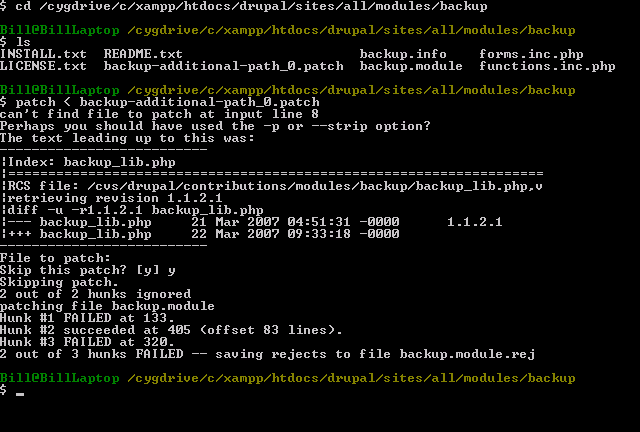
| #13 | backuppatch.png | 14.46 KB | bdornbush |
| #9 | backup-additional-path_0.patch | 2.65 KB | ahoeben |
| #7 | backup-additional-path.patch | 2.29 KB | ahoeben |

Comments
Comment #1
dmuth commentedFirst, I'd like to thank you for posting in the contents of the page. There's enough information there for me to diagnose the problem.
As for your issue, like the screen says, the "mysqldump" program cannot be found. It might not be installed, or it might not be in the path. Either way, you'll need to speak to whoever is the sysadmin of the machine and ask them to put mysqldump into the path.
I don't think there's anything I can do my end to fix a file not found in the path, so I'll mark the bug "by design" for now.
-- Doug
Comment #2
trevornz commentedThank you for your speedy advice Doug
I gather then that it's possibly a problem at my web host's end, not having 'mysqldump' installed. I'll get in contact with them to enquire if they can set it up for me.
Thanks again
Comment #3
Martin Frank commentedHi!
I got the same message, and sent all the same stuff to my hosting administrator...
*backup*
>
> System program "mysqldump" not found in $PATH. Please check with
> your sysadmin for further assistance.
>
> *The following files/directories will be backed up:*
>
> * misc - Drupal images
> * Stripe Surf Shorts 20030726a.htm - UNKNOWN
> * Stripe Surf Shorts 20030726a.pdf - UNKNOWN
> * Stripe Surf Shorts 20030726b.htm - UNKNOWN
> * database - Drupal code
> * files - Drupal's file directory path.
> * sites - Configuration files
> * scripts - Drupal
> * xmlrpc.php - Drupal code
> * modules - Drupal modules
> * FUCK A GUATEMALAN BOY poem 20010716a.pdf - UNKNOWN
> * index.php - Drupal code
> * Stripe Surf Shorts 20030726a_files - UNKNOWN
> * themes - Drupal themes
> * includes - Drupal code
> * Stripe Surf Shorts 20030726b_files - UNKNOWN
> * modules-std - UNKNOWN
> * cron.php - Drupal code
>
> *System Path*
>
> /sbin: /usr/sbin: /bin: /usr/bin
>
> *Programs that will be used:*
>
> * mysqldump program NOT FOUND
> * tar program found at: /bin/tar
> * gzip program found at: /bin/gzip
>
and got back...
"Regarding your Drupal issues. "mysqldump" is already on the server and full path to the program is /usr/local/mysql/bin/mysqldump or alternatively /usr/local/mysql-4.0.21/bin/mysqldump. Somewhere in the settings for the module you should set it as soon as module could not detect the program automatically."
I checked in the module, but could not find where to do what (I don't know php). Would it be difficult to have "settings" for the backup module? Do I have to change something in the module? If yes, what, and where?
And please: In case I should ever need to, how to restore a destroyed website with what the backup module delivers?
Thanks and love
Martin
Comment #4
dmuth commented> Would it be difficult to have "settings" for the backup module?
Not particularly. And it seems like your current configuration is fairly reasonable, so that's all the more reason for me to put some settings in. I'll put that on my TODO list.
-- Doug
Comment #5
Farreres commentedVery strange. I have just installed the new v5 module. When I tried it, the file not found message showed up.
System program "mysqldump" not found in $PATH. Please check with your sysadmin for further assistance.
But I see something weird.
In the debugging information I can see
System Path
/usr/local/sbin: /sbin: /bin: /usr/sbin: /usr/bin
And if I go to my account, and execute 'printenv PATH' I have:
/usr/local/bin:/usr/bin:/bin:/usr/bin/X11:/usr/games:/usr/local/mysql/bin
It means, my account has a correct $PATH but drupal is being run by some other user (perhaps ROOT). Is it a backup module problem who is getting a wrong path? Or is it that I did something wrong with my drupal installation?
Comment #6
dmuth commentedIt's neither backup nor Drupal. What is really happening is that Drupal is being run as the same use that your webserver (Apache?) is running from. You can verify the path set in Apache by calling phpinfo() from any PHP script.
Fixing this problem is more of a sysadmin issue than a programming issue. Probably the quickest way to fix it would be to alter the shell script that starts up Apache to include additional directories in your path.
-- Doug
Comment #7
ahoeben commentedAttached patch allows users to specify additional paths to look for the binaries.
Comment #8
ahoeben commentedWhoops. I wrote this patch for the 4.7 release, assuming it would work in the 5.x release as well and did not test it enough on 5.x. Turns out it needs a bit of work.
Comment #9
ahoeben commentedReworked patch
Comment #10
mattjabs commentedHow do I apply the patch? for 5.x
Comment #11
ahoeben commentedhttp://drupal.org/patch/apply
Comment #12
mattjabs commentedahoeben: Thank you for that link, just so you know, I did do a few searches before I posted that, but I am a newbie...so thanks again.
Comment #13
bdornbush commentedI downloaded this patch, hoping to apply it to my test system, which is Windows XP using Cygwin and Xampp. When I tried to apply the patch to Backup-5.x-2.x.dev.tar.gz, I got some error messages. I have attached the screen shot of the errors that appear in Cygwin.
Comment #14
escoles commentedI get similar results when I try to patch:
I was able to successfully reverse the patch.
Comment #15
escoles commented... btw, system is OS X 10.4 on an Intel Mini.
Comment #16
escoles commentedJust verified that I get a similar failure when I try to patch the 4.7 version:
Again, able to successfully reverse the patch, but unable to run the module due to failure to load mysqldump. Also, just supplying this info as a reference -- I can get this module working on my "production testing" system, up at our hosting provider; these failures are on my local dev machine.
Comment #17
ahoeben commentedThe patch is for the 5--1-2 branch and does not apply to the 4.7 release of backup.module
Comment #18
dmuth commentedHi,
Due to the workload (and features) that I've had with the Drupal 5 version of this module, I would strongly recommend upgrading to Drupal 5 so you can get the latest and greatest features out of this module. I hate to be depressing, but I don't think I will be able to do any work on the Drupal 4.7 version of this module anytime soon. :-(
In the meantime, if you are comfortable with a UNIX shell, I have a command-line backup utility which you may find helpful. It can be found at http://www.claws-and-paws.com/node/1204
-- Doug
Comment #19
Christefano-oldaccount commented@ahoeben, can you reroll this patch for backup-5.x-3.0?