

Closed (fixed)
Project:
Ubercart
Version:
6.x-2.6
Component:
Product kits
Priority:
Normal
Category:
Support request
Assigned:
Unassigned
Reporter:
Created:
4 Aug 2010 at 08:39 UTC
Updated:
6 Feb 2012 at 17:42 UTC
Jump to comment: Most recent, Most recent file


Comments
Comment #1
jdln commentedAnyone? Surely im not the first person to need this functionality?
Comment #2
jdln commentedIve tried using display suite to create a build mode for my view but it doesn't seem to have access to the necessary fields.
The closest it has is the Product: SKU. The product SKU of a a kit contains the SKUs of its contense but this isn't exactly the same as the node title of the products.
Comment #3
jdln commentedIve got some of the way with content templates, but I cant get all the information I need.
Comment #4
longwaveThis is not supported at present, it needs someone to write the Views integration code.
Comment #5
Anonymous (not verified) commentedI need this too. I'll post here if I find a good idea ^^
Comment #6
cafuego commentedHere is my first attempt at some views integration for product kits. The attached patch applies to UC 2.4
It contains two boolean node filters:
The latter is managed by a sub-select query, which is ugly. It should be using an INNER JOIN, but I don't know how to define one of those in a filter handler :-)
It also defines the uc_product_kits table and some views info for that, so you can add a relationship and display product kit information on node listings.
I'm not particularly proficient with views code, so I may have stuffed up the latter part. It seems to do what I need it to do, though. See how you go with it...
Comment #8
cafuego commentedI'm not convinced my patch makes that test fail.
Comment #9
tr commentedOooo, the testbot's getting better! It can now successfully run on fixed-point releases. But that's not what you wanted to do, especially here, since 6.x-2.4 is pretty old and was released before we did the PHP notice cleanup. Changing version to 6.x-2.x-dev to see what happens.
I installed the patch and ran the tests locally, and they all succeeded. Patch looks good to me except for some minor documentation comment problems ("Implementation of" should be "Implements", etc.). I haven't tried it out with Views yet.
This should be ported to D7 after it goes into D6.
Comment #10
tr commented#6: 873398-views-integration.patch queued for re-testing.
Comment #11
cafuego commentedAttached patch done against 6.x-2.x branch and with updated comments.
Comment #12
tr commentedCommitted to 6.x-2.x. Thank you.
Needs to be ported to 7.x-3.x now.
Comment #13
dags commentedThanks for this.
Comment #14
tr commentedMoving to "Product kit" component.
Comment #15
Anonymous (not verified) commentedHello,
Can I display the name of the products contained in the kit and their images with this patch ?
Do I have to set a relation in views or anything else ?
Thank you very much.
Comment #16
Island Usurper commentedThis confused me for a little while. Since product kits are nodes, I expected {uc_product_kits} to be joined on
{uc_products}.nid = {uc_product_kits}.nid. Since it was actually joining to the product_id, a list of nodes would only show you which ones were part of a product kit. I would think that we would want a list of kits that knew which products they contained. Once I changed that, I realized it should actually join on the vids of both tables to prevent duplicates when revisions are used.This file is actually several commits. Apply with
git am <filename>.Comment #17
Island Usurper commentedThis file, that is.
Comment #18
bancarddata commentedPardon my ignorance, but can you please tell me what I should now see after applying the patch in #17? I am trying to take control of my product kit pages with views. My main goal is to be able to add tooltips for the kit parts that show the description and image of each component in a little popup for each part. I had seen a way to do this with Views and the Beauty Tips module, but obviously I need to be able to get my kit pages as a view first. I believe this patch is intended on providing this capability but I can't see what changed in Views after this patch was implemented. Thanks for your guidance!
Comment #19
Anonymous (not verified) commentedIf I remember correctly what I've done to make a product kit view... I think you have to set a relationship (there should be two kinds of product kit relationships) and then find the fields you want. Maybe I'll post an export of my view if you need it.
Comment #20
bancarddata commentedI think a screenshot would be most helpful if you can post one. Thanks! I am not sure what kind of relationship you are referring to. I was able to easily make a list of kits, and show them one per page, but that didn't really do me much good.
Comment #21
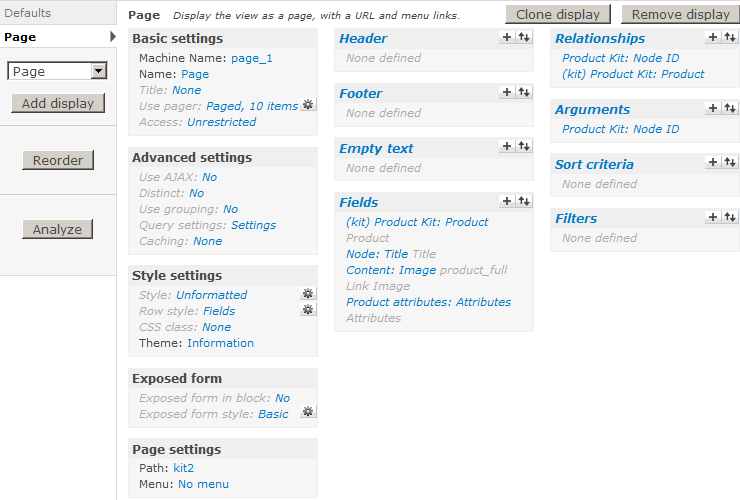
Anonymous (not verified) commentedScreenshot... but in french, sorry...
Comment #22
longwaveThis patch changes the joins and relationships, so the joins are no longer implicit, but you can add both kit parent and kit component relationships, and then access any parent or component field via that relationship.
The "is kit" and "is kit item" filters don't seem to work, but you can use "Require this relationship" when creating relationships to effectively do the same thing for many use cases.
Comment #24
longwave#22: 873398-product-kit-views.patch queued for re-testing.
Comment #26
longwave#22: 873398-product-kit-views.patch queued for re-testing.
Comment #27
jpdaut commentedThis works very well already, however I would like the View to show options' images from the attributes options of the kit components. Do you have suggestions on how to proceed?
Thank you.
Comment #28
longwaveAttributes and options are not yet available in Views; that should go in a separate feature request.
When you say "this works very well" are you referring to the patch in #22 or something else?
Comment #29
jpdaut commentedI'm referring to patch #17, sorry. I will test #22 asap.
With #17 I have a working product kit View using both kit parent and kit component relationships, see attached snapshot.
It shows the attributes and the default options, however this is not interactive. What's needed is to be able to select options, and see option images dynamically as per uc_option_image.
I just created an issue for this as you suggested, drupal.org/node/1305722
uc_option_image is not integrated with Views, so that's an additional task.
If you add a field to the View: Product: Add to cart form / do not use a relationship, you do get the option widget, but not the option image. You also get the add-to-cart button which you don't want.
What I'm trying to do is actually more basic and outside of Views: I'm trying to just add option images to the regular product kit page, which already has the attribute/option widget, but not the images. Do you have suggestions on how to go about that? It would be very appreciated thank you.
Comment #30
longwaveI think what you're describing there is a fundamental bug in uc_option_image that will be easier to fix directly in that module than try to recreate via Views. I don't think it's currently possible to build a view that has multiple products listed but only a single Add to cart button for all the products.
Comment #31
jpdaut commentedI agree... I'm trying to add this functionality thru a hook_uc_form_alter implementation in a custom module.
I also opened a feature request with the uc_option_image here
Comment #32
loparr commentedI have the same problem with with drupal 6. Is it possible to make patch for drupal 6 as well? Thank you.
Comment #33
tr commentedThis will go into 7.x-3.x first, then be backported if possible.
Comment #34
loparr commentedDoe's this patch work for ubercart 6 2.4 as well?
Comment #35
cafuego commentedI wrote it for 6.x to begin with, as I don't use 7. See comment #11.
Comment #36
tr commentedOh yeah, it's already fixed in D6!
Comment #37
longwaveCommitted #22.
Comment #38
loparr commentedThank you for answer. Has this patch been added into the 6 x 2.7 or I have to use the patch from #11 ?
I still use uc 6x 2.6.
Thank yo very much.
Comment #39
longwaveTR said in #36 it was already fixed in 6.x. It was first included in the 6.x-2.6 release. You said in #34 that you are still using 2.4 (which doesn't have this feature) but then in #38 that you are using 2.6.
Comment #40
loparr commentedMy apologies, I looked at my modules page and found out that I use 2.6. Sorry for that.
What I am trying to achieve is to show both products (I created a product kit containing 2 products) using views. I followed the screenshots but with no result.
As a relationship I choose
Product Kit: Node ID
Product Kit: Product
I the field i choose Product Kit: Product and use relationship to kit.
Is this the correct way of achieving it?
Thank you very much for time and help
Comment #41
loparr commentedanybody can help me out with this?
Comment #42
FranckV commentedI am not sure it has been invoked here but there is an alternative way of displaying the products of a product kit in views : using PHP code.
My way of doing is a pretty good compromise :
- it does not use too much PHP (just for the "glue")
- it allows to use a standard view for the product kits display
- and another view for the product display (used as a subview with the product node nid as first argument)
- you don't need to wait for a patch
- it is adaptable to any existing Ubercart store
Basically, I add to the product kit view a new field : Global > Views PHP field (requires module Views PHP http://drupal.org/project/views_php or Views Custom Field http://drupal.org/project/views_customfield) that contains the PHP code that makes the link between the current product kit and its products.
The PHP code first gets the node nid of each sub-product of the currently viewed product kit. Then is uses views_embed_view() to insert the product details view using the node nid of the sub-product as argument.
Here is my sample code for reference :
The main product kit view is any view displaying product kits.
The subview has a machine name : 'my_uc_product_kits_subview' and view display name 'default'
Comment #43
loparr commentedIs it possible to do this without using php code?
Comment #45
pareen commentedHi loparr, did you find the answer?
Anyone, is this possible without php code?
Comment #46
loparr commentedHi,
It depends what you want to achieve. If you only want to display product-kit page using views - that is easy.
Create new node view, filter nodes by type - product kit, add an default argument - node nid and lastly add fields - node title and so on
My scenario was to display product kit with all products details on a product page. That was little bit complicated:)
Comment #47
pareen commentedThanks for the reply.
What I am trying to do is create a view which has all the individual products and display it on product kit page.
So if we have Product Kit 1, below it there will be a block (view) which will say this product kit has Product x | Price x | Add to Cart, Product y | Price y | Add to Cart, etc.
Comment #48
loparr commentedHi,
So you want to be able to add to cart individual products from product kit page? That is interesting, I thought that the beauty of product kits was to add the products to cart together actually:)
I tried many ways to display individual products details using relationships in views but I couldn't manage to pull the data I wanted. What I ended up with was to create cck node relationship (drupal6) on product kit. Using this relationship allows you to pull all data from individual nodes.
Comment #49
end user commentedI've done that before as a test with D6/UC2 with regular products instead of product kit. I wanted to see if I could get away without using Attributes With a custom node-product.tpl.php, relationship module and views I removed the add to cart form and inserted a view. Using relationships I selected the related nodes to the main node. Then with a new region in the node template I inserted the view block which listed all related products in a table with a title and buy button.
So I set up one main product and three other product of the same kind but different bottle sizes.
1L
4L
10L
24L
Then with views I listed those on the 1L product page and unpublished the others so they wouldn't show in the catalog. It was just a test but can be done.