

 Come together with the global Drupal community in Rotterdam, 28 Sept – 1 Oct 2026. Sessions, contribution, connection, and Early Bird savings until 8 June.
Been trying to get the video module to work but am failing. The thubnails are created but the videos are not beeing rendered.
Here is a collection of the most frequent error codes I get:
---
Video conversion failed. FFMPEG reported the following output: FFmpeg version SVN-r0.5.1-4:0.5.1-1ubuntu1, Copyright (c) 2000-2009 Fabrice Bellard, et al. configuration: --extra-version=4:0.5.1-1ubuntu1 --prefix=/usr --enable-avfilter --enable-avfilter-lavf --enable-vdpau --enable-bzlib --enable-libgsm --enable-libschroedinger --enable-libspeex --enable-libtheora --enable-libvorbis --enable-pthreads --enable-zlib --disable-stripping --disable-vhook --enable-runtime-cpudetect --enable-gpl --enable-postproc --enable-swscale --enable-x11grab --enable-libdc1394 --enable-shared --disable-static libavutil 49.15. 0 / 49.15. 0 libavcodec 52.20. 1 / 52.20. 1 libavformat 52.31. 0 / 52.31. 0 libavdevice 52. 1. 0 / 52. 1. 0 libavfilter 0. 4. 0 / 0. 4. 0 libswscale 0. 7. 1 / 0. 7. 1 libpostproc 51. 2. 0 / 51. 2. 0 built on Mar 4 2010 12:35:30, gcc: 4.4.3 Seems stream 1 codec frame rate differs from container frame rate: 50.00 (50/1) -> 25.00 (25/1) Input #0, mov,mp4,m4a,3gp,3g2,mj2, from 'sites/default/files/videos/original/executionalxmaz.mp4': Duration: 00:00:37.20, start: 0.000000, bitrate: 393 kb/s Stream #0.0(und): Audio: aac, 44100 Hz, stereo, s16 Stream #0.1(und): Video: h264, yuv420p, 320x258, 25 tbr, 25 tbn, 50 tbc Incorrect frame size
---
warning: Division by zero in /media/disk/www/www.e-werk.com/htdocs/sites/all/modules/video/includes/conversion.inc on line 178.
---
warning: Division by zero in /media/disk/www/www.e-werk.com/htdocs/sites/all/modules/video/includes/conversion.inc on line 183.
---
The video conversion process has failed. You might want to submit a simpler video format like mpeg or divx avi.
If the problem persists please contact website administrators.
---
I've got no idea where I went wrong. Followed all the instructions, created a symlink to the video_scheduler.php, changed the cron file ...
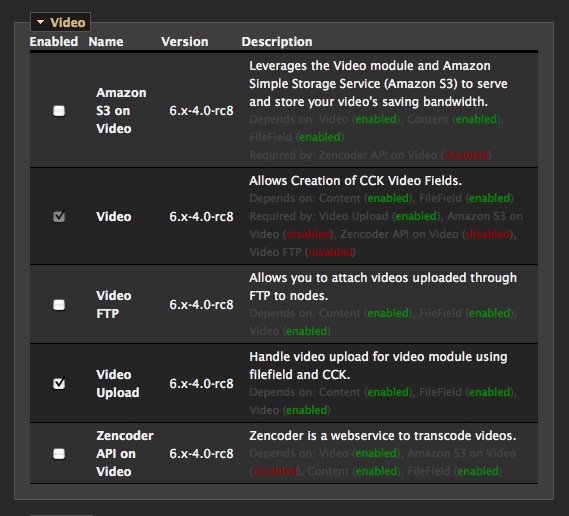
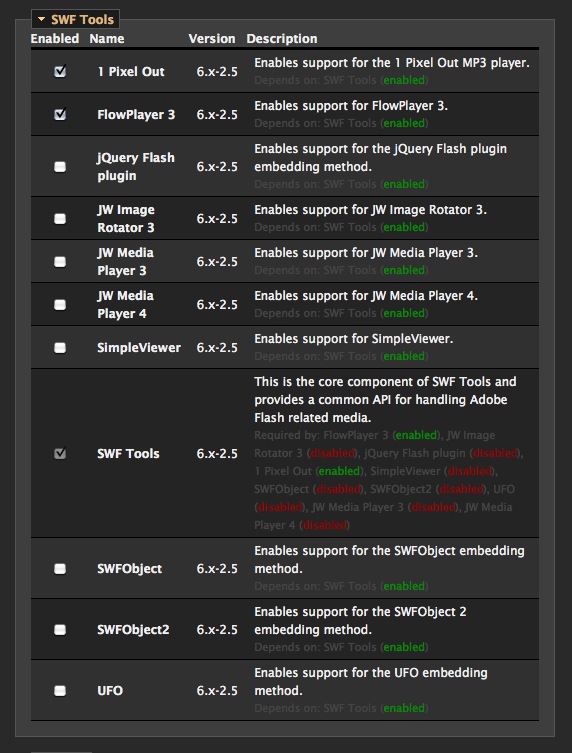
Attached are some screenshot of the installed modules and the errors.
| Comment | File | Size | Author |
|---|---|---|---|
| #2 | FLVTool2_Server.jpg | 80.14 KB | paul_constantine |
| #2 | FLVTool2_Path.jpg | 59.43 KB | paul_constantine |
| Status.jpg | 26.16 KB | paul_constantine | |
| Division by zero 183.jpg | 53.03 KB | paul_constantine | |
| Division by zero 178.jpg | 52.71 KB | paul_constantine |


Comments
Comment #1
hypertext200Did u install FLVTools2 on your server? Please install it and enable the meta data for the videos then this should fix.
Comment #2
paul_constantine commentedThanks for that piece of information.
But as you can see on the attached screenshots "FLVTool2" is installed on the server (Ubuntu 10.04) and the path is set correctly in the video settings.
Have you got any other ideas? I tried googling the error but I am not getting anywhere.
Comment #3
hypertext200What is the exact issue you got? Did you run the cron.php? then what heppened? Please upload some mp4 file and see sometimes when extracting file FFMPEG giving errors.
Send me the exact watchdog messages?
Comment #4
zacho commentedLikewise for me. I was using 6.x-4.0-r8, but tried with 6.x-4.x-dev also. I've tried using video_scheduler.php and using the option to use drupal's cron, but automatically and manually invoked. Also tried using video_ffmpeg directly and via the ffmpeg_wrapper module.
Interestingly, ffmpeg will successfully create thumbnails.
My configuration is similar to the OP. Nodes are created fine, awating video processing. When I invoke video_scheduler (or cron), the relevant output to syslog follows:
I wish I knew more about ffmpeg -- i.e., why the two distinct calls to the program.
I don't expect a solution to my problem per se, but maybe this log will be helpful.
--Edit--
So, the looks like the output dimension as represented by the !size token is not getting set correctly. I'm guessing that's the case for the OP also, though his logs don't explicitly show it. Not sure yet why this is so.
Comment #5
DaRK-1 commentedJust a note to say i also had the same issue when the converter options included the '-s !size' argument, at first i was getting a blank error message (was using the ffmpeg wrapper option, something else that might need looking into) after changing to just ffmpeg i got the same error and noticed 'Incorrect frame size' at the end of the fail message.
Some extra info: not using flvtool2, and running on php 5.3
Comment #6
hypertext200If your using filefield_meta module please uninstall it, it seems video module is incompatible with it. We will work on it to fix it soon.
Comment #7
hypertext200Comment #8
hypertext200Duplicate of #865956: Convert missing dimension size, with wrong parameter for dimension value
Comment #9
zacho commentedFor the record, filefield_meta has never been enabled on my system.
Comment #10
kayakjim commentedIn the Home › Administer › Site configuration › Video > Transcoders > Video Conversion > Advanced Settings add the following to your command:
-acodec libmp3lameMy entire command box looks like:
-y -i !videofile -f flv -acodec libmp3lame -ar 22050 -ab !audiobitrate -s !size -b !videobitrate -qscale 1 !convertfileNote that I am running on an ubuntu server with libmp3lame installed.
Hope that helps others.
Comment #11
hypertext200This is a way of configure your trancoder and not a video module issue.
Comment #13
sumit_drupal commented* user warning: Unknown column 'vr.fid' in 'where clause' query: SELECT vr.status FROM video_rendering vr INNER JOIN files f ON vr.fid = f.fid WHERE vr.fid = f.fid AND f.status = 1 AND f.fid = 131 in C:\wamp\www\movieinfo\sites\all\modules\video\types\uploadfield\uploadfield_formatter.inc on line 38.
* warning: Division by zero in C:\wamp\www\movieinfo\sites\all\modules\video\includes\common.inc on line 17.
i am getting this warning with this message that is Use SwfTools Module to play FLV files if you only convert/upload FLV videos or FlowPlayer Module must be enabled in order to play FLV videos with other types.
in my view
Plz help me out of this