

 The 2026 Drupal Business Survey is open. Your response will help shape the future of the Drupal business ecosystem.
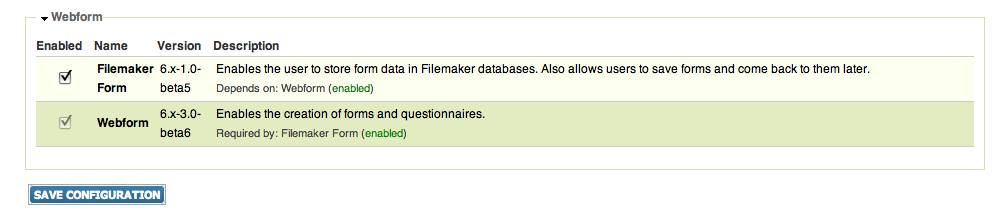
Hi I'm using Filemaker Form with Webform 6.x-3.0-beta6. As soon as I enable Filemaker Form and save I get a blank window. When I run cron I get this: formDelete->FMDelete(true); return array("result" => $result, "fid" => $fid); } ?>
I see the Filemaker Form settings in my webform node but when I try to save the page I get a blank screen again. The Filemaker Form settings are saved, while other changes I made to the node are not. These issues go away when I disable the module. Any ideas?
| Comment | File | Size | Author |
|---|---|---|---|
| #14 | filemakerform.jpg | 30.01 KB | crc6599 |

Comments
Comment #1
flamingvan commentedHmm. I have an installation of Webform 6.x-3.0-beta6 and I am not having that problem.
Are you running this on a LAMP system? Have you tried disabling your other modules?
I'm on my way out of town right now. I'm interested in helping you resolve this and will be back in the office on monday.
Comment #2
crc6599 commentedThanks for the response. I am not running on a LAMP system. It's on an Xserve running leopard server. I will try disabling other modules and let you know if that works.
Comment #3
flamingvan commentedI do not have experience with Xserve (or any access to it), but given the popularity of Filemaker with the Apple crowed I'd like to get the module working on that server (assuming this isn't a module conflict). If you're unable to get the module working I could take a look at your system if you're able to give me access.
Comment #4
crc6599 commentedI tried disabling modules but am still having the same problem. I'm sorry but I don't think I can get you access to the server. If I can answer any questions about it for you or if you are willing to give me instructions we could work on it that way.
Comment #5
flamingvan commentedAre you running PHP 4? I think that could potentially cause problems but I'm not sure. If you are, I have a PHP 4 server I could test the module out on and could potentially debug it there.
Comment #6
crc6599 commentedNo, I'm running PHP 5.
Comment #7
crc6599 commentedI am getting an error message when I run cron that my GD library is missing or outdated. Not sure if that has any effect on things.
Comment #8
flamingvan commentedI am reaching a bit here, but sometimes enabling modules or running cron can result in a white screen if the PHP memory limit is too low. Is increasing the PHP memory limit something that you could try? This is normally done in the php.ini file or in the .htaccess file. In php.ini you would look for this line:
memory_limit = 128M
For debugging you could try increasing it to 128M, 256M or even 512M (which I think would be extremely high!)
Comment #9
flamingvan commentedAlso, make sure you restart PHP after editing the php.ini file.
Comment #10
flamingvan commentedActually, never mind that! I just realized that I am encountering the same issue on one of my other servers. This should allow me to find the problem. I'll be in touch soon.
Comment #11
flamingvan commentedHi crc6599, I have just added a beta5 release of the module which should fix your issue. Would you try it out and let me know how it goes?
Comment #12
crc6599 commentedThanks for all the help, but I'm sorry to say that I'm still having the same issue. My memory limit is at 128, I can try bumping it up.
Comment #13
flamingvan commentedThat's surprising. Can you confirm that you've installed the beta 5 version? I managed to replicate the exact same problems you were having but with the beta5 installation the problems went away.
Comment #14
crc6599 commentedYes, it's definitely installed. Although, it's very possible it's something on my end. I'm very new to Drupal and don't really know what I'm doing yet. I could try a clean install on the same server and test again.
Comment #15
flamingvan commentedIf the issues are the same as what you described in the first part of this thread they are certainly fixed now. Here are the two things I changed in the code:
in filemakerform.module on line 110 I added this line which fixed the issue of webform not saving configuration changes:
In includes/filemaker.inc at the end of the file I removed the following code fragment which fixed the issue with cron:
You could try a fresh install if you want but I don't know why that would be necessary.
Comment #16
crc6599 commentedYeah, I guess one good sign is that I'm not getting that error message anymore. Now it's just the blank window problem.
Comment #17
flamingvan commentedAre you referring to a blank window when you save changes to webform or when you run cron? If you get a blank window when saving changes to webform are your changes getting saved at least?
Comment #18
crc6599 commentedI get a blank window both when I run cron and when I save changes to anything on the site, not just webform. This problem goes away when I disable Filemaker Form. When I first posted this issue it was saving the changes I made to the Filemaker settings, but now it does not.
Comment #19
flamingvan commentedIt's hard for me to debug this without access to an Xserve system, but there are a couple things we could try. One thing is that the blank screen you are getting is presumably a PHP error, but it's likely that error reporting is turned off in the php.ini file. If you turned errors on then we might get a better idea of what the problem is. You should look for the following in php.ini:
display_errors = Off
Change the value to On and restart PHP, then try saving a form again and see if an error gets printed to the screen.
Comment #20
crc6599 commentedError reporting has been on. Other php errors I've had were printed to the screen. You can take a look at my php info and see if you notice anything else http://admin.dance.fsu.edu/phpinfo.php
I could also create a user for you on the site, if that would help at all. At least you could see firsthand what I'm talking about.
Comment #21
flamingvan commentedI've gone ahead and created user "moses". Can you grant me some additional permissions? In particular, module administration would be good, as well as the ability to administer and create webform nodes. If you can give me all permissions then please do.
Comment #22
crc6599 commentedI gave you all permissions.
Comment #23
flamingvan commentedThanks. Just so you're aware, I disabled all contributed modules and made garland the default theme, but then I put everything back. If you're having unrelated issues you might want to double-check your modules page (but I'm pretty sure everything should be the same).
One thing I noticed is that the webform settings are getting saved now, but the filemaker settings are not.
Could you try something? In filemakerform.module could you comment out line 145, like this:
//$form['#submit'] = array('filemakerform_form_submit_handler');
You might then need to go to your modules page and just click the submit button for the change to work.
This will make it impossible to save filemaker settings but I want to see if the white screen goes away.
Thanks.
Comment #24
crc6599 commentedI tried it but the white screen is still coming up... sorry.
Comment #25
flamingvan commentedOk. Could you try commenting out that whole function? PHP comment tags are /* and */ (if you're not familiar with PHP). You should see the whole filemaker section disappear from the settings page.
If you could give me FTP access this would be a bit more efficient.
Comment #26
crc6599 commentedTried it. Filemaker section disappeared, still getting the white screen though.
This server is a university server behind a couple of firewalls. I don't have the authority to open it up for ftp.
I have to have this site done by next week, however this specific issue isn't very urgent. So I think I will do a fresh install and give you access to that site so we can tweak stuff there... so I can keep the current site stable. And in the meantime, I'll ask about getting ftp access.
Thanks for all your help thus far.
Comment #27
flamingvan commentedOk, please do let me know. I would definitely like to work this out.
Thanks!
Comment #28
flamingvan commentedhi crc6599,
Somebody pointed out that there is a trailing space right after the ?> in filemakerform.modules (at the very end of the file), so you might want to try removing that space. I have already created a new release without the space.
Moses
Comment #29
flamingvan commentedI never heard back but I think this is probably fixed in the newest release.