CVS edit link for hedinfoto

I have a mobilewebkit theme for iPhone and Android devices that I want to contribute back to the community. Here is a link to the project: http://hedindesign.com/projects/mobile-webkit-drupal-theme-iphone-and-an...

Comments

hedinfoto’s picture

StatusFileSize
new24.36 KB
new27.88 KB
avpaderno’s picture

Status: Postponed (maintainer needs more info) » Needs work
Issue tags: +Module review

Hello, and thanks for applying for a CVS account.

As reported from the CVS application requirements, can you expand the motivation message, and describe more the features of the theme?

hedinfoto’s picture

Hi,

I built a mobile theme for drupal 6. People have downloaded it and like it. I would like to offer it to the community for download just as I have on my personal site.

The theme uses CSS 3 styling for the front end and uses javascript functions that allow admins to easier manage drupal sites on the back end. This is done by converting the admin menu from hover links to finger sized tapp-able buttons.

avpaderno’s picture

As reported by the requirements

You must provide a motivation message, which should be a few paragraphs instead of only a few sentences. It should include details about your contribution, its features, how it compares to already existing solutions, links to screenshots or a demo, etc.

Even if few paragraphs should be too much for a theme description, two sentences are still not enough.

hedinfoto’s picture

Got it! You need the theme description for the download page. Sorry motivational message was a little abstract for my simple mind.

Theme Description:

MobileWebkit

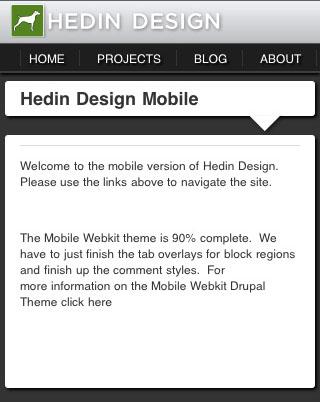
MobileWebkit is specialized theme for webkit based mobile devices including Android & iPhone handsets. MobileWebkit is designed to either use mobile specific menus or your existing menus if desired. Overall this theme is meant to display a mobile specific version of your content. Turning it on without modifying your desktop version's content can look a bit stuffed.

Take advantage of administrating your drupal site via your phone with this theme and the admin menu module. Once logged in MobileWebkit re-skins the admin menu in to a very usable finger friendly experience. If admin menu is present there will be a wrench icon in the upper right of screen.

Other Features:

  • Node edit tabs are converted in to selects for easier use.
  • Rotation aware layout resizes if handset is rotated.
  • Search icon and toggled search overlay
  • Use site name or logo file in top title bar. Logo should be a maximum size of 215px wide by 35px high
  • Works on the iPhone 4's retina display
avpaderno’s picture

Status: Needs work » Needs review

Thank you for your reply.

avpaderno’s picture

Issue tags: -Module review +Theme review
avpaderno’s picture

Status: Needs review » Needs work
  • The points reported in this review are not in order or importance / relevance.
  • Most of the times I report the code that present an issue. In such cases, the same error can be present in other parts of the code; the fact I don't report the same issue more than once doesn't mean the same issue is not present in different places.
  • Not all the reported points are application blockers; some of the points I report are simple suggestions to who applies for a CVS account. For a list of what is considered a blocker for the application approval, see CVS applications review, what to expect. Keep in mind the list is still under construction, and can be changed to adapt it to what has been found out during code review, or to make the list clearer to who applies for a CVS account.
  1. version = "6.16"
    project = "drupal"
    datestamp = "1246481719"


    Those lines need to be removed.
    The version line needs to be removed from the .info file.

  2. 	function _phptemplate_variables($hook, $vars) {
    	  if ($hook == 'page') {
    
    	    if ($primary = menu_primary_local_tasks()) {
    	      $output = "<div id='menu-tabs'></div>";
    	      $output .= "<ul class=\"tabs primary\">\n". $primary ."</ul>\n";
    	      $vars['tabs'] = $output;
    	    }
    
    	    return $vars;
    	  }
    	  return array();
    	}


    Why is the code returning an empty array when $hook is not equal to 'page'?

  3.  function mobilewebkit_preprocess_node(&$vars) {
    	
    	$vars['submitted'] = 'Posted ' . date("F j, Y", $vars['node']->created);
    	}
    

    Strings used in the user interface should be translated.

  4. See http://drupal.org/coding-standards to understand how a module should be written. In particular, see how the code should be formatted.
  5. <script type="text/javascript" src="/misc/jquery.js"></script>


    The jQuery library is already included from Drupal; there is no reason to add that line.

  6. if((navigator.userAgent.match(/iPhone/i)) || (navigator.userAgent.match(/Android/i)) || (navigator.userAgent.match(/iPod/i))) {
    	//Mobile switch back to mobile theme from main theme.  Paste in to main theme's page.tpl.php
    	var urlTofwd = "http://mobile.yourdomain.com/"  +  location.pathname ;
    	//Add your domain to the line above and remove the comments below to enable theme switching.
    	//Uncomment Here location.replace(urlTofwd);
    	 
    }
    else{
    	//Mobile switch back to desktop theme
    	var urlTofwd = "http://www.yourdomain.com/"  +  location.pathname ;
    	//Add your domain to the line above and remove the comments below to enable theme switching.
    	//Uncomment Here location.replace(urlTofwd);
    }


    Why is the URL hardcoded in JavaScript code when it's possible to get it from PHP?
    Why is the JavaScript code included in the template when it could be placed in a separated file?

  7. <script type="text/javascript" src="<?php echo base_path() . path_to_theme();?>/mobilewebkit.js"></script>
    <link rel="stylesheet" type="text/css" media="all" href="<?php echo base_path() . path_to_theme();?>/mobilewebkit.css" />
    <link rel="stylesheet" type="text/css" media="all" href="<?php echo base_path() . path_to_theme();?>/custom.css" />


    JavaScript and CSS files that need to be included with the theme should be declared in the .info file.

  8.   <?php print $footer_message ?>
    

    There should be a semicolon after such statements.

  9. The CSS files don't have the CVS ID tag.
    The file custom.css is empty.
hedinfoto’s picture

StatusFileSize
new25.74 KB

All the issues noted above have been resolved. Thank you!

avpaderno’s picture

Status: Needs work » Needs review
sutharsan’s picture

hedinfoto, you've been left wandering alone for some time. Sorry about that, but no worries I will pick it up from where kiamlaluno brought you.
Until here you have fixed most of the API issues and I found no security problems. Most important now is code style. Remaining items is about tidying up.

  1. You missed item 3 in #8. See the t() function about translatable strings: http://api.drupal.org/api/drupal/includes--common.inc/function/t/6
  2. Please check your code for the coding standards using the Code module http://drupal.org/project/coder
    Make sure you check "include files (inc | php | install | test)" and of course your theme to check your code at http://my_sandbox.com/coder
  3. Add some documentation to the functions in template.php Describe what happens and why you override.
  4.   <?php $mobiletheme = 'yes'; ?>
    
      <div id="top-icons"></div>
    
      <?php //print $breadcrumb ?>
    

    Remove any unused code, div's etc from page.tpl.php

  5. Maintain correct indentation in the templates and js files. It makes code and soo much better readable.
  6. regions[MobileHeaderMenu] = Mobile top Menu
    regions[MobileFooter] = Mobile Footer
    regions[MobileFooterTab] = Mobile Footer Tabs
    

    Use the correct variable name convention for the region names. http://drupal.org/coding-standards#naming e.g. because regions[MobileHeaderMenu] is converted to $MobileHeaderMenu

  7. Remove 'version' from the .info file. It will be added by the packaging script.
avpaderno’s picture

Status: Needs review » Needs work
zzolo’s picture

Component: Miscellaneous » miscellaneous
Status: Needs work » Closed (won't fix)

Hi. Please read all the following and the links provided as this is very important information about your CVS Application:

Drupal.org has moved from CVS to Git! This is a very significant change for the Drupal community and for your application. Please read the following documentation on how this affects and benefits you and the application process:
Migrating from CVS Applications to (Git) Full Project Applications

  • The status of this application will be put to "postponed" and by following the instructions in the above link, you will be able to reopen it.
  • Or if your application has been "needs work" for more than 5 weeks, your application will be marked as "closed (won't fix)". You can still reopen it, by reading the instructions above.
avpaderno’s picture

Component: miscellaneous » new project application
Issue summary: View changes