

Closed (fixed)
Project:
Arrange Fields
Version:
6.x-1.3
Component:
Code
Priority:
Normal
Category:
Support request
Assigned:
Unassigned
Reporter:
Created:
15 Aug 2010 at 11:32 UTC
Updated:
29 Nov 2010 at 15:37 UTC
Jump to comment: Most recent file

Comments
Comment #1
richardp commentedThanks for the compliment!
I was able to use CAPTCHA with Webform 3.0, but interestingly enough, I tested it with Webform 2.x, and it didn't work. So, I have added the necessary changes, and they will be in the next dev release later today.
But as to your original problem-- remember that admin cannot answer CAPTCHA questions. Or at least, they can't on my test box. I had to create a dummy user who could both arrange fields and administer webform. THEN I saw the CAPTCHA for me to arrange.
Give that a try and see if it doesn't help.
EDIT: If you want to try out the new code changes, but the dev release hasn't been generated yet, you can download just arrange_fields.module from here: http://drupalcode.org/viewvc/drupal/contributions/modules/arrange_fields...
Thanks
Richard
Comment #2
Lord Drachenblut commentedInitial creation of the webform everything lines in a single colomn.
After using arrange fields to realign fields for easier viewing the captcha/recaptcha block moves to the top of the page and covers content and can't be moved. In arrange fields the captcha/recaptcha block is in the location i choose just not once viewed by annonymous user.
Comment #3
richardp commentedOkay, so if I understand correctly, when you are arranging the fields as an admin, you can move the recaptcha around w/o a problem? It's just when you go to view it as an anonymous visitor that it doesn't work.
It is possible that, since you are viewing it as two different user types (one as admin, the other as anonyous) that the recaptcha is given a different ID in the system, which would cause the CSS created by Arrange Fields to fail.
I will investigate right away to see if I can replicate the problem, and post back here my findings. In the meantime, you can always manually position the recaptcha in your theme's CSS by using TOP and LEFT properties.
Richard
Comment #4
richardp commentedI was not able to recreate your problem. I was able to arrange the recaptcha and view it just fine with an anon user. Does this happen in all browsers? As in, have you tried it with IE, Firefox, and Chrome? If you get different results, it could mean you just have a browser cache issue, and it just needs to be cleared.
I tested both Webform 2.9 and 3.x.
Comment #5
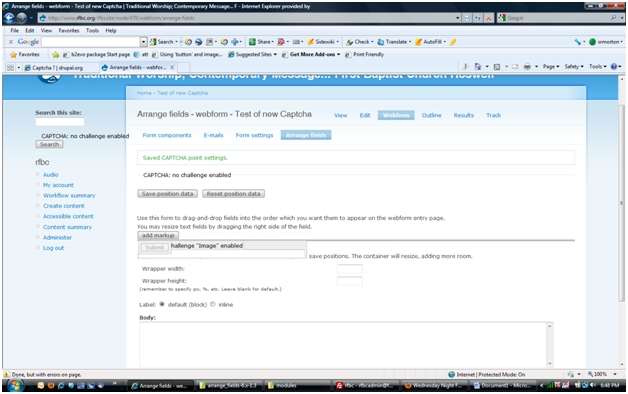
Lord Drachenblut commentedtested in arora, chromium, and firefox all have the same issue as shown in the attached image.
Comment #6
Lord Drachenblut commentedFound a temporary solution atleast of giving anon user rights to admin arrange fields and can now move captcha and it show where i wanted it.
Comment #7
richardp commentedI did something similar to that in my own tests. Instead of giving it to anon, I created a new role for the sole task of arranging fields, and then used a dummy user account who also saw the captcha. This let me position it.
Because I suspect others may run into this problem, I added a section about it to the handbook page for Arrange Fields: http://drupal.org/node/877774#captcha
I'm glad you got past this particular problem!
Richard
Comment #8
shai.avi@gmail.com commentedI followed the instructions in comment #7, disabled all the caching and optimizations, but still the Captcha appears at the top of the form for anon users. Could you please explain how I could give the anon user rights to admin arrange fields, so that it can move the captcha around? I didn't manage to find it myself. Thank you!
Comment #9
richardp commentedSure thing. It's a permission under your admin->user management->permissions. The permission is called "administer arrange fields". If you temporarily give it to the anonymous user, then navigate to the correct URL to arrange the form in question, you shouldn't have a problem.
Richard
Comment #10
shai.avi@gmail.com commentedSorry for the question. I was finally able to figure this thru the permissions setup. I did manage to provide permission for the anon user for arrange_fields and after doing that the Captcha did come up in the right place, as previously mentioned. Thank you for the advise.
Comment #12
srmorton commentedCaptcha's div tag being written with incorrect id. It should have the following id id="edit-captcha-fieldset-draggable-wrapper" but instead is being written as id="edit-captcha-draggable-wrapper". The "-fieldset" is being omitted. Using the image captcha and arranging the Captcha to the position you wish for it to show up and saving. When the Webform is opened as anon the Captcha shows up at the top over the form. If you change the div tag to the proper id then all works correctly. (I changed this with FireFox but do now know where to change this in the code which writes the div tag.
Any idea where this is written or is generated.
Comment #13
richardp commentedOdd, I don't think I've ever seen that happen. What version of CAPTCHA and Webform are you using?
Richard
Comment #14
srmorton commentedI'm using the latest version of each:
webform 6.x-3.4
captcha 6.x-2.3
Here is a link to the form http://www.rfbc.org/rfbcsite/content/wednesday-night-fellowship-supper
The form id is webform_client_form_475
It looks like the sub elements are being built correctly, but when it goes to write the div wrapper for the CAPTCHA it does not write the "-fieldset" as the write function is not reconizing the CAPTCHA as a fieldset. The best I can conclude.
Comment #15
srmorton commentedRichard,
I have attempted to look trough the arrange_field code. Looking at script arrange_fields.module it looks like line number 307 sets the element as the Captcha form. I could not see where the element type was set to fieldset, but it must be somewhere. Now in line number 385 the wrapper is set for the fieldset. If you look at the code generated for the form in html you see that the style section has been configured for the Captcha fieldset with the approperate ids, but looking at the html generated for the Captcha you do not see the same fieldset ids being used. The html seems to be generating the html div tag as if it were just a normal wraper i.e. not a fieldset. The only place I could find the wrapper being set was in the arrange_fields.module line number 385. Somewhere after this the $css_id gets reset before it is written to the html div tag.
It seems that arragne_field is reconizing Captcha as a fieldset i.e. it is writing the style elements, but when it generates the html the $css_id is being reset.
Still looking through the code.
Steve
Comment #16
richardp commentedYou are correct that the Captcha is not being treated as a normal fieldset by Arrange Fields. This is because of the way that the Captcha module attaches itself to the form, which is outside of my control. So it gets a "draggable wrapper" div placed around it as if it were a normal element.
However, this shouldn't cause any problems.
I tried, but was unable to reproduce your problem.
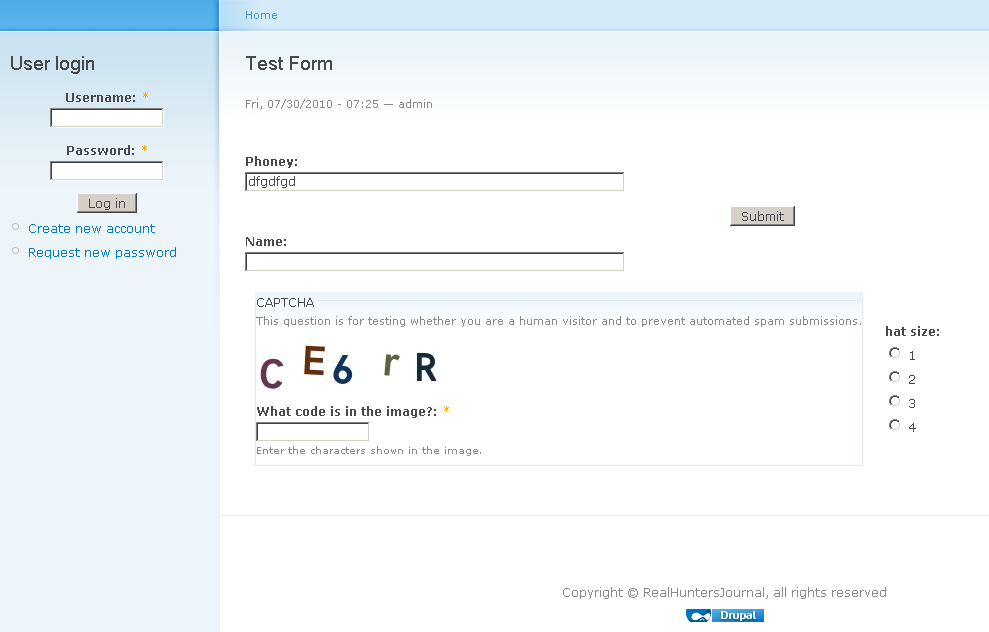
I have tested moving the captcha with two different setups: Webform 2.9/Captcha 2.1 and Webform 3.4/Captcha 2.3. I was able to arrange the captcha just fine under both setups. I am including a screenshot for the Webform 3.4 setup. As you can see, I am the anon user, and the captcha has been arranged. I tested this in both IE and Firefox, and didn't have any problems in either.
So, just thinking about it, the only reason I can think of that the Captcha block wouldn't be getting arranged for you is if the CSS wasn't being applied, or was being overwritten. Or, if it wasn't being saved in the first place. If you use Firebug, you can see a [style] block somewhere inside your form. Arrange Fields put that there. Look to see if you see anything involving Captcha in that block. It should be specifying its position.
Also, what user are you using to arrange the form? The anon user, or some other user? Just curious so I can try to replicate your attempts exactly.
Comment #17
richardp commented-- Sorry, I just realized in your first post that you did indeed already check on the style block.
After looking at the form link, I see what you are talking about. I am going to test out a few things on my own set up and report back.
Richard
Comment #18
richardp commentedOkay, I just checked, and on my set up, it is referring to the captcha block in CSS (for arranging) as:
#edit-captcha-draggable-wrapper{}
which is what it should be doing, and why its working for me. I am not sure why it would be slipping the "-fieldset' in for you.
What version of Arrange Fields are you using? The latest, or the dev version?
Comment #19
srmorton commentedRichard,
I'm using the latest Arrange Fields 6.x-1.1
I thought at first that it may have been because I activated the Captcha after I had created the form. So I just created another webform with just two fields in it and the Captcha active from the beginning. Same results. The Styles are being taged with the '-fieldset' and the div wraper is #edit-captcha-draggable-wrapper{} while the 'styles' has #edit-captcha-fieldset-draggable-wrapper{} once you correct (with FF) the div by adding the '-fieldset' it repositions to correct location.
So, there must be somthing unique to how I have things setup. I'm going to try a few things and will let you know.
Are there any modules which you know that may conflict with Arrange Field?
Also, do you have a public form that I could load and look at with FF to see if I can spot a difference?
Steve
Comment #20
richardp commentedNo, I can't think of any modules which might affect Captcha's fieldset, except maybe Vertical Tabs. Are you able to arrange the Captcha fieldset, and it sticks? As in, when you go to arrange it later on, the captcha is where you left it? Or does it always pop back to the top after you hit save?
I have a public form here you can inspect:
http://richardpeacock.com/rhj/content/test-form
Comment #21
richardp commentedI suppose it is possible that you have a weight issue. As in, some modules are getting loaded before or after others, in a manner that Arrange Fields isn't expecting.
If you look at the system table in your database, arrange fields should have a weight of "500". Captcha should have a weight of "0". And webform a weight of "-1".
Comment #22
srmorton commentedRichard,
The weights are correct. No problem there.
Yes, when I come back to the form and enter Arrange Fields the Captcha is in same place I left it when I saved the configurations.
The only thing that I see is that my styles section for Captcha is being written with the '-fieldset' in it and yours is not written with the '-fieldset' in it.
But, Captcha is a fieldset so should it not be written with the '-fieldset' in it.
I have now upgraded to Arrange Field 6.x-1.2, but this did not change anything.
I'll continue to look. I'm sure that it is something that I have installed.
I do have the module smart_menus 6.x-1.7 with smart tabs activated, but smart menu is de-activated. If I can remember correctly there was another module I'm using that required smart menus.
Steve
Comment #23
srmorton commentedIt is Module Grants Monitor that requires Smart Tabs to be enabled.
Steve
Comment #24
richardp commentedNow, that's really interesting that it's in the correct place when arranging, just not when viewing. It is still using CSS to position everything while arranging, at least when the page initially loads.
You are right that in theory Captcha *should* be considered a fieldset. But, at the time the form is rendered, it does not have "#type" => "fieldset". Instead, it has "#type" => "captcha". This is why Arrange Fields does not see it as a fieldset. I am not really sure why this is the case; I have always assumed that the Captcha module did something special to it, so it needed it to not appear as a fieldset.
I am attaching a revised arrange_fields.module file, which on line 519 I go out of the way to ensure that if it's captcha, we don't add the -fieldset bit, regardless of what the #type property says. If you would, please copy and paste it into your setup, and see if it fixes your problem. If it does, I will include that in the next version.
Richard
Comment #25
richardp commentedI went ahead and published a new version, which contains this fix and one other bug fix. It is version 1.3. Please try it out at your convenience and report back if you are still having trouble.
Thanks
Richard
Comment #26
srmorton commentedRichard,
Installed the new 1.3 version.
1. flushed the Arrange Field cache
2. opened the existing webform that already had the Captcha in it at the location I wanted, but was not showing correctly referenced above. Note: the Captcha is not in blue anymore which means you can not select another type of Captcha. Also, when you click on the little property popup it does nothing except give you the tool tip of configure.
3. saved positions.
4. opened in anon and it is now showing correctly.
Decided to create a new form. There is a serious problem now.
1. created a new Webform
2. placed one text field component in it.
3. went to arrange field
4. Captcha is under the field and just above the Submit Button
5. Captcha shows in blue so I picked image and clicked on Save
6. Returned to Arrange Field, but grid is not showing and arrange field property is showing on the page and fills the page.
7. will not let you do anything.
Comment #27
richardp commentedWell, it certainly sounds like you're having some problems!
The only reason for the grid to not show up or the dialog to print on the page is a CSS problem. Just spitballing here, but I know IE has a bug where it refuses to load any more than 31 or 32 CSS style sheets. Its a little known bug that can wreak havoc on unsuspecting webmasters, especially in Drupal, where each module has its own stylesheets usually. Might double-check in another browser just to make sure.
I repeated your steps with a fresh, new Webform, but didn't have any problems. I cannot repeat your issues. This leads me to believe that either (a) there is a very deeply buried bug in Arrange Fields, or (b) this is the result of one of your other installed modules acting strangely with Captcha. Unfortunately, I do not know where to even begin looking if that is the case.
My general advise would be to disable your other modules (which are not core) one by one, flushing the cache after each one, to see if Arrange Fields/Captcha ever starts working. If it magically does, that will tell you which module was the culprit.
Also-- just for fun-- disable Arrange Fields. See if Captcha works at all. It is possible Arrange Fields isn't really the issue at all, but is exacerbating the problem with all it's CSS and javascript.
I wish I could do more to help you! If you ever do figure out the problem, by all means please post back here, especially if there is something I can do to the module to try to keep others from experiencing the same frustrations.
Richard
Comment #28
srmorton commentedYea, I have already run into the IE 31 css file reference problem and since have already enabled the Optimize CSS under Performance.
I have confirmed that this is just an IE issue. I am able to do everything correctly and with the approperate results in FireFox. It will show correctly in IE so it must be an IE issue with the CSS as you stated in the last post.
I tried to disable the Optmize CSS and then go back to create a webform with same results, turnned it back on and same results.
FireFox is preforming without issue.
I did not run into this with version 1.2 so it is probably something that has changed in the css between 1.2 and 1.3.
I'll do some checking and see if I can identify the troublesome css that IE does not like. Will report back here.
Steve
Comment #29
srmorton commentedOk, let's see if I can explain all of this in some orderly fashion.
Working in IE8:
Given that your site has reached a state where you have 31 css references and you have Optimize CSS Enabled.
When you create a webform. You have the Captcha option on. As long as you do not have a "Challenge" enabled you can view everything normally in the Arrange Fields. Place everything where you want it. Then save everything and go to User Management CAPTCHA and in the settings turn on the form challenge to Image. From this point on you CANNOT go back to Arrange Fields in the form and move things around or you will get the frozen page and no grid display. If you wish to move things around go back to User Management and CAPTCHA and set that form to "none" in the Challenge. You can then go back and re-arrange everything. Then reverse the settings. You may have to clear the Drupal Cache.
Funny that this just started happening, but I think it must have something to do with CAPTCHA. It does not play well in IE with Arrange Fields.
Right now I'm happy to use FireFox if I need to add Captcha to a form, but just in case someone hits this in IE8 they will kind of know how to work around it.
If I learn anything further I'l post it here.
As for my original issue I would consider this issue closed.
Richard, thank you for your quick and persistent response to this issue. It is greatly appreciated and if I can assist you in the future please do not hesitate in asking.
Steve
Comment #30
richardp commentedSteve,
I'm glad you got everything figured out! And I'm glad I could help, too. I'm just sorry that IE has struck again ;). I've seen the 31 CSS file issue brought up again and again in other modules' issue queues.
There are a couple drupal modules I am aware of which are supposed to work better than the default Optimize CSS feature. One is this: http://drupal.org/project/ie_css_optimizer. The other is: http://drupal.org/project/unlimited_css. I have never used either, so I cannot vouch for them. But you might experiment with them and any other similar modules to see if any of them give you some more freedom in IE.
It seems to me like Drupal should just include the functions in those modules as part of core, since this comes up so often.
Anyway, best of luck,
Richard
Comment #31
srmorton commentedOk, here is a little more information after some additional testing.
Using the CAPTCHA module installed only.
1. both the math and image challenge cause the Captcha component to not become a hyperlink and the Arrange Field dialog box for the Captcha component will not display the dialog. The dialog is already expanded below the grid therefore rendering this component non configurable.
2. as long as you turn on/off the challenge via the User Management CAPTCHA Settings you can at least view the Arrange Field Grid.
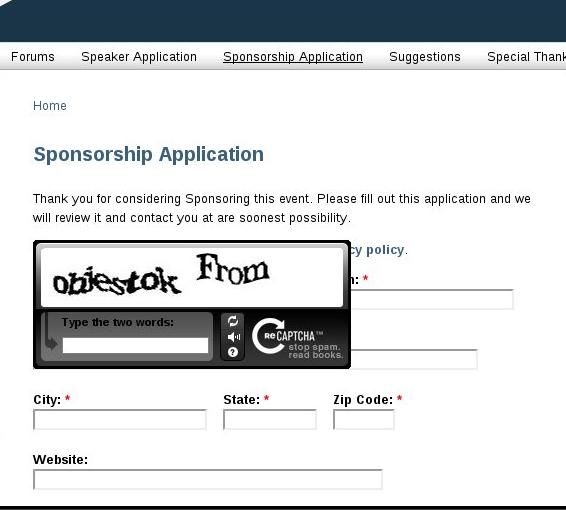
Using the reCAPTCHA module along with the CAPTCHA module.
1. Everything appears to funciton as you would expect it to function. The CAPTCHA component is blue and hyperlinked and the Arrange Field is fully functional. The grid appears correctly.
Conclusion:
There is something about the CAPTCHA math and image challenge that is causing the problem in IE within the Arrange Module.
Steve
Comment #32
richardp commentedThank you for your additional testing. That certainly is odd. Good to know, at least, that you can get reCaptcha to perform OK. My theory is that reCaptcha handles its stylesheet in a different way than the regular Captcha module. However it handles it, this must be OK for IE.
Throughout all this, I have never been able to reproduce your results, testing in all versions, all browsers. Nor did I ever see your original problem, where the extra "-fieldset" got added to the CSS definition. This leads me to believe that while the IE CSS bug is probably a direct culprit, there must be some other module in your setup which is also part of this equation. If anyone out there in Internet Land has any insight, please feel free to post!
Thanks again,
Richard
Comment #33
srmorton commentedRichard,
I think I'm getting closer to identifing what is happening here.
I have saved the source code that is being generated under three cases. No Challenge, image Challenge, and reCaptcha generated code of Arrange Field and then I have used WinMerge to compare the files. The only major difference between the image Captcha and reCaptcha is that the image Captcha is putting a fieldset in and reCaptcha is not.
The dialog that is being exposed is the
<div id='arrange-fields-config-dialog' title='Configure'>which is present in all three conditions, but IE is not hidding the dialog in the image Captcha and is hidding it in the other two conditions.Here is what I suspect is going on. Because image Captcha is throwing in a fieldset there is a CSS class or selector within that fieldset which is exposing the
<div>which is directly following the fieldset closing</div>tag which is the dialog.I further suspect that the grid, which is placed via CSS, is being collasped to just a narrow line due to an inherited css.
I beleive the reason for this is because IE does not treat some CSS the same as FireFox does and that is why this is not being exposed in FF. Now the trick is to locate the CSS that is causing the problem.
If I remember before you made the change in 1.3 to force CAPTCHA to not be assigned the -fieldset the entire CAPTCHA fieldset above was being egnored and that was why it was not being positioned correctly, therefore IE was not seeing the CAPTCHA fieldset. Therefore I was not seeing the problem with image Captcha. I sure wish IE had a FireBug plugin.
I'll post back when I identify the css which is causing the issue. I have another test drupal site that has almost no modules in it I'm going to install webforms, CAPTCHA, and arrange field in it and see if I can duplicate the same issue.
It was interesting to see that in WinMerge that there was not really any additional code differences except the fieldset wrapping the CAPTCHA. This kind of indicates to me that it is not a Module conflict. Now I need to compare the two different CSS files to make sure no extra css is coming into play. Will do that next.
Steve
Comment #34
richardp commentedThat's very interesting. The arrange fields dialog is hidden using CSS, so, that supports the theory that the arrange fields' CSS is not being read by IE, which further supports the 31 stylesheet limit in IE theory. The differences in CSS may be the difference between a module using @import to load stylesheets, or using the [link] tag to load a stylesheet. IE likes @import better (it will allow more than 31 of those). Naturally, the @import method is worse for performance and can lead to javascript problems-- Of course IE likes it! But I digress...
I was wondering if you had tried either Unlimited CSS or IE CSS Optimizer, to see if either of those modules just magically fixes the problem?
Richard
Comment #35
srmorton commentedRichard,
I did us IE CSS Optimizer. IE CSS Optimizer only allows you to Exclude one module at a time and CAPTCHA shows up as one module and Image CAPTCHA shows up as a second module in the IE CSS Optimizer exclude dropdown only allowing you to choose one at a time. I tried both and tested each after each exclude. The tests revieled NO CHANGE is results. This has led me to believe that there is not a stylesheet 31 limit issue or at least it was not evident in the test. Now that does not mean that it is definently not as I could not select both modules to exclude.
I'm going to compare CSS files now so I should be able to report back shortly. What I'm hoping to find is a difference in the two css files. If I understand the CSS Optimization option is that it basically builds a composite css temporary file of all loading css stylesheets that is cached and then loaded each time. We will see.
Steve
PS. I did not try the Unlimitted CSS as when I read the notes it did not seem to fully address the issue. I may try it shortly if I have time.
Comment #36
srmorton commentedInteresting... using the IE Save As to save complete html in seperate folders of both with and without Image Captcha resulted in identical files in the support directories. Thus the css files and all other supporting files are the same. No extra stuff.
The only difference is the two html files that are created.
Steve