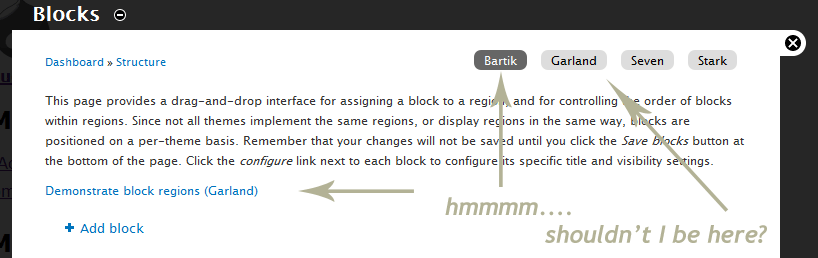
In Drupal 6 when you went to the blocks page the current active theme is selected by default, in Drupal 7 this does not happen and is pretty confusing because you can end up configuring blocks and then wondering why they don't show up - there's no real warning about which theme you are changing blocks for, just a local task tab highlighted. The "demonstrate block regions" correctly show the current active theme so you're twice WTF'ed over because you think your on the right theme, but you might not be, on a core install if you change your theme to Garland then go the blocks page you land on block config for Bartik...
If this is a dup sorry, there are some pretty long issues to read through and it may have been raised, also I have no clue where to post this so dumping in block module.


Comments
Comment #1
Jeff Burnz commentedShowing the issue from a users perspective, even I have been caught out by this a few times...
Comment #2
Jeff Burnz commentedThis seems to be a caching issue.
Comment #4
robertom commentedI've marked this bug closed because is a duplicate of:
#690544: Blocks admin (admin/structure/block) requires menu_rebuild() to display settings for current theme