

 Come together with the global Drupal community in Rotterdam, 28 Sept – 1 Oct 2026. Sessions, contribution, connection, and Early Bird savings until 8 June.
I've been experimenting with the module, to see if it's appropriate for a couple of the sites I maintain (Drupal's standard forum module just does not cut it), and noticed something.
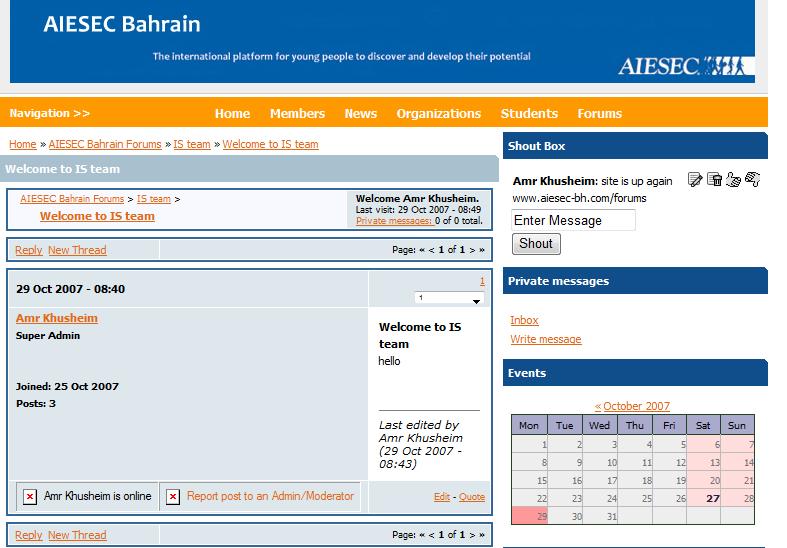
I made a couple of test posts (in addition to the automatic welcome posts that appear when a new forum is created), and noticed that, at least in the standard Drupal theme (Bluemarine), the author info area (where the author's name, etc. appears) is a _lot_ wider than the actual post area, which is all cramped over to the right side of the page. Needless to say, that's not terribly readable.
When I tried to create an additional, longer post, to see if that would fix the problem (my test posts were short), I ran into another issue, which I'll report seperately, where it says that the user's new post was made after too short a duration (no matter how long I wait). : /
| Comment | File | Size | Author |
|---|---|---|---|
| #11 | uie.jpg | 46.02 KB | Amr Khusheim |
| #10 | screenshot.png | 100.13 KB | BMOREX |
| #6 | shift.jpg | 72.31 KB | Amr Khusheim |


Comments
Comment #1
daniel.hunt commentedThis is likely a style sheet issue. We've been experiencing it on and off over the past few months on unreal.ie aswell - and I can't for the life of me track it down.
If you have any experience with CSS or PHP I'd appreciate it if you could look at it for me aswell - a fresh pair of eyes can make all the difference!
If not, then I'll get to it eventually, as it really is something that bothers me :/
Thanks though,
Daniel
Comment #2
daniel.hunt commentedComment #3
Coyote commentedIt may just be related to how browsers handle objects that don't have enough content to fill the space assigned to them. It's almost certainly something that would be fixed by a different style sheet, or simply by waiting until there's enough longer posts in a thread to make the point moot.
Probably what needs to happen is that the markup for the author and post areas need to have a specific set width (not necessarily a pixel width). I'll _try_ to dig through it, if I have time, but unfortunately, I'm working a night job _and_ doing some site work for a client, so I may not be able to get to it in a timely fashion.
Someone else may be able to put aside the time to look before I do.
Comment #4
daniel.hunt commentedWell if you can get the time to look at it I'd appreciate it :)
All you need do is examine the html of the page, any changes to the code can be looked at by me once the problem is found :D
Comment #5
daniel.hunt commentedJust an update: this is still happening, and I can't for the life of me track down the reason.
Daniel
Comment #6
Amr Khusheim commentedso did anyone solve it ?
Comment #7
daniel.hunt commentedThat's a completely different issue Amr - your images path isn't setup correctly
Comment #8
Amr Khusheim commentedsorry zoro check again on the picture i attached .. am having the same problem
the author info space is wider than the actual post space .. so how do i fix it ?
www.aiesec-bh.com/shift.jpg >> to make what i am saying clear
thank you in advance
Comment #9
daniel.hunt commentedAmr - your UIEForum images paths are not setup correctly! Check your admin settings to confirm them.
The user info area is too wide because of the missing images at the bottom.
Comment #10
BMOREX commentedI am having a similar problem but mine does display the icons at the bottom any help?
Comment #11
Amr Khusheim commentedsorry i am really bad at this .. i went to the admin and confirmed the path .. but didnt change ..
what is the right way to change the path ?
this is how my path looks like under the configuration
www.aiesec-bh.com/uie.jpg
thank you very much zoro !
Comment #12
daniel.hunt commentedThis is a common problem, and I haven't a clue why it keeps happening. It's definitely a styling issue, but I can't figure out what's causing it
Comment #13
daniel.hunt commentedAmr - where have you installed the uieforum module to? Can you confirm the exact location, relative to your Drupal root?
Comment #14
BMOREX commentedamr - i had a similar problem with that before basically it is looking for 2 image files and it doesnt have the location of them. im guessing this is so in the future you could customize the buttons or something. but basically you have to verify those 2 image files are where they are supposed to be. i think before i had to move the files to another directory to get them to read.
on a side note is there a particular theme that works really well with this forum?
I need a theme that works well with gallery 2 and uie forum. you would think it woudl be easy but not many work lol
www.bmorex.com
thanks for the hard work
Comment #15
LupusStudios commentedI've fixed this on one of my client's sites in a fairly inelegant manner, but it worked for us:
Adding this to the style sheet fixed it:
.post_user_info {
width: 150px;
}
Now I am totally baffled by this because the actual style path (table.forum td.post_user_info) is according to FireFox's DOM inspector being applied to the table element which should give you that width. However something bizarre is happening because it's not.
I've tested the fix on FireFox, Opera and IE6 (not had chance to try IE 7 but I'm sure it will be fine) so it seems to be a workaround but it's silly. It SHOULD work as it is.
Anyone else want to confirm if this fix works for them?
Comment #16
LupusStudios commentedActually that fix hasn't worked it seems :(
Comment #17
daniel.hunt commentedI really, really haven't a clue on this one. Everything appears to be in order, but something, somewhere, is breaking the CSS :/
Comment #18
pomliane commentedThis version of UIE Forum is not supported anymore. The issue is closed for this reason.
Please upgrade to a supported version and feel free to reopen the issue on the new version if applicable.
This issue has been automagically closed by a script.