

 The 2026 Drupal Business Survey is open. Your response will help shape the future of the Drupal business ecosystem.
By dellis on
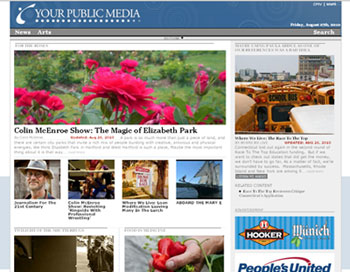 Yourpublicmedia.org is a curated news and arts portal built by the Connecticut Public Broadcasting Network (CPBN) that is dedicated to promoting high quality, local/regional content that is created by non-profit organizations from around Connecticut including: Connecticut Public Broadcasting (CPTV/WNPR) and a number of community partners including the Connecticut Historical Society, the CT Mirror (an independent, Knight-funded news organization), the New Haven Independent (a hyper-local news site), and Fairfield University. We are continuously working to secure additional content partners.
The idea that this site would consist of a curated experience was a very important one to us during the concept and design phase - the two national entities that we (CPBN) are associated with are PBS and NPR; two brands that have a long history and reputation for providing such content curation. We didn't want to simply turn this into a river-of-news-type site, and we recognized that neither our internal staff's capacity, nor the capacity of the non-profit groups we would be working with, would be able to add any meaningful value on this front with the for-profit local news agencies already working hard in this area, and auto-aggregated services like news.google.com providing incredibly useful resources to people looking for up-to-the-minute (breaking news) information.
Instead, we chose to leverage the longer-form coverage and focus on more in depth analysis that we consider a core competency, rather than the sort of coverage typically achieved within the breaking-news context.
Why Drupal?
We first started researching open source CMS platforms in the summer of 2007 as we looked ahead to relaunching our main website (www.cpbn.org). At that time, things like CCK, the extensive user permission options, and quite honestly, the combination of the audio and station module(s) (we have both TV and Radio broadcast platforms) really set Drupal apart from the competition (we had reviewed Joomla!, Mambo, Typo3 and a few others). In addition, a case study put together by IBM was very valuable in lending some "credibility" to our choice within the organization.
We worked with Drupal 5 to launch cpbn.org and a number of other smaller microsites in late 2007-early 2008. We started working with Drupal 6 once things settled down with contributed modules, and got very familiar with its capabilities while building a few program microsites. Our comfort level developing with Drupal and the responsiveness of the community made Drupal the obvious choice for this project (we looking to relaunch cpbn.org on Drupal 6 in the coming months). In particular, one case study that had really impressed us was on the New York Observer's site and most definitely helped us with some of our design structure (e.g the "Edition" content type) and provided a high standard to model.
Staff "content creation" experience with Drupal
Since January of 2007, our staff (radio and TV folks) have been adding content to cpbn.org - and therefore had largely learned how to use Drupal to post articles, shows, blogs, etc. As the yourpublicmedia.org concept began to take shape, we worked very closely with our content contributors to discuss their preferences: tools they liked, things that didn't "quite" work as advertised, things they saw in other applications (e.g., WordPress, Blogger, Facebook) that they liked better, how long things took, what their workflow had evolved into based on their Drupal experience thus far. Those discussions, along with regular "check-ins" during the development were incredibly valuable for this project.
With CPBN.org, no time had been spent on improving the usability of the "backend" interface. While this is likely a common conclusion of most "in-house" development projects, it did prevent the system from gaining wider adoption. We had determined early on that if our plan was to incorporate additional (outside) partner organizations, then the interface for adding content had to be simple to learn and easy to use. The largest issue from staff was the difficulty in using something like GIMP to format images for pages (we had used the image module instead of imagecache/imagefield on cpbn.org), and the largest issue from the editor group was flexibility. They wanted to have freedom in how their pages looked and not be locked into a basic template. We were able to address these issues quite well in this design.
Modules used
We built this site with Drupal 6.x, and a number of contributed modules:
CCK, Views, Devel, Imagecache, Modal Frame API, Automodal, Modal Node References, CKEditor, Clone, Emfield, Flowplayer, Fieldgroup, Filefield (and a number of other standard CCK widget modules), Blockreference, Multiblock, Pathauto, Path Redirect, Token, Rules, Rules Scheduler, Search by Page (by Nodes), Captcha, Taxonomy, Tagging, Extractor, Taxonomy Extractor Suggestions, Cache Exclude, Feeds, Ajax/Ajax UI, Chaos Tools, and a custom helper module containing some functions and javascript.
Some of the most valuable, yet lesser known/used modules (deserving of their own list item) really leverage the power of CCK formatters and Imagecache, and they include:
- Custom formatters: creates a contemplate-style interface for adding CCK formatter options
- Formatter Selector: allows users to choose which CCK formatter is used for the display of each field during node creation
- Uberimage/aef_image: an incredible imagecache + jcrop driven imagefield widget that allows you to assign multiple imagecache presets to a field instance, then adjust the cropping of each image preset instance independently (from within the node form interface). (screenshot)
- Views CCK formatter: allows you to use the CCK formatters as a row display style in views
Site Logic/Design
 The decision to structure a site's content is always a tricky one. Working out the logic behind the content types is one of the most important things in the site building process; getting that part wrong will make life miserable later on. That said, there are always options and different ways work for different folks. We had built a number of other sites over the last few years, experimenting with various content structures along the way. We tried to streamline the process with yourpublicmedia.org, and thanks to the automodal module(s), we were able to really simplify the user's content creation experience.
The site was developed with the intent of having two main classes of users: Authors and Editors. There are other roles as well, but these are the primary ones.
Web Page(s)
Authors create all of the Web Pages, which in turn have reference fields for audio, video, person profile (for author, host, contributor, etc.) and partner (content partner) content types. Using the aforementioned automodal module(s), page authors are able to create each of the referenced nodes on-the-fly in a modal pop-up launched from the Web-page-create form; these newly created references' nid is then automatically filled into the autocomplete field connecting the nodes.
Authors leverage the power of Uberimage for the Web Page's main image(field) and for any slideshow image(fields) directly within the web page content type. We considered making the Image a first-class node, but Uberimage was so incredibly easy to use that we would have simply been creating duplicative meta-data on an image type that was likely already in the Web Page; in addition, almost every web page would have at least an image and therefore it seemed appropriate to build that into the primary form.
There is also, of course, a way to categorize the pages by: a) assigning the page to a partner (that the user has permission to post for: a custom field value script searching through options that match their permissions) and b) suggesting certain "channels" for their content. I should note that the Web Page form is long, but as we leveraged the CCK Fieldgroup module to break it into smaller and easier to digest chunks, users haven't expressed any issues with the length.
Once the Web Pages are created, they need to be curated by an Editor
The logical/navigation structure of the site simply contains three types of entities: Web Pages, Partner Pages (content Partner organizations) and Channel Pages (each containing content of a similar theme). The vast majority of Channel and Partner pages are automatically populated (more like the river-of-news approach) and this is simply due to a lack of staff/editorial resources. The functionality, however, exists with all Channel and Partner pages to turn them into a manually-curated display, whereby an Editor can create an Edition (meaning, this is a toggleable option that can be turned on/off at will).
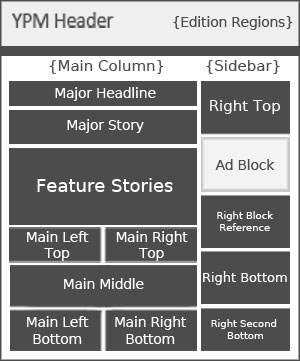 The Edition is another content type that is basically just a collection of node and block references that are assembled by the editors and assigned to a particular Channel (or Partner) and set to be published (via Rules Scheduler) on a particular day. Each nodereference is placed within a multivalued CCK field, and each multivalued instance is then treated as a region in the edition template (acting in a similar manner to the block-layout region system that comes with drupal's core block assignment interface). At the moment, the result is that on nearly a daily-basis, yourpublicmedia.org publishes 3 new editions: the main edition, a News edition, and an Arts edition.
The archived, daily-editions approach serves several purposes
First, from a workflow standpoint, it actually helps during Editorial meetings to discuss layout decisions and to determine best practices using actual examples of past editions. An additional workflow consideration was that having a daily edition has really helped drive our production schedules--and this process continues to evolve/develop. From a user perspective, the feature provides contextual value--people like to look at newspapers from the day they were born, or from the day of an historic event--that sort of context of information is something that the web, largely, lacks. We believe that preserving those real, human-curated, relationships that exist between stories has a value to the public (in addition to the related pages-type functionality we also use within Web Pages). Lastly, from a practical perspective (assuming the content and presentation are compelling enough), a daily edition should lower the web visit bounce rate and increase visitor loyalty.
To demonstrate the archive, for example, here is the News Edition from August 24th, 2010
and here is the News Edition from July 30th, 2010
Edition Layout
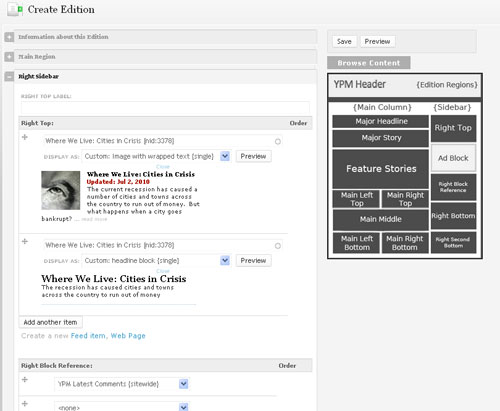 With respect to layout/styling, Editors have the capability (as mentioned) to choose which nodes go into which "regions" (CCK Multivalued nodereference fields--that are printed within their own regions in the edition tpl file), but they also have the ability to select which CCK Formatter (thanks to the Formatter Selector module) gets applied to the referenced node. At this point there are somewhere around 20 different templates that Editors can select when displaying content in various "regions", as such, they have flexibility in how each Edition page looks on any given day. Because of the tremendous flexibility existing within CCK Formatters, it is very easy to add new layout options--so when an editor sees a "node teaser" style that they like online somewhere, we can fairly rapidly incorporate that style into our collection of templates.
Once the editor builds the edition, the nodes that they have chosen to add to each region are now tied to a CCK Formatter (through the Formatter Selector module) and the matching theme function is used to display the node in that format, and within the assigned "region" through the edition.tpl.php file. Since the tpl file loops through the loading/displaying of all nodes in each "region" (Multivalued CCK field within the Edition content type), it can then create a very dynamic looking page--and provides the editor with tremendous flexibility when designing their layout. Essentially, we've given them design elements to "mix and match" at will, on a daily basis. Since the edition is a node, we also have therefore created a way to archive past editions--with the Channel/Partner pages (if set to manual editions) showing the latest published edition--and through an editions "drop-down" the ability to navigate forwards and backwards through the archived editions.
"Content Browser"
A recurring problem/issue expressed over the last few years (with Drupal) by our content contributors has been the nodereference autocomplete field's interface. The functionality is awesome, and appreciated, but as the site's content grows--or as they start referencing old content--the user has to try and remember words from the title of the node to find it. Admittedly, this is hardly a huge problem from our perspective, but it adds a bit of inconvenience to the contributor. Since one of the development goals of this project was to minimize the "hassle" factor, we implemented the automodal nodereference interface within the Web Page form (so they could build referenced nodes directly from that page) to help the Authors. The Editors would really be at the autocomplete field's "mercy" because they likely wouldn't know that pages exist to showcase unless searching through the content management tools; as a result, we created a "Content Browser" tool, which is accessed by clicking on a button added to the Edition form. Clicking launches a jquery dialog box that (currently) contains 3 tabs; each tab relates to a different sort of content.
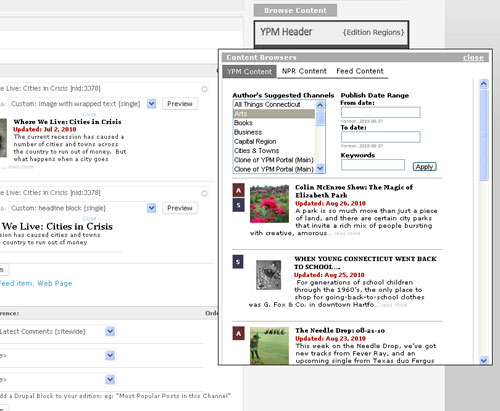 The first tab is for YPM Content browsing, and consists of a view with some exposed filters (keywords, dates, channels, etc.) and displays each returned node formatted with one of the CCK formatters (using the Views CCK Formatter module) to make it easier to look at. Next to each of these returned nodes, we added icons for whether the story contained particular features (audio, video, slideshow, or a widget element), which would help the Editor determine which CCK formatter to use for that story (when added to the Edition)... some templates display embedded audio or video players (using flowplayer), while another template actually places the slideshow directly on the Edition page (seen in the second link from above).
The second tab browses Feed nodes that have been imported into the system via the Feeds module--again, via a View with exposed filters. These feeds provide us with content from some of our content partners--though other partners do often contribute directly through the Yourpublicmedia.org interface. Feed nodes--imported from less-rich RSS feeds are often used to supplement our more developed content pages (because they tend not to have multimedia), but they still provide significant value--and can be presented with most of our CCK formatters. Note: the nodereference fields in the Edition content type are set to accept either Web Page or Feed nodes.
 The third tab took a little more work, but integrates the NPR content API into the Editor's toolbox. As Connecticut's largest NPR affiliate, we help support the coverage that is produced at a national level--this content typically covers content areas that are still quite important to our more local/regional audience, and often is distributed though WNPR (our radio platform). NPR's content API is a really first-rate tool, which we've integrated into our website. Instead of pulling in a "static" RSS category feed, we have a keyword search (with optional requirements for images and/or audio that accompanies the content) in this third tab that looks for stories appearing on NPR.org that match our entries. Once a list of matching stories is returned, they are formatted to resemble the CCK formatted view result from the other tabs, with an "Add" button next to each story. Clicking on the add button triggers another ajax call to the API, returns only that story's information, and then a custom function using drupal's node_save() and a number of other parameters creates the related Web Page, including where applicable, related Audio, Video and Person Profile (if the author doesn't already exist) nodes, then the "Add" turns to "added" and the Editor is free to reference that story's yourpublicmedia.org Web page in his/her edition. Basically, we've added the ability for Channel Editors to quickly grab content from NPR.org to, again, supplement locally produced content when it might provide a value to our visitors. Rather than pulling in an "RSS Feed block," this allows our Editors to be highly selective when incorporating national stories, and by creating full-blown yourpublicmedia nodes, these pieces are therefore archived within the context of our daily editions.
One example of this can be seen here on Yourpublicmedia and here on NPR. This is all allowed through our Station's relationship with NPR, and is really what they built the tool for.
Our Editors have really found this "Content Browser" combination of exposed views and the npr API to be quite valuable.
Other Odds and Ends
- We have a tokenized view for RSS/Podcast feeds for each Partner and Channel set up automatically to allow people to simply get the river-of-news version of our content
- We're playing with the Apture.com toolbar (currently in all non-IE browsers) to see whether the added functionality is something that users will enjoy
- Using the Admin module (administration menu, but on the side of the page) we added a custom "Bookmark"/menu item for Tutorials. We created 13 screencast tutorials for users of the site--whose visibility is determined by user role (so Authors don't have all of the Editor tutorials, etc) ranging from "how to create a web page" to "how to use the WYSIWYG" (a lovely 27 minutes long cast). These have been very valuable in training new staff/partners and have cut down significantly on repetitive questions.
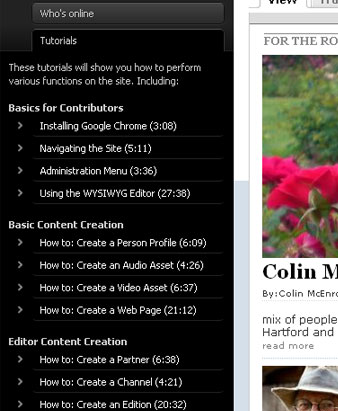
- WYSIWYG for this project: we settled on CKEditor, and it does a great job
- We also installed a handy little module called Nodedump. Basically, this does a pre-print_r for a single node; it wasn't needed but was a convenient tool and works well
- Our theme is a custom Zen subtheme, but because editions play such an important role, CCK formatters do a lot of the heavy lifting with respect to nodereferenced formatting
- CCK Formatters are hugely powerful and are really great for this specific use-case
- When developing our Edition content type, we considered Panels/Views, but because users would be using the node form for Web pages (and everything else) it made sense for us to create a "layout" content type--again, it provides the kind of flexibility that was initially requested without making things too complicated on the admin UI side of things.
- We've also integrated bigTarget.js -- a script to help avoid the "where is the link" issue often seen in click-heat-maps.
- The site uses a jQuery lazy load plugin for images below the fold (except on the ipad which has problems with it)--not sure whether this adds practical value at this point, but wanted to experiment
- AJAX comment form and admin is a great little feature that really beats the standard version
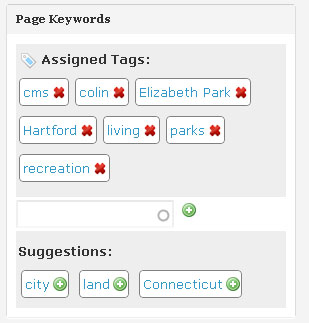
- The Tagging module is a really nice UI enhancement for adding taxonomy terms, and our contributors love it.
Drupal is an amazing application, and so many contributed modules are really fantastic. The vast majority of features on yourpublicmedia.org are thanks to core and contributed modules; in fact, very few specialized custom functions were needed to make this stuff work--and mostly that was for theming purposes. This community is truly remarkable and we are very grateful for your support. Many, many thanks.

Comments
Wow, great write up. This
Wow, great write up. This should really be featured on the d.o. homepage. It took me a little while to digest it all, I've never seen some of those modules. Glad you showed me.
Thanks!
Thanks! Those AEF/France24 Modules are fantastic and I think they'd help out a lot of folks (especially uberimage). But CCK formatters really make it all possible... wondeful stuff.
Formatters
\o/
CCK formatters are something *veeeery* useful, but not well known. Take a look at them!
Such an amazing website!!! I
Such an amazing website!!! I would add an easy way to make the text bigger though.
Thanks! Yeah, there isn't a
Thanks! Yeah, there isn't a way on the Edition pages to bump the font size (though there is on the story "Web page"). I'd say that the two things that seem like they are missing are 1) font size on the edition pages and 2) some sort of visible permalink for edition pages. I can't say I know how to fit those in (visually), but hopefully we'll figure something out.
Awesome write-up, thank you!
Awesome write-up, thank you!
The "Browse content" on the
The "Browse content" on the right of the screenshot of "Create Edition" page , is just a simple image showing regions position of a page ?
or it is can be interacted by clicking desire region and popup a modal windows for selecting content ?
And
The regions of content type Edition are ordinary drupal block regions or other means?
If they are ordinary drupal block regions , and these regions are specified for Edition content type, how the block administration page look like ? Still showing all regions no matter of content type ?
So there are a couple of
So there are a couple of things. First, the "Browse Content" image is a button that triggers a modal popup. This modal popup is simply a way to browse the content of the site (pages, feed items) and npr.org. From this pop-up, editors can figure out which stories they have available for display in the edition.
Then, the image displaying regions below the browse content button is just an image--it is meant to help the editor understand where content will show up when the stories are plugged in to various "regions" in the node form. That is an interesting UI idea though--I hadn't considered that possibility.
The regions of content type Edition are not drupal block regions (but that is the sort of interaction I'm modeling).
Editions have a number of fields, like any node type--but the important Edition fields (the ones emulating this drupal block concept) consist of names like: "major headline" or "main top left" or "sidebar top", etc.
"Main Top Left" is a multivalued (with "Unlimited" values selected), cck nodereference field (as are all of these "region" fields). So, if this was just a typical nodereference field, we could just display all of the added nodes through a loop and some custom display php/html code in our Edition.tpl.php file. All of the nodereference values would be turned into nodes using node_load, etc. and then we'd print the fields of that node within our loop.
The really awesome thing about CCK formatters, and in this case the Formatter Selector module, is that it makes it really easy via the GUI to then assign different templates for each of those nodereference field instances (each actual autocomplete input field) within the "Main Top Left" CCK field. Formatter Selector exposes a drop-down list of CCK Formatter (node template) options, which can then be applied to each individual multivalued field. This allows you to mix and match which "templates" are used when you are looping through the "Main Top Left" nodereferences in the Edition.tpl.php file--all you have to do is add a variable theme function within the otherwise standard loop--and let the CCK formatter handle presentation. The Edition.tpl.php code becomes much more simple, because all it has in it are the various "region" multivalued CCK fields printing out their assigned (nodereference) values, and displaying them with the appropriate CCK Formatter. This gives the content editors virtually entire control over what the homepage/news page/arts page looks like, everytime they create a new Edition. We're still working on best practices for laying out the page, but we're pretty happy with the outcome.
CCK formatters are really amazing.
Unfortunately, editors still have to type in the title of the node when adding the nodereferenced values; it would be much cooler to drag-drop the element from the Content Browser, but that is probably something we'll work on down the line.
The other thing, from a daily-use/practical experience perspective... it would also be more convenient if we could drag/drop the positioning of whole "region fields"... so we could take the "Main Left Top" field values, and move them (as a group) to the "Main Right Bottom" field. I have some vague ideas of how to do that now, but I think given the way this is built it would take some time to incorporate. Still, that would help the editors when they clone today's edition for the next day--they could move whole groupings of stories without having to manually transfer each nodereference value individually. For what it is worth...
Great website and great
Great website and great writeup
I love the edition layout
is there a tutorial on how to achieve this ?
------
GiorgosK
Web Development
nothing other than this case
nothing other than this case study (and now the reply to the above comment). I'm happy to answer any more detailed questions though. The biggest "hurdle" is just trying to figure out how CCK formatters work (what they are, how to create your own, and how to use the theme functions)--and then the rest is fairly standard.
Enable CSS / JS aggregation.
Enable CSS / JS aggregation. Internet Explorer has problems loading in more than 13 stylesheets, you oughta know that.
Furthermore I don't like the design of the site at all. It looks dated and sloppy.
oops, thanks for the css/js
oops, thanks for the css/js reminder! I'm sorry you don't like the site.
huh?? It works just swell in IE6
I opened the website in ietester using IE6 http://www.my-debugbar.com/wiki/IETester/HomePage before this comment was made and it worked perfect from what I could tell. I only spent a minute on it. I personally think that you did a good job with the design.
Rather than criticize, I'll share some good reading on newspaper layout and design.
Here is the case study by Khoi Vinh the designer of the New York Times and the Onion http://www.subtraction.com/2005/08/30/making-new-f using a grid layout that later became the foundation of the Blueprint framework and 960.gs framework. http://www.subtraction.com/2004/12/31/grid-computi
Also, here the latest and best technology on building a css framework using SASS http://sass-lang.com/ -- it's called Compass http://compass-style.org/ .
Keep up the good work and thank your for bringing my attention to the France 24 module set.
What a marvelous writen case study
You make me eager for more playing with Drupal.
Arne
---
www.arnetietz.de
Personal Development - Lifecoaching - Stressmanagement
I like the widget that
I like the widget that resizes the text.
It would be nice if it also changed the size of headlines and other text elements.
Apture Bar - very annoying.
But site is great, thanks.
And sorry for my English :)
Thanks for the super detailed
Thanks for the super detailed study on your website. It was really interesting to read through it to see how the backend was created.
What is the name of the admin theme you are using?
Rubik
It is an awesome theme created by Development Seed called Rubik (initially paralleling some of the d7ux admin theme work--now I can't remember whether I had seen this page, but it is likely given the real value with the admin module + Rubik combination: http://developmentseed.org/blog/2009/nov/20/admin-rubik-improved-ui-drup...
To be honest that decision was made pretty early on after having played with the very nice "Root Candy" admin theme for a while, Rubik just seemed a little bit more clean.
The Drop Down Menu
Hey there,
I like your drop down menu a lot. It is kinda the effect I am trying to build on my site. Are there any specific menu module you are using for this site ?
Thanks,
Noah
Thanks Noah, actually it is
Thanks Noah, actually it is just jQuery. The individual channels or partners are assigned in their node forms to be listed in either News or Arts, if they aren't toggled on to one of these, then they don't show up in the menu--this is just a query (could be a view) of all "menu item" channels in news, then display the list, and so on... etc.
I had seen a few jQuery plugins that accomplished similar tasks, but in reality, the JQuery is easy enough to do without adding another plugin. here is a link to a demo: http://nettuts.s3.amazonaws.com/041_TopPanelWithJquery/demo/index.html
and here is the tutorial that should speed you on your way: http://net.tutsplus.com/tutorials/javascript-ajax/build-a-top-panel-with...
hope that helps!
The tabbed section (Most
The tabbed section (Most Popular) on your homepage is not working in IE7.
Such an amazing website!!!
Such an amazing website!!!
Thanks for the heads up.
Thanks for the heads up. I'll take a look!
Install Profile?
This site looks like it would be a wonderful candidate for an install profile. Would you be interested in doing something as such yourselves, or handing the task off to someone... such as myself? :) !!
Richard Schulte
Hi rerooting, I have no idea
Hi rerooting, I have no idea how install profiles work/are built. It isn't something I've spent time on. Send me an email and we can discuss it--if there is enough value in it I'd be glad to help!
+1
I think this seems a very good candidate for installation profil.
What was the cost of this webiste : number of person involved and time needed in various capacity.
Thanks. It took
Thanks. It took approximately 75% of 3 months for primarily 1 person to do everything in development and design. I had a few times where I had to get additional help--which was VERY valuable (at times both in development and design), but as a percentage of overall development time it was small. We had a number of people working on the user side of things--but they acted more as consultants--reviewing mockups/versions and suggesting/asking for changes here and there.
Great Site Just need some help for a similar local site
Hi,
Great Implementation< i am trying to make a similar local site, As I am new to this site I think that using the library card I can login to http://denverlibrary.org/ and hold a book
,see my holding return a book etc...
I want to include such a module to hold,return books , is there some opensource to do it or can I find source of http://denverlibrary.org/ that will be of great help..
Any pointers are more than welcome.
Thanks & Regards
Saurabh
Great website
That's an excellently designed website, is there any developer i can contact for the development of this kind of site?
____
kwpang
photographer
Thanks for sharing this
Thanks for sharing this case.
It introduce me about the aef series modules.
And the Edition content type is also inspiring
Could you explain a little
Could you explain a little more how the Channel and Edition content types work? Specifically, how does drupal know when to show a river of news or a custom edition node? Is this a view that returns the latest edition node? I know there is a checkbox on the channel node type, but is there some kind of call back like the observer.com does to get the lastest edition node if the checkbox on the channel node is checked? If so, could you post the callback code?
Is there a way to schedule that the channel be reverted back to a river of news after the edition has expired?
Thank you for the great write up.
Thanks! So within each
Thanks! So within each Channel content type, I have a cck field with "automatic" or "manual" as possible values. Site editors or editors assigned that particular channel can toggle the setting on the edit screen of that channel. When set to manual, I place the nid of the latest edition into the URL, and display that latest edition on the channel page--basically a tpl.php file for the channel, that switches code based on that cck value--either display the latest edition or the river of news view.
Basically, it is just an SQL query to return the latest edition node's nid (which is printed to the URL's eid), then I load the node, and then use a tpl.php theme file for the edition content type to present the node. Otherwise, if the channel is set to automatic, it just bypasses this query and swaps in a standard drupal view (using the CCK formatters).
I use the nid in the url, and also an offset parameter in the url to help with the edition browsing (latest, previous, next) links. the edition's nid is the ultimate determiner for which edition is displayed, and when you click "prev" or "next" I change the offset param in the url and also the eid. This way you can bookmark older editions (or email direct links to them).
Good idea about expiring editions--I can definitely say that we should do that, but it isn't set up that way yet. We have definitely had occasions where the editor hasn't toggled the channel back, and that can lead to a pretty stale channel.
Fantastic write-up
Fantastic write-up
-----------------------------
Subir Ghosh
www.subirghosh.in