

Active
Project:
QTChat
Version:
6.x-1.x-dev
Component:
Miscellaneous
Priority:
Critical
Category:
Support request
Assigned:
Unassigned
Reporter:
Created:
27 Aug 2010 at 07:08 UTC
Updated:
19 Sep 2011 at 17:36 UTC
Jump to comment: Most recent file



Comments
Comment #1
vasan.85 commentedhi
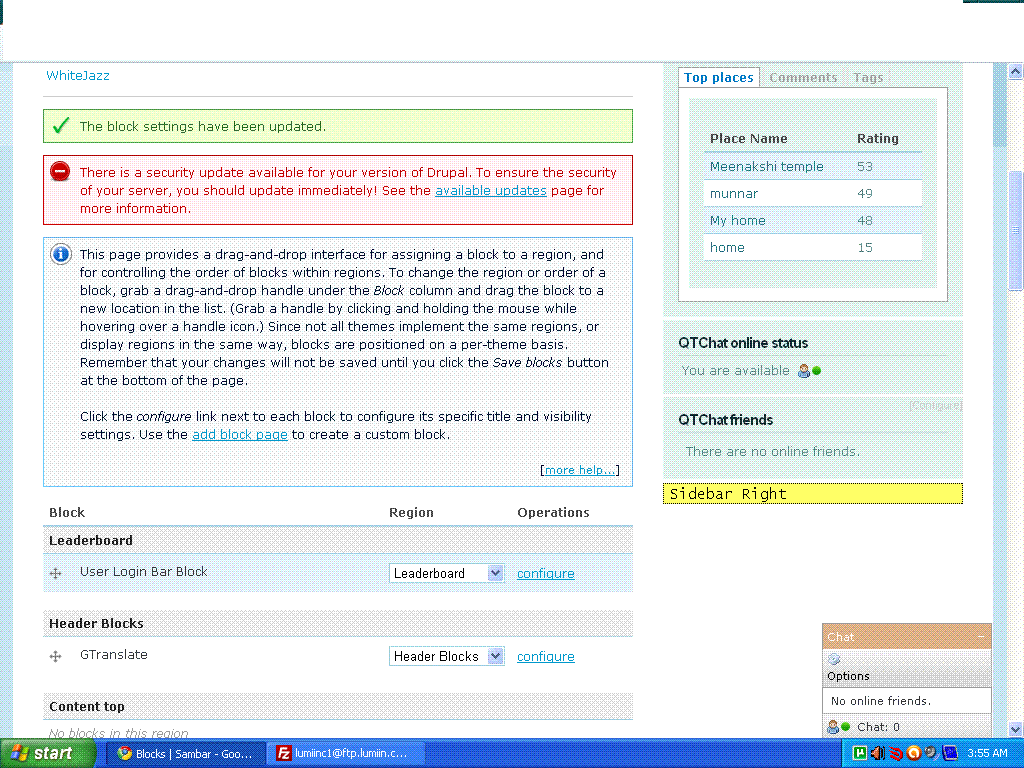
for your info here i attach screenshot of qtchat settings set by myself.plz inform me if any thing miss.
thanks
Comment #2
quiptime commentedTo make a simple test. Enable the block "QTChat". This block displays online users, whether they are an friend or not.
Comment #3
vasan.85 commentedHi,
As per instruction i enable that qtchat block and check for online friends.But it cant display online friends.its only shows no friends available. At friends i add by using user relationship module are available at the moment. For kind reference i attach the screen shot of my tests. i awaiting for your kind response.
thanks
Comment #4
quiptime commentedThe screenshot displays not the block "QTChat". There exist two blocks to display users: "QTChat" and "QTChat friends".
The block "QTChat" displays all online users.
The block "QTChat friends" displays only friends.
There are exists relation ships?
Comment #5
vasan.85 commentedhi,
I don't find block "QTChat".It display only two blocks (i.e) QTChat users online status and QTChat friends .currently i am using qtchat 6.x-1.x-dev module and for user relationship i use UR 6.x-1.0-rc4 module. Relationship exits between two users and i check this.
thanks
Comment #6
quiptime commentedOh bullsh... I forgot my latest developments: If a friend module enabled the block "QTChat" is not available. Sorry for my hint to enable this block.
Your problem
I test QTC with the same UR version. Mhm.
Go to QTChat settings -> Chat -> Status settings -> Status variant -> Online status variant. You are enabled the option "No, use Drupals default"?
If so please test to enable the option "Yes, accept users status".
Comment #7
quiptime commentedYou are reported an real exist bug - I found him just.
Thanks for your feedback. The bugfix is available in the dev of tomorrow.
Comment #8
vasan.85 commentedhi,
The new DEV version works fine only"No, use Drupals default".if i choose "Yes, accept users status" option it didn't show the online friends again same problem happen.
thanks
Comment #9
quiptime commentedThe latest error are an usability error.
This is fixed with the second dev release from 28.08.10. Please retest and give me feedback.
Comment #10
vasan.85 commentedi tested with your latest second dev module.I just enable "Yes, accept users status" option. i set both users status available it works fine.but it can't display it in online friends list.kindly inform me if i any thing miss in my testing.
thanks
Comment #11
quiptime commentedI do not understand what you mean.
The visualization of the status of the users is only available in the friends list of the chat bar.
In other words: The friends block visualized not the current status of online friends. This is not implemented
Comment #12
chintan4u commentedhi
I m also getting same problem.
sys.specs are:
User Relationship 6.x-1.0-rc3
QTChat 6.x-1.0-beta2
I am getting online friends in Block but not getting into " ChatBar "
Comment #13
chintan4u commentededit : getting user as offline
QTChat settings -> Chat -> Status settings -> Status variant -> Online status variant.
is "Yes, accept users status".
Comment #14
rohailiqbal commentedhi,
I have read and followed the complete thread but all in vain. I am unable to make it work. I followed the documentation but of no use. No online friends are shown. Help required regarding this problem :(
Comment #15
heatsinkbod commentedHi was working but since I upgraded a few things stop working...............
Live Chat Block shows the other users online as in 2,3,4..... but does not list them
Comment #16
subeen commentedI am also facing similar problem. Please check the screenshot. Test and test2 are friends to each other (I used user_relationships-6.x-1.x-dev for creating the relationship) but it shows 'There are no online friends'.
Screenshots for QTChat settings are also attached. Please let me know if I am doing something wrong.
Thanks.
Comment #17
poli commented+1