

 Come together with the global Drupal community in Rotterdam, 28 Sept – 1 Oct 2026. Sessions, contribution, connection, and Early Bird savings until 8 June.
The new About page has a section called Drupal Features. The content that is or should be linked from each subsection doesn't currently exist.
The copy that appears in this section on the About page is open for improvement as well.
What you need to do:
*If you want to work on this, please assign this issue to yourself*
1. Gather and revise marketing copy for this section (in this case, 'Administer'), and the new Administer section itself, based on the content suggested on http://redesign.drupal.org/about
2. Follow the Editorial Guidelines
3. Gather screenshots (or ideas for screenshots, since they'll need to look consistent)
4. The community will review the copy for consistency and completeness
5. There are no rules yet about length but each page should probably have a least one paragraph per linked term on the About page.
**If you don't have edit access on d.o., lisarex can add the content for you on the live site. Content is updated automatically to the redesign site every 24 hours**
Live (but not linked from anywhere):
http://drupal.org/features/administer
Redesign:
http://redesign.drupal.org/features/administer
Editorial Guidelines:
https://infrastructure.drupal.org/drupal.org-style-guide/editorial.html
| Comment | File | Size | Author |
|---|---|---|---|
| #18 | Drupal7_dashboard.png | 101.42 KB | aschiwi |
| #17 | contextual_block_links.png | 25.71 KB | lisarex |
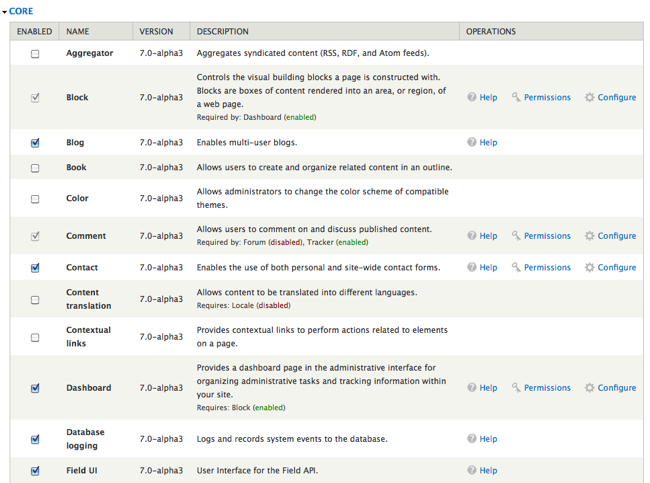
| #17 | Drupal7modules.png | 134.49 KB | lisarex |
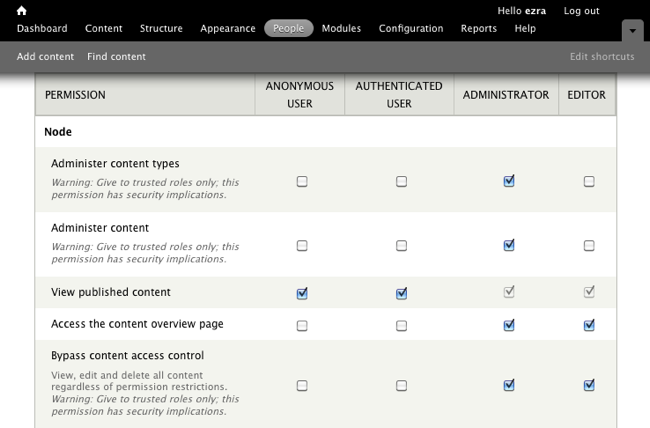
| #17 | Drupal7Permissions.png | 75.61 KB | lisarex |
| #15 | Drupal 7 Permissions-2.png | 70.45 KB | ezra-g |




Comments
Comment #1
lisarex commentedMarking as critical
Comment #2
alex ua commentedRenaming to 'Collaborate' to reflect the new About-> Drupal CMS Features structure (since this is where social publishing should exist under)
Please note: we still need to change the paths to reflect this change.
Comment #3
lisarex commentedI've already got one called Collaborate :) #895550: Collaborate page in About: Drupal Features needs content and screenshots
Call this one Administer
Comment #4
lisarex commentedAssigning this to Diana
Comment #5
lisarex commentedContent updated! Needs review and screenshots!
Screenshot ideas: the D7 admin theme, permissions stuff (think we have that screenshot already...) what else?
Comment #6
ezra-g commentedHow about:


and
http://drupal.org/node/325506 ?
Comment #7
lisarex commentedezra-g and I worked on these screenshots and I've updated the page: http://drupal.org/features/administer
Comment #8
Bojhan commentedThis is a very wierd page, I am totally not following what we are doing here. We are showcasing features by showing a drush screenshot :S?
Comment #9
aschiwi commentedThe page doesn't really go into detail about Drupal Administration out of the box. The second paragraph goes right into talking about Views Bulk Operations, then there's Drush. Drush is probably really interesting to developers (even though it's useful for everyone, but other's won't know it's interesting for them), Views Bulk Operations is awesome as well, but it's hard to understand for beginners. Could be mentioned at the end though. I guess headlines for both the Drush and VBO sections would make sense as well. Drush's headline could be "Command line tool for Drupal" and VBO's headline could be "Extending administration possibilities using Views Bulk Operations" or something similar.
So how about we add some more screenshots for contextual edit links, for a couple of important admin pages and the new possibilities for adding modules through the UI?
I'm attaching some screenshot suggestions.
Structure for text could be something like this:
- administering content (nodes, blocks)
- administer users, permissions
- Dashboard
- adding modules and themes
- Drush
- VBO
Comment #10
aschiwi commentedChanging status.
Comment #11
drummPlease upload screenshots as PNG files, http://drupal.org/node/762
Comment #12
lisarex commentedI've asked diana to take another crack at incorporating some new content here
@bojhan if you have suggestions please share ;)
re: screenshots, ideally they are Drupal 7, English-only and look as if they've come from a really robust site full of content. We can always update them later though. And I can convert to PNG.
Comment #13
aschiwi commented@drumm Oh sorry, I checked one of the existing screenshots (the one of Drush in Terminal) and that happened to be a jpg, so I went for that.
@lisarex: I can fix my screenshots. As far as I see they are Drupal 7 and English-only. Should add some content for the Dashboard though. Any other suggestions for the screenshots?
Comment #14
lisarex commentedI'll work on the content and ezra-g is doing some different screenshots
Comment #15
ezra-g commentedHi @aschiwi - Here's a screenshot that showcases some user permissions configuration. I'll let you go head with the improved dashboard and other screenshots - find me in #drupal-redesign or #drupal-contribute if you want to coordinate and avoid duplicating our efforts :).
Comment #16
diana.k commentedI revised the copy to this below. I only briefly touched upon themes and modules since they are covered more in-depth in "Design & Display" and "Extend", respectively. Let me know what you think.
With Drupal, administering a site is easier than ever.
Drupal’s administration is separated into five main sections: Content, Appearance, People, Structure, and Configuration. Additional modules you install will expand these sections with more settings. You can easily administer basic site configuration settings, such as changing your site slogan, modifying default language and date/time settings, creating site-wide and custom RSS feeds, and much more. After you have a fully-configured website that is ready for content, you can tweak and fine-tune your site by setting blocks, creating menus, enabling new themes, and adding nodes for content types such as stories and blog posts.
Themes, which define how your site is laid out, are highly configurable in Drupal and can be fully customized by a web designer. They are freely available for download on Drupal's Themes page. A site can have an unlimited number of themes installed, allowing you to test out themes, have your users choose a personal theme, or even set a mobile site theme.
Users and Permissions
Drupal comes with great options for new user accounts and user permissions. Users can be assigned one or more roles, and each role can be set up with fine-grained permissions that allow users to view and create only what the administrator permits.
Dashboard
Drupal 7 comes with a new feature called Dashboard, a module that provides users with personalized dashboard pages similar to iGoogle or MyYahoo. Users can add widgets to their pages and arrange them through a drag-and-drop interface. This administrative page can be customized to provide quick access to the tools you use most, links to manage your content, or simply lists of new comments or users.
Extending administration possibilities
The Views Bulk Operations module further extends administration possibilities. It provides a simple and easy-to-use moderation system by defaulting your content to the unpublished state and then setting it to publish at set times. It can also perform bulk operations on custom lists of content built by the Views module.
Command line tool for Drupal
Drupal Shell (Drush) simplifies site administration by allowing you to use a single command to complete multi-step operations, instead of spending hours hacking away at the command prompt. A command line shell and scripting interface, Drush can automatically update your modules and core to the latest version, install and enable modules, clear your cache, and even run module functions such as cron hooks.
Comment #17
lisarex commentedI've incorporated Diana's copy with a few minor tweaks.
I've added screenshots from #9 (converted to png) and #15, and resized to 650 px.
@aschiwi, if you do another Dashboard screenshot with more content (make up some titles about music or gardening or something, not lorem ipsum, if you have time), we can add to the page after launch.
Comment #18
aschiwi commentedSecond try :)
Comment #19
aschiwi commented@diana.k: The new text is much better now!
Comment #20
Bojhan commentedI am not sure we are going in the right direction with this, screenshots are very hard "especially at this size" to comprehend what features we offer for a given category, browsing through all I see is paragraphs of text with headings, its not scanable and not saying much about what it does out of the box.. We should really reconcider what makes the most rich description of our features, which to me would be a video.
Comment #21
shyamala commentedShould we talk about:
1) Multiple Navigation points like:
2) Use of Overlay to display information
3) Use of images on this page: We should probably use small images uniformed sized with a light box class to pop up images in a light box?
Comment #22
lisarex commentedWe will need to look at the Feature section as a whole in #1832566: Revisit & improve the Features section of drupal.org