Hello,
Here's the scenario:
I have a view which has a page display and two attachment. The page display display either nothing or some text. The attachment displays are controlled by a an argument, a PHP code defines which attachment to display.
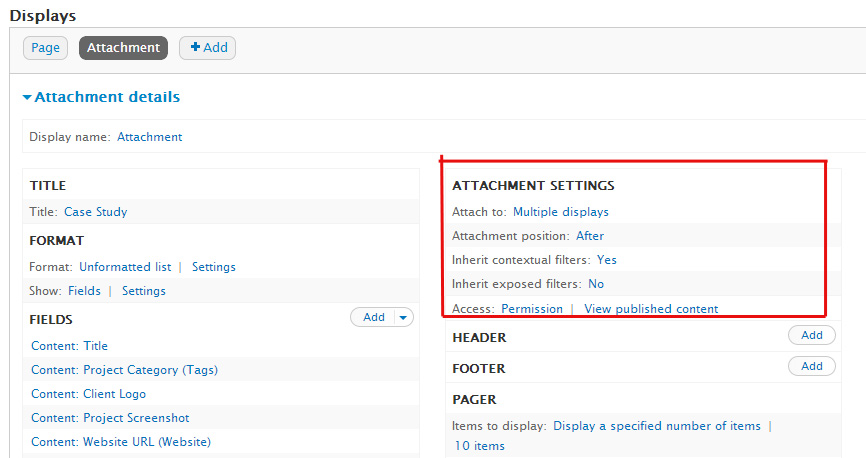
Inside each attachment I have exposed different type of filters. The attachment does not inherit exposed filters.
The problem is that none of the exposed filters are displayed when I preview or execute the actual view. And also when I set the exposed form in block to yes, the block is not created.
This is not a duplicate of #753226: Attachment causes exposed filters to break because the exposed filters does not appear in the source code too.
Is it a bug? Is it possible to display exposed filters in the attachment display?


Comments
Comment #1
ecos36 commentedI have exactly the same question
Comment #2
akadimi commentedAnyone to answer this question?
Comment #3
dawehnerDo you have overriden the filters of the attachment display? If no i would try it.
Comment #4
akadimi commentedFilters are already overriden. I tried to recreate the view from the scratch but the problem remains even when I don't use arguments.
The attachment works but filters are not being exposed. Here's the steps to reproduce the problem:
1- create a node type view
2- add a page display
3- add an attachment to the page display
4- add exposed filters to the attachment
I tried with 6.x-3.0-alpha3 also but same issue
Below is an export of a view test that doesn't work for me.
Comment #5
akadimi commentedAny thoughts?
Comment #6
akadimi commentedUp
Comment #7
akadimi commentedAny clue on this please?
Comment #8
rschwab commentedI was able to reproduce using the steps in #4. I've attached the view from my sandbox because its a very simple example of this bug in action.
Comment #9
eL commentedsame problem
Comment #10
killua99 commentedSame problem, subscriben.
Comment #11
thommyboy commentedsame here- really need exposed filters in attachments...
Comment #12
aaron commented@rschwab in #8, it looks like you need to check 'inherit exposed filters' for the attachment view (in the bottom-left section when you edit it). I'm not sure re. #4, as that export doesn't contain the necessary information; OTOH, it looks like that file was modified before posting.
Comment #13
valarauco commentedSame problem!
Comment #14
flyingL123 commentedsame problem...here's what I'm seeing:
I created a page view that contains an exposed filter. I created an attachment display to that view, for which I created a different exposed filter.
1. If I set the attachment to NOT inherit exposed filter values from the parent display, then the exposed filter for the attachment appears, but it does not function (if the user enters a value and clicks "submit", nothing happens).
2. If I set the attachment TO inherit exposed filter values from the parent display, the exposed filter for the attachment does not appear anywhere on the page.
In both cases the exposed filter for the parent view appears and functions correctly.
Does anyone have an idea why this would be happening?
Comment #15
d.novikov commentedSubscribing.
Comment #16
illepic commentedsubscribing
Comment #18
dalinian commentedThis should not be closed. There has been nothing fixed here. The problem persists for me, but I don't see a solution posted on this issue. Does no one have an idea about this behavior?
Comment #19
rschwab commentedRe-opening per all the reports of this problem still being out there.
Comment #20
fourmi4x commentedSuscribing. I just can't see exposed filters whether I use "inherit exposed filters" or not!
I think the module Exposed Filter Data might help those who really badly need this...
This thread is quite interesting too.
Comment #21
kappaluppa commentedSubscribing... having the same problem.
Create a view
Add two attachments
Set exposed filters on MAIN page
set Inherit exposed filters to yes -
filters show, but results of search yields false results
set inherit exposed filters to no -
no filters show at all
Set exposed filters on ONE attachment
set Inherit exposed filters to yes -
filters show, but results of search yields false results
set inherit exposed filters to no -
no filters show at all
Set exposed filters on BOTH attachment
set Inherit exposed filters to yes -
filters show, but results of search yields false results
set inherit exposed filters to no -
no filters show at all
Set exposed filters on ONE attachment AND Main Page
set Inherit exposed filters to yes -
filters show, but results of search yields false results
set inherit exposed filters to no -
no filters show at all
change label on exposed filter on ATTACHMENT
only exposed filter with label as set on MAIN page is displayed
remove exposed filter from main page, no exposed filter is displayed
I've tried this with attachments before, after and both
I've also rearranged the order of the attachments
When I submit on the filter, the Main page goes away, leaving just the two attachments.
The Exposed filter & label do not change to the exposed filter that is set on the attachment
I submit again, nothing happen
I've come at this from every angle I can imagine. So far, views attachment & exposed filters are not working for me. Any help on this would be greatly appreciated!
Comment #22
drupaledmonk commentedI cannot provide any new information from what is there in this thread, but I would like to see some progress on this issue. Can we not do some work around using tpl files by hiding filter in one of the templates and outputting in the other.
Comment #23
liminu commentedMaybe it works, try to expose the filter and set also in the views attachments type and set to yes the option.
Comment #24
alanom commentedSame problem with latest 7.x.3 dev, similar behaviour to @kappaluppa.
Comment #25
Yotamb commentedAny news on this bug?
I think it should be at least major.. This is an issue with a views core feature (exposed filters) and i'm surprised that 1 year after initial report, it's still untouched.
Can't any dev even give a status report or something?
Yotam Bar-On.
Comment #26
hiddenfellon commentedCan someone please take a look at this issue and come up with a solution?
Comment #27
dawehnerCalm down, you don't pay for support.
Comment #28
Reno Greenleaf commentedCan we give up using attachments at all? By replacing them with blocks inside header or footer as "Global: View area". Exposed filters work here.
Comment #29
myevit commentedSame
Comment #30
jamesrutherford commentedFor anyone else running into this issue, I was able to get the behavior working with the following configuration in 7.x-3.5.
Page display with exposed filter. Attachment display with inherit exposed filter checked. In the filters for the attachment add the exact same exposed filter thats on the page view. It wont show, but the attachment will inherit the filter choice as expected.
Comment #31
brephraim commentedDidn't work for me.
Comment #32
leoklein commented#30 -- Worked for me. Thanks.
Comment #33
skyredwangThis is not a support request. It's a bug that attachment view is not able to have its own independent exposed filter (you can configure, but it won't show), no matter how you use attachment view with other views types.
Ways to reproduce: simply create an attachment view, and add an exposed filter, in the preview, there is no exposed filter.
Comment #34
sassafrass commentedSubscribing
Comment #35
umeshpatil commentedTo use Master page filter with attachments you just have to enable some settings which are already there in views. I have attached screenshot with this. But to use master's filter you must attach it to master page first.
Comment #36
hovel commentedSame remark as #33:
view is not able to have its own independent exposed filter.
Comment #37
merlinofchaos commentedIf you want independent exposed filters, I recommend adding the view via the area handlers (i.e, in the header) rather than as an attachment.
Comment #38
cck commentedI use a page display to show a summary table. A few attachment displays to show more details in two levels. That is, clicking a link in the page display, the related attachment display will appear, and clicking a link in the attachment display, the lowest level of attachment display will appear with the most details. Contextual filters are used to hide or show the attachments depending on the links being clicked.
Ran into the same issue that I need independent exposed filters at the lowest attachment displays. Looks like the attachment cannot have its own filter from the code below (D7.19)
/**
* Attachment displays only use exposed widgets if
* they are set to inherit the exposed filter settings
* of their parent display.
*/
function uses_exposed() {
if (!empty($this->options['inherit_exposed_filters']) && parent::uses_exposed()) {
return TRUE;
}
return FALSE;
}
/**
* If an attachment is set to inherit the exposed filter
* settings from its parent display, then don't render and
* display a second set of exposed filter widgets.
*/
function displays_exposed() {
return $this->options['inherit_exposed_filters'] ? FALSE : TRUE;
}
I tried 2 workarounds to get the filters exposed:
1. Create a new page view with the required exposed filter and add it in the footer/header using view area of the original page view. Adding an attachment display in the view area in the original view does not work.
2. Returning TRUE in the display_exposed()
Contextual filter does not control the exposed filter, so when attachments hide and show according to the links clicked, the exposed filters do not hide. So my problem is not completely solved, jQuery is needed to hide/show these filters.
Comment #39
likewhoa commentedbump, this is an old bug. @merlinofchaos, would work if global view area had an option to inherit 'Filter criteria' along with 'Contextual filters'. Currently two things happen depending on what kind of view display you are adding to the header,
My use case is that I am using "better_exposed_filters" on the main page display with a few filters exposed and with 'auto-submit' form on selection turned on since these are taxonomy terms shown as check boxes so the page should reload on selection. Initially there was a 'search terms' exposed filter but that doesn't play well with 'auto-submit' form feature, so I decided to attach a secondary display with just the search terms filter and auto-submit turned off which is the default anyways. Using views attach doesn't expose filter criteria and with global views area it shows it but only for the secondary display which is being shown on the primary one.
Comment #40
ron collins commentedOld news but Merlin's suggestion works if you build the inserted view as a page, but not as a block.
Comment #41
ron collins commentedComment #42
spgd01 commented**Here is the solution I found**
Attachments work as designed in my opinion and how I want it to work. If you want the exposed filters to be seen then what you want is a block embedded in the header or footer.
If you want the exposed filter in an embedded view to be available and INDEPENDENT from the view then you need to:
For INHERITED Exposed filters on page with a block inserted in header or footer.
Attachments: Inherit exposed filters without exposing attachment filters to the user