Closed (cannot reproduce)
Project:
OpenScholar
Component:
User interface
Priority:
Normal
Category:
Support request
Assigned:
Unassigned
Reporter:
Created:
7 Sep 2010 at 04:27 UTC
Updated:
25 Nov 2012 at 19:08 UTC


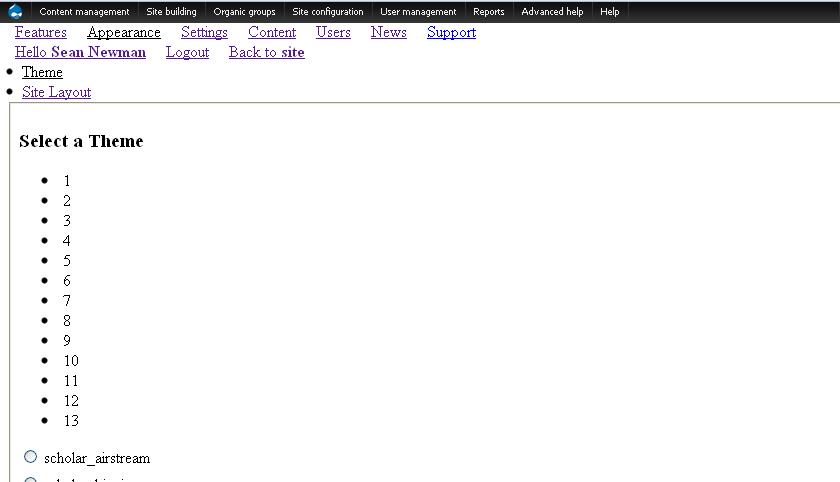
I've installed an OpenScholar site and everything looks ok until I start to edit my site. The control panel theme doesn't show for me - it looks like plain html like when a theme isn't installed. A screenshot of what I see when I try to change my theme is attached. Again the themes work for the site, just not when I try to change anything via the control panel. Is there something I'm missing?

Comments
Comment #1
mducharme commentedCan you provide some more details?
- Which version of OpenScholar did you install? Beta#.#?
- Which install profile you used? Personal? Project?
- What is the url for the page where you took that screenshot?
Comment #2
newms commentedThanks mducharme.
The version - 2.0-beta8-3
The install profile is personal.
The url for that screenshot is http://example.org/site/cp/appearance where 'site' is the name of the personal site.
I have it installed as part of a multisite installation - I don't know if that would be a problem.
Comment #3
ferdi commentedOne more question. What browser are you using ?
Thanks for your input !
Comment #4
newms commentedHi ferdi,
Thanks for your reply. I see the same thing on Chrome and Firefox (I haven't tried any other browser).
Comment #5
newms commentedHi ferdi,
Do you have any ideas what could have caused this?
Thanks.
Comment #6
mducharme commented