

Closed (outdated)
Project:
Views Infinite Scroll
Version:
7.x-1.x-dev
Component:
Miscellaneous
Priority:
Normal
Category:
Bug report
Assigned:
Unassigned
Reporter:
Created:
9 Sep 2010 at 10:24 UTC
Updated:
27 Mar 2020 at 17:14 UTC
Jump to comment: Most recent, Most recent file



Comments
Comment #1
Remon commentedComment #2
benone commented+1
Comment #3
runzipel commented+1
Comment #4
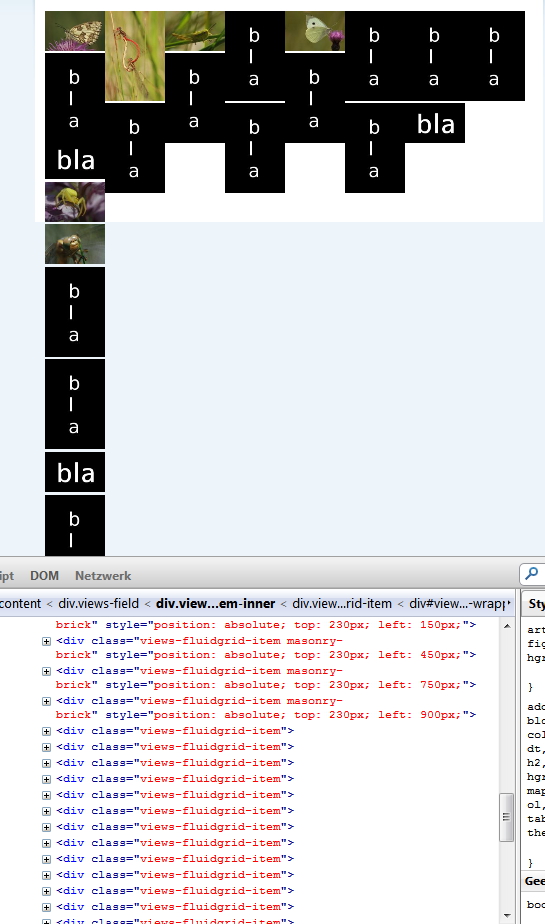
scotjam commentedFor me, when using views_fluid_grid and infinite scroll, the first paging/scrolling works as expected. Every page/scroll thereafter has the pager and the throbber left visible when it should be hidden.
I believe the html div elements gets skewed / don't complete correctly.
Screenshot attached.
Comment #5
jthomasbailey commentedI made some changes to the Fluid Grid Module so that it also uses infinite scroll (though not the Autopager.js that comes with this module)
To use it, first download the newest masonry: http://github.com/desandro/masonry/raw/master/jquery.masonry.min.js and put it in views_fluidgrid/js (I used the min version, to use the full version go into views_fluidgrid.module and include the full version). You need the newest version, it's not included with the Fluid Grid module.
Also put this into views_fluidgrid/js: https://github.com/paulirish/infinite-scroll/blob/master/jquery.infinite...
Then drop in the file that I attached here.
And then in your View set the pager to 'mini pager' and the style to Views Fluid Grid. You can't turn off infinite scroll, any View that uses masonry will infinitely scroll.
It's not real pretty, for some reason things bounce around a little until they're masoned and there's one huge problem: javascript toggle events like Vote Up/Down and Flags don't work on appended nodes. They refresh the page.
If anybody knows how to fix this (I noticed they work fine with the Infinite Scroll module, how'd you do that???) please chime in. It really ruined my day.
Comment #6
vlooivlerke commentedI have installed your fluidgrid.module
It works but like you said, it is shaky.
This would be such an awesome module feature to have.
Have you been able to fix it?
Comment #7
jthomasbailey commentedYeah, I have it working pretty good. If you have different sized images the trick is to use imagesloaded or better yet make sure imagecache outputs the image sizes in the html (remember that imagecache only outputs the sizes the second time the image is loaded, I solved this by loading the imagecached image on the node page, which is loaded immediately after the node is created, and then hiding it with CSS).
I fixed the flags and ajax problem by adding Drupal.behaviors to the infinite scroll function and stopped it from skipping the second page (did you notice it was doing that? Neither did I for a while) by adding currPage: 0 to the infinite scroll options.
Comment #8
vlooivlerke commentedHi going to test it immediately. Will it be possible to have a link to your site so that I can see your work in action?
Thanks
Comment #9
technikh commentedbookmarking..
Comment #10
mr_wookie commentedI have got an issue with this combination of modules in the drupal 7.8 version with views 3. I have installed the masonry module from here: http://drupal.org/node/1031402#comment-4890184 and applied that modification http://drupal.org/node/1031402#comment-5263244. the output is shown in the first attached image. infinitscroll adds the next item inside the class "view" and not inside the class "view-content".
I could help that by adding the following code to "views_plugin_pager_infinite_scroll.inc"
The result is the second attached image. I also tried the other classes being provided there, but apparently they are somehow not defined in the infinitescroll module. since I am not that firm with the drupal system yet, I dont feel able to continue from here without help.
How do I now get the masonry functionality in there? Obviously the images did not slide into positions so that the vertical space would be minimal. they only did that within their class.
Comment #11
mr_wookie commentedWhen adding the code
it gives me the attached result, so I got the items inside the actual class, but the masonry style is not applied to them.
Comment #12
carlitus commentedmaybe you want see this related issue: http://drupal.org/node/970870#comment-5945292
Comment #13
funature commentedi use the Views Fluid Grid module from http://drupal.org/node/1031402, and infiniscroll doesn't work with it.
Comment #14
jcohlmeyer commentedAll I did was add $('#content').masonry( 'reload' ); to the load: function(){} on line 41 of the views_infinite_scroll.js and it seemed to fix my problems :) Where #content is the id of your selector for jquery.masonary of course :) Hope that helps.
Comment #15
funature commentednow the only way for me is #12, waiting an better solution
Comment #16
maharag commentedsubscribing
Comment #17
ptmkenny commentedI'm using Drupal 7.17, Views 3.5, Views Fluid Grid 3.0, and Views Infinite Scroll 1.1. As far as I can tell, the markup has changed since the fixes provided by #11, and I am unable to get infinite scroll to work on my fluid grid.
Comment #18
marcelsafont commentedHi, i'm pretty new in Drupal. I had the same issue and the only workaround that I found is not installing the masonary module and add the masonary library from the mytheme.info, and also add a .js with this code:
I'm quite sure is not the best solutions but it works for me.
Comment #19
ptmkenny commented@marcelsafont Welcome to Drupal. Please don't change the issue from a bug report to a support request unless it is incorrectly labeled. In this case, the issue is that Masonry and Infiniscroll cannot be used at the same time, which is a bug. Thanks for posting your solution though!
Comment #20
marcelsafont commentedSorry, I did change the category.
Comment #21
martijn houtman commentedGot a patch for 7.x-dev. You will need to patch views fluidgrid as well: http://drupal.org/node/1552192#comment-6977520
Comment #22
hadsie commentedI've just tested this patch (and the referenced patch) from Martijn and I can confirm it's working.
Comment #23
Berliner-dupe commentedIts overlapped the images when infinite scroll load the next page and dont work correct. Same problem by Module "Masonry Views".
Are new information available for Fluid Grid and Infinite Scroll or has anyone a working configuration?
Comment #24
Barry Tielkes commentedThis works for me:
$(window).load(function() {
$('.views-fluidgrid-processed').masonry('reload');
});
Comment #25
josebrito commentedI've also tested #21 patch and the referenced fluidgrid patch and is working for me too.
Why this is not included on any release?
Comment #26
whop commentedHi there, can somebody provide info on solution for infinite scroll and fluid grid ?
I mean https://www.drupal.org/project/views_fluid_grid, not Masonry.
I applied patch for infinite scroll on current PRD version, but auto patch for fluid grid is for masonry version only.
Is thewre workaround for fluid grid too ?
please provide finished .tar
or reference which patch on which version.
thanks a lot for info !
Comment #27
honza pobořil commented