

 Come together with the global Drupal community in Rotterdam, 28 Sept – 1 Oct 2026. Sessions, contribution, connection, and Early Bird savings until 8 June.
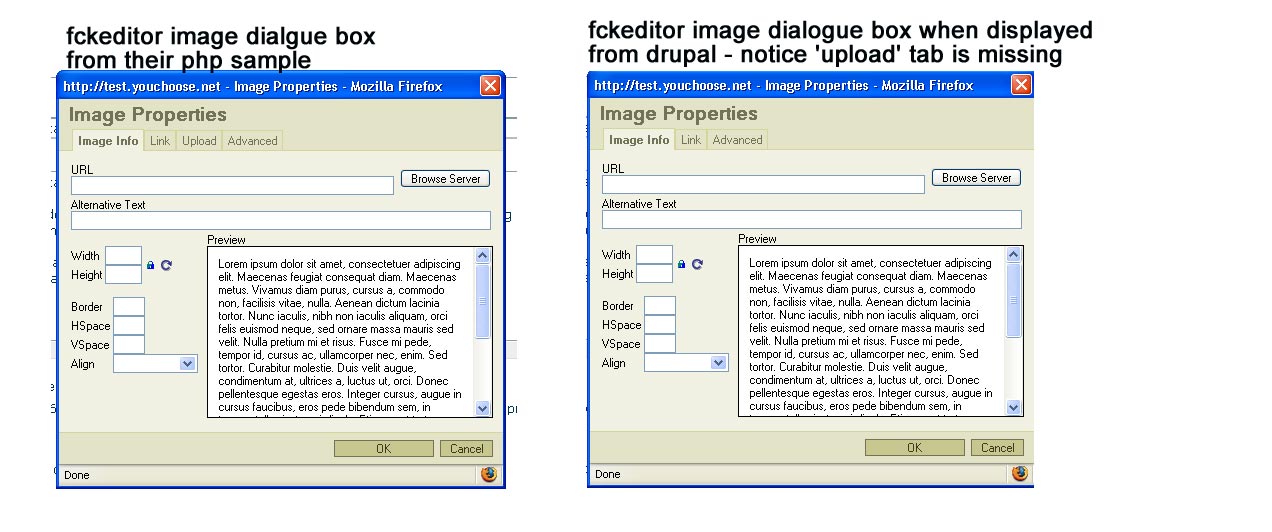
drupal interface to fckeditor will not expose the upload tab in the image upload dialogie box
if downloading fckeditor and using their sample php copde to test it...once the config files are setup to allow image uploading the fckeditor will allow images to be uploaded by exposing an 'upload' tab in the image upload dialogue box.
However when drupal 4.7 invokes the fckeditor the 'upload' tab is not displayed in the image upload dialgue box even thought "allow fckeditor file uploads" are enabled in the access panel of the admin menu in drupal 4.7
| Comment | File | Size | Author |
|---|---|---|---|
| fckeditorproblem.jpg | 121.94 KB | jjj0923 |

Comments
Comment #1
jjj0923 commentedan image showing the problem can be found here:
http://www.sailnet.com/images/fckeditorproblem.jpg
Comment #2
MySchizoBuddy commentedi don't think that is a bug or anything. just a feature that might have been disabled.
Comment #3
ontwerpwerk commentedThat feature is indeed disabled in the current version for drupal. You can turn it on yourself of jou dive even more into the configuration.
File uploads are still possible with the browse server button.
Comment #4
jjj0923 commentedhow do I turn it on myself?
We do not like the current browse server button because we do not want people browsing our server and we prefer the simple upload method offered in this tab.
thanks in advance.
Comment #5
ontwerpwerk commentedAt the moment that would be hard, because a large part of the initialization is handled in the
fckeditor.modulefile...you would have to replace the following occurences at line 257
with this code
and after that you would have to edit the
\modules\fckeditor\fckeditor\editor\filemanager\upload\php\config.phpin the same way as the file browser configurationComment #6
ontwerpwerk commentedsetting this to postponed, later I will make an option to turn it on.
Comment #7
ontwerpwerk commentedComment #8
CopaceticOpus commentedCould you add a description about this to the README file? I just spent a couple hours trying to figure out why uploads weren't working, because I've always used the upload tab and I expected it to be there. Just a simple explanation like this would be enough:
The FCKeditor module does not display the "Upload" tab of the Image Properties window. All image uploading is done using the File Browser, which is accessed using the "Browse Server" button from the Image Properties window.
Thanks!
Bryan
Comment #9
ontwerpwerk commentedI'll think I will include both as an option in the next version, so you can choose it yourself
Comment #10
ontwerpwerk commentedfixed in current development release
Comment #11
(not verified) commented