

 Come together with the global Drupal community in Rotterdam, 28 Sept – 1 Oct 2026. Sessions, contribution, connection, and Early Bird savings until 8 June.
am I doing something wrong or is the following not (yet) implemented:
I can insert a node in my WYSIWYG Editor but I only see the tag [[nid:472]] not the rendered embedded node. When I select "preview" I do see the embedded node, but the template is not used. Finally when I save the node and watch it, everything is fine and the embedded node gets rendered using my template...
| Comment | File | Size | Author |
|---|---|---|---|
| #8 | Screen Shot 2014-07-24 at 7.21.40 PM.png | 22.9 KB | michaelfavia |


Comments
Comment #1
aleksandar.jakovljevic commentedSame here. I'm using the drupal 7 version of the plugin.
Ideal would be if the tag could be visible in source, but the rendered embedded node to be shown in the WYSIWYG (not to be editable directly, though).
Is there a way to achieve this?
Comment #2
aethem commentedHi,
I'm also trying to use node embedding in Drupal 7. Where did you find the Drupal 7 version of this module?
Any luck getting it to work well?
Cheers,
A
Comment #3
komlenic commentedThe D7 version of Node Embed can be found here http://drupal.org/node/1149106 (not yet an official release).Now an official release, see below. I've been using it without issue on D7.See also: http://drupal.org/node/1431518Comment #4
komlenic commentedNote that Node Embed now has an official D7 version.
To answer #1, I do not know of any way to make portions of CKEditor in WYSIWYG mode un-editable, while still allowing other portions to be editable. Clearly we'd need to make included node parts not editable somehow for this to be integrated intuitively.
Additionally (and related), less-savvy users have been known to delete the tags ([[nid:472]]), or otherwise mangle them, then save their changes. The only solution I can conceive is to only allow node embed on an input filter like "full html" which you then only allow certain trusted roles to edit. Then of course, lesser roles can no longer edit these nodes at all.
Ideally, a solution here would:
Comment #5
lance.gliser commentedI'm not certain you would need to avoid users editing the embedded node. I believe point #4 "make it clear where the embedded content starts and stops as well as why it can't be edited directly" would be enough.
As to how we could possibly render it in the WYSIWYG view... I think #4 covers that need as well.
I can imagine inserting something like:
With that html structure, we should be able to put something like dashed lines around the entire preview, and also provide a regex to change the above code back into the embed syntax on node save, since we have a clear start, stop, and id available in the 'likely' uneditable html comments.
Edit
Sadly, I realized one thing potentially tricky about the above.
Our embed tags can contain extra arguments. We'd have to expand the html comment to include the full embed syntax, not just the node id.
Comment #6
amaisano commentedIf the Media module can do it, then so can we :)
Comment #7
amaisano commentedComment #8
michaelfavia commentedActually it looks like media module is attempting to do it on our behalf! :)
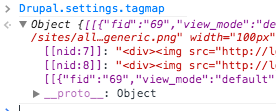
TO recap their approach it looks like they are parsing through the field and creating a "tagmap" out of anything matching [[ THINGS HERE ]]. Unfortunately t looks like our node embed elements are getting swept up in the process. I can only imagine that others are as well. THe only part it doesnt seem to be doing is making the actual replacement in wysiwyg-media.js.
Obviously we don't want the media module doing this on our behalf but perhaps we can ape the functionality they've implemented. Its not an approach i might have thought of thats for sure. I would have used some JS callbacks or something.
Preferences on approach? We have a client that needs this and I'm willing to implement next week if there is any feedback.
Comment #9
amaisano commentedThe Media filter/replacement technique seems like a good place to start experimenting. It has all the right stuff - showing [[TAG]] while in source or full html mode, and rendering it in WYSIWYG / Preview mode.
[[Encouragement]]
Comment #10
smd_ksu commentedJust want to say that I would not want this to be the only way it is handled. Optional is fine but I want the tag, not to see it rendered in the WYSIWYG.
Comment #11
mrharolda commentedUnless someone supplies a patch for this, I won't be adding this as it seems too much work/hassle/impact.
Please re-open if you plan to work on this! It is a fancy feature, after all ;)