Active
Project:
AJAX Poll
Version:
6.x-1.0
Component:
Code
Priority:
Normal
Category:
Bug report
Assigned:
Reporter:
Created:
18 Sep 2010 at 23:17 UTC
Updated:
1 Nov 2014 at 03:09 UTC
Jump to comment: Most recent, Most recent file


Hi,
Installed Ajax Poll module
Now, when I click on the "Vote" button I get the results all fine and dandy , but the title/question has dissapeared.
I can get it back with a page refresh, but still, not something that is desireable I would think.
Same thing happens again when clicked on the "Cancel Vote" button.
| Comment | File | Size | Author |
|---|---|---|---|
| #8 | ajax_poll-915876.patch | 803 bytes | mavimo |
| #6 | randompoll.view_.txt | 1.95 KB | Drave Robber |
| #5 | Capture_before.JPG | 56.97 KB | Max_Headroom |
| #5 | Capture_after.JPG | 56.76 KB | Max_Headroom |
| #2 | ajaxpoll.jpg | 49.89 KB | sunchaser |



Comments
Comment #1
quicksketchHow is this poll being displayed? AJAX Poll uses different mechanisms depending on if you're looking at a block or at the node. Differences in your block or poll templating may also cause problems. Does this occur when viewing the site in Garland?
Comment #2
sunchaser commentedYou are right. I should have been more descriptive, I'm sorry. still learning this issue - posting etiquette, it's a science on its own :)
I enabled the core Poll module
I then enabled the Ajax Poll
I created a poll with a taxonomy (cause I need different polls on different (category) pages)
I then created a Poll block-view that has the taxonomy Term as a Filter to show the latest poll in that specific category.
I then put the block in a region for it to be displayed on the right pages.
See attach for a graphical representation of what I'm on about
sorry about the mosaic filter in the screenshot, there is actually a reason for that...
Comment #3
quicksketchOkay, sounds like a situation AJAX Poll doesn't yet accommodate for. Essentially this is a node displayed within a block, my guess is that AJAX Poll is using the block-behavior (replace the entire contents of the block) when it should use a node-like behavior (replace the contents of the node, but not the title). I'll have a look next time I'm working on AJAX Poll.
Comment #4
sunchaser commentedSounds good.
thanx for your swift response.
Looking forward to your (or my own) solution for this.
Will post back here if I found a workaround... but I' wouldn't lose sleep over waiting for that to come from here ... I'm not the Ajax guru :d
Comment #5
Max_Headroom commentedI'm having exactly the same problem when I use the block on a Panels page.
Also using custom poll templates, but that is only to add more div classes for styling and to implement the suggestion on your readme.txt for showing the cancel vote button in a block.
This line is still in the templates:
<div class="title"><?php print $title ?></div>and I got it wrapped in two other div classes.
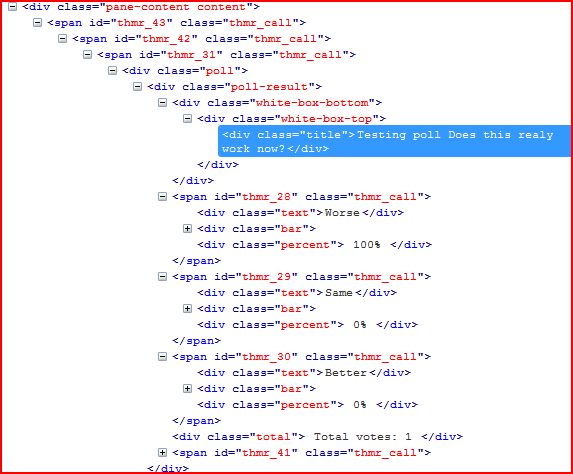
First image shows firebug output as normal and second image is after I cancelled and revoted:
The print $title line as well as the two div classes that wraps it are missing.
Same happens for title on voting form.
using Panels 3.7
Hope this will help you find the problem.
Comment #6
Drave Robber commentedI have a very simple 'Random poll' block built with Views, and so far I have not experienced this problem – probably it only appears with certain Views settings. I have attached my exported view below – maybe you can work something out by comparing it with yours.
I'm having some other minor issues atm, but the titles are just fine. :)
Comment #7
mavimo commentedTo solve this issue please change file ajax_poll.js on line 15 from:
var $pollWrapper = $form.parents('.content, .poll');to
var $pollWrapper = $form.parent('.content, .poll');see parents without S.
It work fine for me on node, blocks, views with node, ..
Comment #8
mavimo commentedPatch attached
Comment #9
quicksketchCould you try keeping parents() but use the ":first" modifier instead? Using parents() is more robust (less likely to break) when users override tpl.php files.
Comment #10
simon georges commentedI tried with the suggestion in #9 and AJAX broke totally, whereas with the suggestion in #7, it worked perfectly. I work on a site where a lot (and probably too much) customisation has been made on the theme part, so maybe that's why.
(I am using a bloc generated by a View with "Node" display type).
Anyway, thanks for the module, it is really great !
Comment #11
quicksketchSorry my suggestion won't work in jQuery 1.2.3 (the Drupal 6 version of jQuery) because .first() doesn't exist in that version. .filter(':first') works much better:
This allows theming to add addition wrapper DIVs without breaking the AJAX functionality. I've committed this change and checked that it works as expected.
Comment #12
quicksketchComment #14
poukram commentedHello,
first, I would like to thank developers for this module, it is very help helpful.
But I have a problem with this bug, and this code :
var $pollWrapper = $form.parents('.content, .poll').filter(':first');I use a block generated by view and a node teaser display, I have this structure :
I have 2 div with the class "content" and when I submit the form the first
I think that the first suggestion is better :
var $pollWrapper = $form.parent('.content, .poll');Can you reproduce the same bug ?
Thanks for everything.
Comment #15
alanpeart commentedConfirmed that patch in #8 works for me:
var $pollWrapper = $form.parent('.content, .poll');The committed fix from #11 did not resolve my problem, which was the same as poukram's - a block generated by a view with a node teaser display.
Comment #16
cthshabel commentedQuicksketch thank you so much. Number 11 was the solution for Drupal 7 version of ajax_poll module. This helped me out a lot. Thanks again
Comment #17
arlingtonvoicellc commentedI also confirm #11 works for Drupal 7. Thanks!UPDATE: Actually, #11 only works if you refresh the page one time. For some reason, when you visit the poll for the first time and click to vote, the button says "voting" and then turns back to "vote." Almost like a vote was never recorded. However, when you refresh the page, the results show. When you hit "cancel vote" the ajax works the way it should. So honestly, this module doesn't seem to function properly. If I have to refresh the page, then the purpose of the module is pointless. Wish it worked, was excited to use it.