I found this problem when using theme_table() to create a sortable table from a query that uses db_select's addExpression() method. It should output a 3 column table. The middle column's content should be the alias created by addExpression(). Instead, the content always ends up in the last column of the table, no matter what.
I have tried this with any number of columns, and any alias added by addExpression() always ends up at the right-hand side of the table. I don't know if this is a problem with db_select or theme_table().
Details on my platform: PHP 5.2.14, PostgreSQL 8.3.11, Apache2 2.2.11
Sample code:
  // $headers for theme_table and TableSort extender
  $headers = array(
    array( 'data' => 'Manufacturer', 'field' => 'company_name', 'sort' => 'asc' ),  // FIRST column
    array( 'data' => 'Item', 'field' => 'itemlink'),  // SECOND column
    array( 'data' => 'Abbr.', 'field' => 'abbreviation')  // THIRD column
  );

  // Set up the query
  $query = db_select('battery_model_list_view');
  $query = $query->extend('TableSort');
  $query = $query->orderByHeader($headers);
  $query->addField('battery_model_list_view', 'company_name');  // FIRST db column
  $query->addExpression("'<a href=\"/batt/details/' || batt_model_id ||'\">' || model || '</a>'", 'itemlink');  // SECOND db column
  $query->addField('battery_model_list_view', 'abbreviation');  // THIRD db column

  // Execute the query
  $result = $query->execute();
  $rows = $result->fetchAll(PDO::FETCH_ASSOC);

// Create $table variables for theme_table()
  $table = array(
    'header' => $headers,
    'rows' => $rows,
    'caption' => null,
    'attributes' => array(),
    'colgroups' => array(),
    'sticky' => null,
    'empty' => null,
  );

   $out = "<p>The following is a list of items.  Click the model to see details of that model</p>";

  $out .= theme_table($table);

  return $out;


Comments
Comment #1
JohnWoltman commentedI updated to HEAD (October 8, 2010 @ 13:20) and now receive this error when I try to resort by a column other than the default:
PDOException: SQLSTATE[42703]: Undefined column: 7 ERROR: column "itemlink" does not exist LINE 1: SELECT itemlink AS itemlink, battery_model_list_view.company... ^: SELECT itemlink AS itemlink, battery_model_list_view.company_name AS company_name, battery_model_list_view.abbreviation AS abbreviation, '<a href="/batt/details/' || batt_model_id ||'">' || model || '</a>' AS itemlink FROM {battery_model_list_view} battery_model_list_view ORDER BY itemlink ASC; Array ( ) in battery_info_batt_list() (line 93 of /var/www/drupal/sites/default/modules/battery_info/battery_info.module).It looks like the generated query is incorrect, because it thinks that itemlink (an expression) is a database column. This may be independent of the original issue, which still occurs even with the revision of HEAD I am using.
Comment #2
Crell commented#0 is by design. The query builder tracks literal fields and expressions separately and adds them to the select list separately, fields first and then expressions. That should be fine in 99% of cases because if you're relying on field order you're going to have extremely brittle code. Remember that selects also get run through query alter, which could add fields as well, so you cannot rely on field order. Just don't do that. :-)
#1 sounds like an issue with table sort specifically, so renaming the issue accordingly. I don't have time to look at it in detail right now, though. Can you paste the code you're using to create the query?
Comment #3
JohnWoltman commentedThe query is built with the D7's db_select system:
Comment #4
dave reidThat is a horrible mis-use of PDO. You will be much better off building that link yourself with the proper API funciton l().
Comment #5
JohnWoltman commentedThe issue occurs when using TableSort with any PDO queries with an addExpression call, not just my above example. Just checked, and this is still an issue with 7.x-dev (as of Oct 21, 2010, 12:15PM EST)
Comment #6
dave reidThis is not the proper way to use PDO, plus you are opening yourself up to XSS attacks by not properly escaping your output. I will go to the effort to show you how it should be done:
Comment #7
JohnWoltman commentedI don't see how that fixes the bug with TableSort's handling of expressions. If I want to use my database's built-in functions or stored procedures on a set of data, Drupal should accommodate this.
I understand that the example code I gave is insecure, but it is just an example. The database is able to transform data, and I don't have to run an additional PHP loop. There is a bug, as Crell pointed out in his post. If I should start a new bug report to make this a regular bug, let me know.
If there are limitations to PDO, I can write it out as SQL I suppose.
Comment #8
Crell commentedOK, first, let's not confuse things. PDO is JUST the connection abstraction provided by PHP. The Drupal DB layer, DBTNG, lives on top of it. The Select builder is entirely Drupal code, not PDO.
Second, John, we can't fix a bug that we cannot replicate. So please, if you can confirm that there is a bug with TableSelect and supported expressions please provide sample code.
Third, "supported expressions". Drupal aims to be database agnostic. That means we cannot use a lot of SQL functions as those are almost entirely database-specific. So:
It's not going to, at least not directly. It is not possible to do so in a database independent way. Drupal uses a database for data storage and retrieval only, not for non-trivial manipulation. That is by design.
Comment #9
JohnWoltman commentedCrell, thank you for clarifying the differences between the Drupal's database system and the PDO-provided features.
Here's an example, that should work for most databases (I'm using PostgreSQL). First, create a table
The first column is the manufacturer of the equipment (like Ford or Jaguar). The second column is the model (like Mustang or XJ). The third column is the number of that item in stock (like 5).
Sample data:
Now I have a page callback that looks like this:
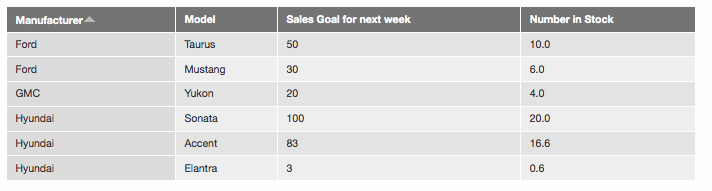
Notice that the third $headers element, "Sales Goal for next week," is before the "Number in Stock" column. However, when the page is created the "Sales Goal" numbers get moved to the fourth column ("Number of Stock") (see attached image). This is, of course, a made-up example, but I just tested it with HEAD from earlier today, and it still happens.
Comment #10
Crell commentedExpressions are always ordered in the dynamic select after static fields. That's by design, and not something that can be changed without heavy internal changes. If you're relying on the order of fields in a select then your code it too brittle. That has nothing to do with the TableSort extender.
The solution here is "don't rely on the field order in the select query."
Comment #11
JohnWoltman commentedBut that's not the point. I think that my example maybe make too much of the column order. The important thing is the header order. What I'm saying is that the $headers used by theme_table don't work right. Even when the headers are in the order I want them to be in $headers array, when I call theme_table then it moves the 'sales_goal' *data* from the third to the fourth column, even though 'sales_goal' is the third header. It does this with any $header column that gets its results from addExpression, not addField. This is illustrated in the screenshot attached to #9.
Isn't that a bug with theme_table? I updated #9 to make it clearer.
Comment #12
Crell commentedIf you skip the tablesort and just throw the result set at theme_table, what's the order there?
If the order is different, then that could be a bug.
Comment #13
JohnWoltman commentedIf I remove the
$query = $query->extend('TableSort');line and the$query = $query->orderByHeader($headers);line, then the table column data is still out of order. Does this mean that the bug is in theme_table?Comment #14
Crell commentedNo, it means that this block is the issue:
The select query itself will put the expression after the number_in_stock, as I said. That is by design. The code appears to be doing exactly what it was written to do.
However, that does bring up an interesting question for tablesort. It means that this:
Is simply insufficient when you are using expressions. You'll need to reorder the fields yourself. Which is, legitimately, non-optimal. However, I see no way to change that without a major rewrite of the guts of SelectQuery to change how fields and expressions are managed, which I am loathe to do at beta 2.
Blargh.
Comment #15
JohnWoltman commentedSo will this bug remain open then? I will use Dave Reid's work around (#6) for now, but like you said in #14, it's a bit of a drag on performance.
Should it be reclassified as a database system bug?
Comment #16
Crell commentedYes, #6 is the solution for now. I don't know if there's anything we can do in Drupal 7 about it at this point. Someone would need to dig into the code and try to rebuild the internals of SelectQuery to see if it's even possible.
Comment #17
JohnWoltman commentedComment #18
berdirAFAIK, "postponed" is usually used when an issue is postponed on another. In this case, I think it's better to simply move the issue to 8.x..
Comment #19
jhedstromIs this still an issue in 8.0.x?
Comment #20
ben coleman commentedIt's certainly still an issue in 7.39. This code in the AdSense Top Page report:
produces this query:
SELECT ads.path AS path, ads.title AS title, count AS count, COUNT(*) AS count, MAX(timestamp) AS last FROM {adsense_clicks} ads GROUP BY path ORDER BY count DESC LIMIT 50 OFFSET 0Somehow, it thinks count is a table field (it's not), and adds it in to the select fields.
Comment #27
sgdev commentedWhile it has been a long time since anyone responded to this issue, I'm going to offer the suggestion that saying "code is too brittle" ignores a real problem.
If you're attempting to create complex
UNIONs (as we do), and have a combination of one table without expressions, and a second table with expressions, this issue is going to cause it to fail. Everything in aUNIONmust be in the same order to work correctly.The only way we can accomplish our needs is to create separate queries with separate processing code for many different functions, which is a huge waste of resources. I wish we could get around the problem by writing our own
db_query, but in this case we can't even do that.Comment #35
luke.stewart commentedFound this at the end of the bug smash "Needs issue summary update" queue.
Looks like it got this take with a question as to whether this was still an issue in D8.
There was no response.
Given that and there has been a good 6 years since last comment. I'm going to mark as postponed needs info.
I think if there is no engagement in another 6 months then we can probably close this.
Comment #36
acbramley commentedGiven the lack of updates here I'm going to close this one out.
Please feel free to reopen with an updated issue summary including steps to reproduce if this still affects you.