

 Come together with the global Drupal community in Rotterdam, 28 Sept – 1 Oct 2026. Sessions, contribution, connection, and Early Bird savings until 8 June.
I have created a module called Webform Taxonomy Select to extend Webform's pre-built option list functionality and I'd like to share it.
The module enables the use of taxonomy terms from selected vocabulary to populate select list components in Webform.
It's easy to add new pre-built options using Webform's hooks but this module can be useful to people with no knowledge of php and few other scenarios.
The module is working but requires a patch to Webform that has already been approved and committed (http://drupal.org/node/907762) but not released yet.
Depends on Taxonomy and Webform.
The module enables the use of taxonomy terms from selected vocabulary to populate select list components in Webform.
It's easy to add new pre-built options using Webform's hooks but this module can be useful to people with no knowledge of php and few other scenarios.
The module is working but requires a patch to Webform that has already been approved and committed (http://drupal.org/node/907762) but not released yet.
Depends on Taxonomy and Webform.
| Comment | File | Size | Author |
|---|---|---|---|
| #9 | webform_taxonomy_select.zip | 3.93 KB | gionnibgud |
| #6 | webform_taxonomy_select.zip | 4.01 KB | gionnibgud |
| #3 | WebformComponenteEditing.png | 74.17 KB | gionnibgud |
| #1 | webform_taxonomy_select.zip | 7.88 KB | gionnibgud |

Comments
Comment #1
gionnibgud commentedHere is the module to checkout.
Requires drupal 6.x, Taxonomy, Webform + this patch http://drupal.org/node/907762
Comment #2
avpadernoHello, and thank you for applying for a CVS account. I am adding the review tags, and some volunteers will review the code, pointing out what it needs to be changed.
As per requirements, the motivation message should be expanded to contain more features of the proposed project. For themes, it should include also a screenshot of the theme, and (when possible) a link to a working demo site; for modules, it should include also a comparison with the existing solutions.
Comment #3
gionnibgud commentedI'm posting the content of the README file.
Webform Taxonomy Select
=======================
Adds a pre-built option list of terms for each vocabulary in Taxonomy
Configuration
=============
This is a very simple module and there is no configuration at all.
Instructions
============
Enable the module. REQUIRES TAXONOMY + WEBFORM (+ this patch http://drupal.org/node/907762 until next webform update)
1. Create a Vocabulary if you do not have one
2. If needed add some terms to your newly created vocabulary
3. Create or edit a Webform
4. Add a select component
5. Use the pre-built option list select to choose a Vocabulary
6. Save the component
You should now have a select component populated with all the terms from the selected Vocabulary.
I also plan to add the possibility of choosing which vocabularies will be exposed to Webforms (for now i just show all) this is why there is an .install file in the module that doesn't do anything at the moment.
I did not set up any specific permissions for the module since its functions are only called from within webform.
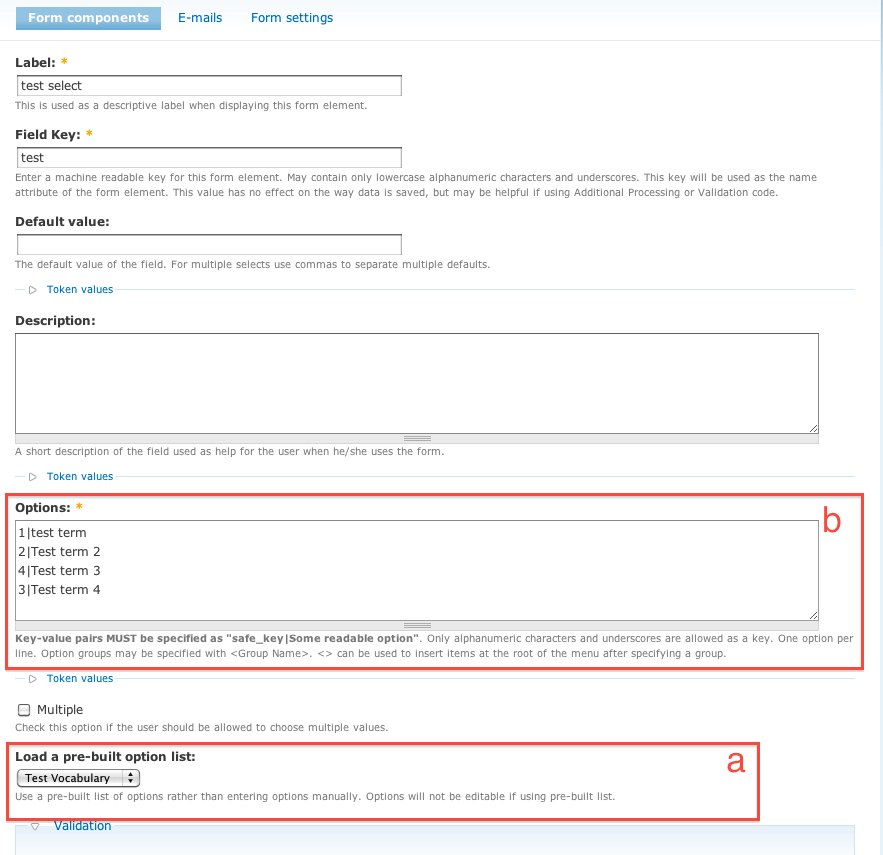
I'm adding a screenshot of Webform's select component editing page with my module activated.
You select the vocabulary from the list (a)
Options field is filled with values from the terms list as tid|term name (b)
The module is really two functions. I checked it with coder and it's pretty clean now.
Use case scenarios:
-I have no knowledge of php but I'd like to reuse and keep up to date commonly used options lists for my Webforms
-I need to build a questionnaire that involves selecting terms from the taxonomy
In the future the module could go beyond taxonomies and start supporting custom lists from different sources like views or nodequeue.
Comment #4
gionnibgud commentedComment #5
avpadernoAs reported in Documenting hook implementations:
Avoid to escape a string delimiter inside a string, especially if the string is passed to
t(). Why isn't the string using HTML tags?Comment #6
gionnibgud commentedThanks for the review, kiamlaluno.
1. Removed licence file
2. Hook implementations corrected
3. Lazy me. Now I'm using html. No escaping.
Comment #7
gionnibgud commentedComment #8
drupalshrek commentedHi,
As far as I see functionally it looks OK.
All text needs translating with t() which you have done, but all HTML output (as I understand it) needs to be themeable (so that someone can override the layout, rather like with t() people can override the translation). See:
http://drupal.org/node/306
http://drupal.org/node/165706
Specifically, for the following code, I think you should use http://api.drupal.org/api/drupal/includes--theme.inc/function/theme_item... :
I think the convention for README naming is README.txt rather than README.TXT
Comment #9
gionnibgud commentedHi drupalshrek, thanks for taking the time to check my module.
I've implemented some changes in hook_help.
The item list now uses the theme function and each string, paragraphs too, is translatable.
The rest of the module's output is plain text and gets themed by Weform.
Comment #10
drupalshrek commentedHi,
I don't have CVS rights so I can't help much further than the initial review. You will need to wait for someone else to take this further.
Good luck!
Comment #11
gionnibgud commentedThank you!
Comment #12
zzolo commentedHi. Please read all the following and the links provided as this is very important information about your CVS Application:
Drupal.org has moved from CVS to Git! This is a very significant change for the Drupal community and for your application. Please read the following documentation on how this affects and benefits you and the application process:
Migrating from CVS Applications to (Git) Full Project Applications
Comment #13
avpadernoAs per previous comment, I am setting this issue to won't fix.
Since new users can now create full projects, applications have a different purpose and they are handled on a different issue queue. See Apply for permission to opt into security advisory coverage for more information.
Comment #14
avpaderno