

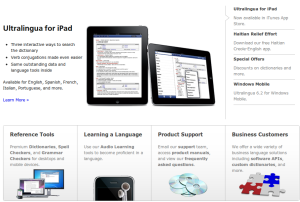
 Ultralingua, Inc. is a software company that makes products for people who love languages. Their website is a place for people to access a free online dictionary, download product trials, and purchase software for personal use. It is also a hub of information for business partners and offers a technical support section for customers.
Ultralingua competes in the market for software-based language tools such as dictionaries, spellers and grammar checkers. Their customers include teachers, students, translators, and multi-lingual professionals from a host of industries. They also sell to many organizations including HarperCollins, the Government of Canada, Hachette Multimedia, netTrekker, and Texthelp who purchase site licenses and embed OEM, APIs, and web versions of their products.
Ultralingua began work to transition to Drupal in 2009, and launched their new Drupal-based site in early 2010.
Goals
By mid-2009, Ultralingua had been using a series of static pages as its website for several years, and they were ready for a change. Their company and product lines were growing quickly, and the system they were using at the time couldn’t keep up. With a team of developers on staff already, the company had the internal expertise to take on the development of the new site themselves.
"We had done traditional web development before, but Drupal was completely new to us," explained Bret Jackson, Ultralingua’s web developer for the project. "We chose Drupal because such a large community supports it, and we could see quickly that the documentation and help forums would be an asset during the initial phase. We picked up the new terminology and structure quickly, but the early development stages came with some interesting challenges nonetheless."
Ultralingua’s website is the primary channel through which they market and sell their products, so they had to build in the tools they would need to communicate with customers and process sales effectively. Because they were new to Drupal, they ended up creating custom solutions to some of the challenges they faced rather than manipulating existing themes to get the results they were looking for.
Another goal the team had was to make it possible for individuals with limited technical expertise to edit content on the website. This was something their old solution did not allow, and it was hindering the company from creating content quickly enough to keep up with product releases. They also set goals to better integrate analytics and reporting into the structure of the site.
A website would also help Ultralingua communicate to their customers what sets them apart: their model for creating premier language software by bringing language and software experts together to create the best product possible. Language is constantly evolving and their software developers work directly with linguists and researchers to create language tools of the highest quality.
Major Challenges
Navigation
 Ultralingua wanted to implement a custom mega dropdown to allow site visitors to navigate directly to pages that contained information about specific products.
Drupal’s menu system wasn’t able to generate the results they were aiming for, so Jackson went to Drupal’s support forums to track down an answer. Many other developers had a similar problem, and there weren’t many good solutions available. The team took a look at their options and decided to use blocks instead.
Overall, the Ultralingua website team is happy with the results they got using blocks for navigation. However, the choice had some interesting implications for their ongoing maintenance flow. Blocks aren’t part of the revision system, so any changes that need to be made to the navigation need to happen separately on the dev version of the site. Ultralingua’s website team had to create an internal process that allowed the marketing staff to make changes while coordinating their release with those the web developer had to make. Although this complicates things a bit, they are satisfied with the results as a whole.
Localization
Translating their content into multiple languages was a priority for Ultralingua, as marketing generalist Ashleigh Lincoln explains:
It’s important to us to communicate with our customers in the languages they speak, and about half of our users are native speakers of languages other than English. We have large groups French, Spanish, and Portuguese users in particular, so localizing our content into those languages was something we wanted to do straight away.
When they added new localization to their site, they saw an increase in traffic as well as in sales.
Their original solution for localization was a basic translation module. Using this system, Ultralingua had their content translated outside the Drupal system entirely and then had someone on the website team enter all the translated content into Drupal manually. Localizing more than 30,000 words of content this took months, but it was the only option they thought was available at such an early stage. When they discovered the Translation Management module, things changed.
Ultralingua enjoys using the Translation Management module with translation from ICanLocalize for a variety of reasons:
- It is easy to find and review professional translators to work with.
- Assigning nodes for translation and communicating with translators while work is in progress is simple and straightforward.
- The review and proofreading options are helpful.
- Quality of translation is extremely important to Ultralingua, and the translators they find through ICanLocalize consistently impress them.
- Contents are automatically entered into Drupal once translators complete each page sent for translation, so it becomes ready for their team to review quickly
One of the biggest hurdles involved their Workflow module, because at that time the Translation Management module wasn’t compatible with it. Ultralingua and ICanLocalize worked together to create and test a solution with their system, which now makes it possible to easily send newly translated content to editors for review.
A Site that Can Keep Up
Moving to Drupal brought a lot of benefits to Ultralingua’s content management team. Drupal’s workflow and revisioning systems make it possible for various individuals at the small company to work on the site.
Integrated translation management means that all new contents are available in all languages, without spending time coordinating changes with translators.
Ashleigh concludes:
We come out with new products all the time, so we like working with Drupal because it is easy for us to use the tools to get content out quickly. The set-up we have now really puts us in control.
Major Modules
- Workflow
- Revisioning
- Content Construction Kit (with Money field, Filefield, Content Permissions)
- Currency
- i18n
- Translation Management
- Nodequeue
- Google Website Optimizer
- Google Analytics

Comments
The content carousel on the
The content carousel on the homepage is horrible with its present settings - it needs to fade rather than jump straight to the next item.
You have a point
We didn't code the site, but only handled its translation work. I think that you have a good point about the fade effect.
The site developers are going to add a lot more to this post, telling how they did stuff. Maybe they'll notice your comment and change the transition effect to something smoother.
A quick fade effect would probably be pretty nice to the eye.
Good idea
That's a great idea. It would be a small change that could result in a much improved experience. Our developer will take a look at updating the carousel in the near future. Thanks for your feedback!
What are your thoughts about other parts of the site? Any other ideas that might make things smoother?
No not really, I think
No not really, I think perhaps the Business Solutions and Support pages are a little text heavy - an image or icon or two might make it easier on the eye - that said my eyes are tuned to media and arts sites rather than business ones. Apart from that I think the site looks good, particularly the products sections.
no i18n?
so they didn't use i18n? can we create a multilingual site (blocks,content,etc) with the translation management module?
oops, i18n is obviously used
It's possible to create a multilingual site without i18n, but not with block translation, menus etc.
Ultralingua.com uses i18n and I added it to the list of modules. Thanks for the correction.
I agree with TonyBarker's comments...
I think this is one of the cleaner/polished and eye-catching designs I've ever seen.
I agree with Tony's remarks...
- the carousel effect the needs to be smoother.
- the text-heavy pages as well. When it comes to the support section, I guess that js expandable fields would do fine in hiding whatever info does not need to be visible at all times.
- the products' section does look really nice and I think that the front page's carousel's tabs should be stilled the same as this (they are better-looking + for consistency reasons).
- the mega-menu's pop-up delay is a bit longer than I'm used (in all browsers tested - ie8, fx4, chrome 8/9/10 & safari 5) and it makes it feel kinda sluggish.
Business and support pages
We're really looking forward to working on the Business Solutions and Support pages, they were outside the scope of the initial migration and are still in need of a redesign. Hopefully we can make the content clearer and easier to navigate while making the designs fit with the rest of our site. Thanks for the note about the delay and transitions on the homepage, too - we're looking into making some adjustments there.
What was not Drupalized
It would be more informative if features that were not migrated to Drupal were also mentioned (forums - phpbb, shopping cart - outsourced to cleverbridge.com). Were these features implemented earlier and good enough, or were they introduced during the migration and a decision made against using Drupal (or Ubercart)?
The configuration management issues (keeping development and production sites in sync) are typical. Actually, I find it quite embarassing for Drupal that despite its current level of maturity there still seems to be no "best practice" in that area (although there are some good partial solutions, like the Features or Query Monitor modules).
Forum module suggestions?
Our forum and shopping cart systems were in place before switching to Drupal. We decided not to include them in the initial migration in order to keep within the scope of the project. We're eventually planning on moving to a different forum solution that is more user friendly and integrated throughout our site. Do you (or does anyone) have any particular suggestions?
advanced_forum module by
advanced_forum module by michelle
Bug issues
Hi,
You have done a great job. I am not an expert in design and development but I consider the first impression, when I get to a site; the most important. This is the impression I got, when I visited the site. However I got stuck at some point and this is where I would leave the site, if I were looking for something particular. Why? I was originally served the pages in English at www.thesite.com. Now I tried changing language to Spanish, Portuguese and so on and this was okay. Now when I clicked to revert language to English, it tried serving the pages in German and subsequently a 404 error, refering to the www.thesite.com. I think this is a bug which you may want to fix to avoid user frustration.
Nevertheless, great site.
cheers
How did you revert language?
When you say that you revert the language, what did you click on?
@icanlocalize
I clicked on the language selection drop down on the top right. First I selected Spanish and veiwed the website in Spaniash. Then I wne t again to the language drop down and selected English to go back to the English pages. But I was shown the 404 error and the Germasn language on the language selection (which I did not select in the fist place). Maybe because I am viewing the website from Germany...
Regards
I could not reproduce this
I could not reproduce this error, though I am not in Germany.
Could you share the JS you
Could you share the JS you used to get the blocks to show and hide?
Navigation boxes at bottom of page
I like the boxes at the bottom of the page for navigation.
Is it a custom module or did you use an existing one ?
Concerning the View site in ..., I can switch to any languages except english; instead it reverts to the language of my navigator (french).
--
Michael
Mega Dropdown
Can you share how the menu system was created and implemented on the site for showing/hiding the blocks?
Mega-menu dropdown response too slow
* The mega-menu dropdown response is a tad slow. I thought I had to click it for the dropdown to show.
* The footer headers (e.g. What languages do we provide?, What can we offer you?, etc) is a little unreadable.
(I'm using FF3.5)
Other than those 2 - I think it's a good job!