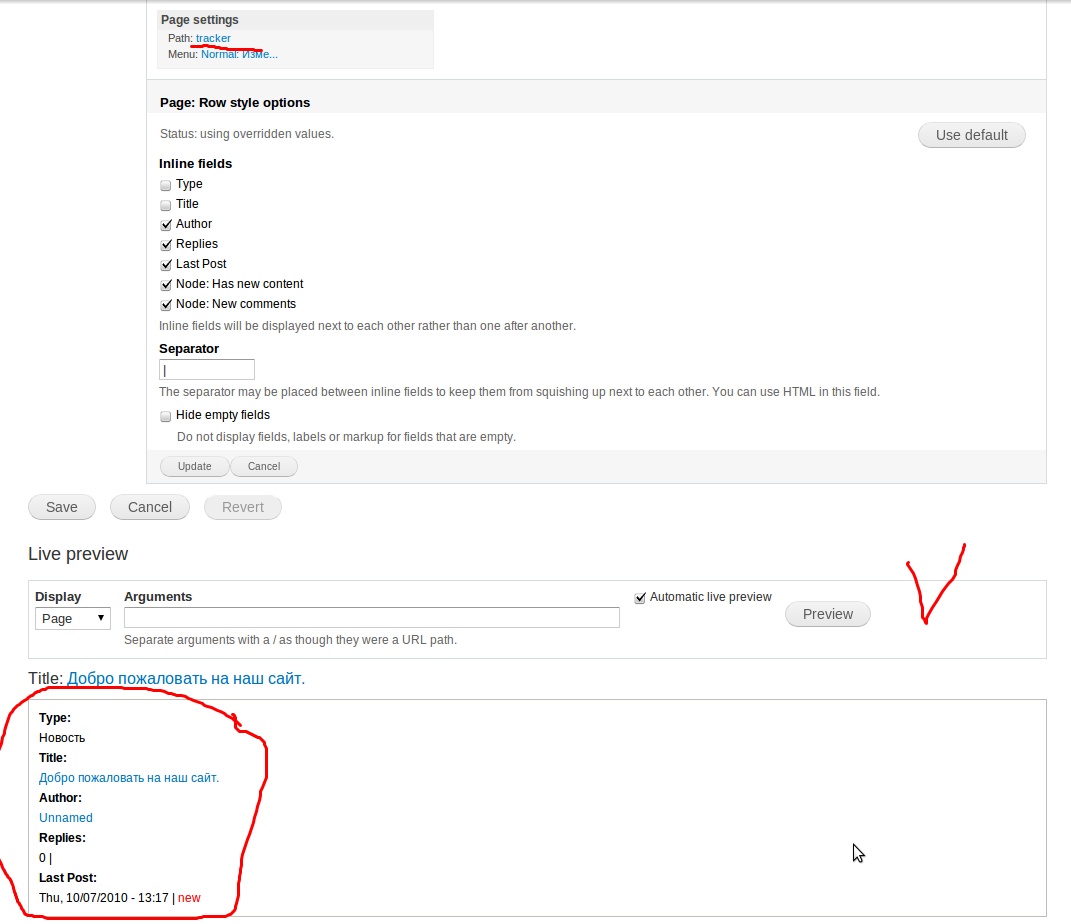
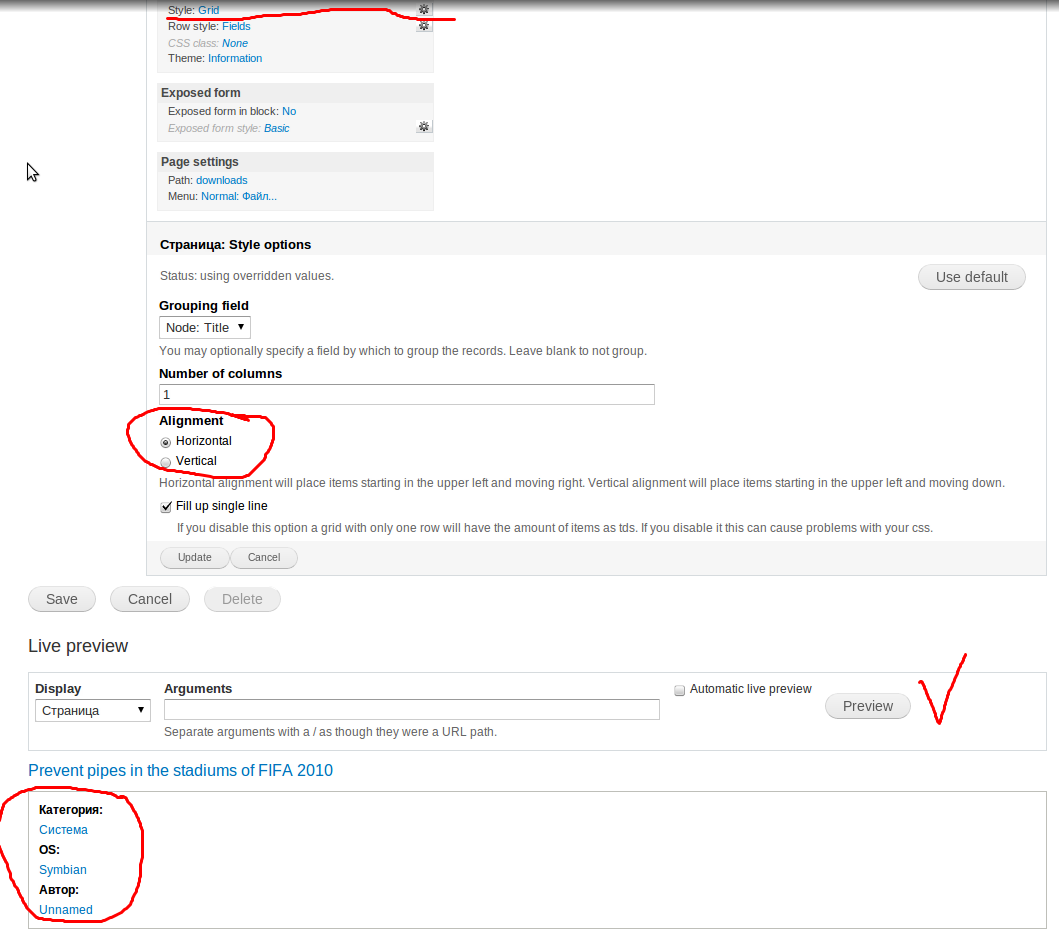
I can not describe the problem, since I do not write in English.
Show in the screenshots

CommentFileSizeAuthor
#10 _008.png73.53 KBUnnamed
#4 _007.png67.32 KBUnnamed
002.png77.97 KBUnnamed
001.png80.38 KBUnnamed

Comments

dawehner’s picture

I try to reproduce the bug but it's not possible for me to do it. Can you give more details? Maybe this is just a css bug.

esmerel’s picture

Status: Active » Postponed (maintainer needs more info)
dawehner’s picture

What happens if you uncheck the "fill up single line" option?

Unnamed’s picture

StatusFileSize
new67.32 KB
Unnamed’s picture

I'm using the default theme. D7-beta

Unnamed’s picture

I send you admin user login:pass and link bug

dawehner’s picture

Mh. I cannot find the right view :(

Unnamed’s picture

merlinofchaos’s picture

Those fields appear to be custom? Or at least, I don't recognize the names of the fields and they do not conform to normal Views naming conventions.

Fields that report themselves as being block level fields cannot be made inline. That might be the problem.

(Note the grid style will not make your fields inline, so don't pay attention to that; only the 2nd screenshot matters).

Unnamed’s picture

StatusFileSize
new73.53 KB

Default vief "tracker"
http://unnamed.net.ua/tracker

ozoned’s picture

Grid can't be filled horizontally with single column.
Try to set 'Number of Colums' more then 1.

Unnamed’s picture

Number of columns in the grid gives a different result. And to conclude, in this same field in the grid line.

esmerel’s picture

Status: Postponed (maintainer needs more info) » Active
merlinofchaos’s picture

When I try this exact thing, I get the result I expect.

I note that your field labels are in bold, and that the field that does not have a label is properly inline. Is it possible you have CSS that is making the label a block level element?

merlinofchaos’s picture

Oh wait, this is D7, not D6.

I see Seven made <label> a block level element.

Well, I'm told we're not supposed to be using label there anyway.

iamjon’s picture

Category: bug » task

I talked to merlinofchaos about this on irc
I'm marking this as an unassigned task to change the way we are using labels.

iamjon’s picture

Title: Does not sort the horizontal » Review usage of the label tag

Changing title

druper’s picture

I'm having the same problem and resolved it by using "Rewrite Results" for each field and filling with

<strong>Label: </strong>[field_label]

Not the way I'd expect Views to handle this but it's a workaround for now.

dawehner’s picture

You can also configure the field and change the label tag there. No need to rewrite the output.

merlinofchaos’s picture

I agree. I learned elsewhere (and there may still be an issue open for that) that our use of the label tag is wrong, and we need to change this. It's particularly bad in Bartik that provides non-inline styling on the label tag.

dawehner’s picture

Here is a very simple view.


$view = new view;
$view->name = '935084label_view';
$view->description = '';
$view->tag = 'default';
$view->base_table = 'node';
$view->human_name = '935084label_view';
$view->core = 7;
$view->api_version = '3.0-alpha1';
$view->disabled = FALSE; /* Edit this to true to make a default view disabled initially */

/* Display: Master */
$handler = $view->new_display('default', 'Master', 'default');
$handler->display->display_options['title'] = '935084label_view';
$handler->display->display_options['access']['type'] = 'perm';
$handler->display->display_options['cache']['type'] = 'none';
$handler->display->display_options['query']['type'] = 'views_query';
$handler->display->display_options['exposed_form']['type'] = 'basic';
$handler->display->display_options['pager']['type'] = 'full';
$handler->display->display_options['pager']['options']['items_per_page'] = '10';
$handler->display->display_options['style_plugin'] = 'default';
$handler->display->display_options['row_plugin'] = 'fields';
$handler->display->display_options['row_options']['hide_empty'] = 0;
/* Field: Content: Title */
$handler->display->display_options['fields']['title']['id'] = 'title';
$handler->display->display_options['fields']['title']['table'] = 'node';
$handler->display->display_options['fields']['title']['field'] = 'title';
$handler->display->display_options['fields']['title']['alter']['alter_text'] = 0;
$handler->display->display_options['fields']['title']['alter']['make_link'] = 0;
$handler->display->display_options['fields']['title']['alter']['absolute'] = 0;
$handler->display->display_options['fields']['title']['alter']['external'] = 0;
$handler->display->display_options['fields']['title']['alter']['replace_spaces'] = 0;
$handler->display->display_options['fields']['title']['alter']['trim'] = 0;
$handler->display->display_options['fields']['title']['alter']['nl2br'] = 0;
$handler->display->display_options['fields']['title']['alter']['word_boundary'] = 0;
$handler->display->display_options['fields']['title']['alter']['ellipsis'] = 0;
$handler->display->display_options['fields']['title']['alter']['strip_tags'] = 0;
$handler->display->display_options['fields']['title']['alter']['html'] = 0;
$handler->display->display_options['fields']['title']['element_label_colon'] = 1;
$handler->display->display_options['fields']['title']['element_default_classes'] = 1;
$handler->display->display_options['fields']['title']['hide_empty'] = 0;
$handler->display->display_options['fields']['title']['empty_zero'] = 0;
$handler->display->display_options['fields']['title']['link_to_node'] = 1;
/* Sort criterion: Content: Post date */
$handler->display->display_options['sorts']['created']['id'] = 'created';
$handler->display->display_options['sorts']['created']['table'] = 'node';
$handler->display->display_options['sorts']['created']['field'] = 'created';
$handler->display->display_options['sorts']['created']['order'] = 'DESC';
/* Filter criterion: Content: Published */
$handler->display->display_options['filters']['status']['id'] = 'status';
$handler->display->display_options['filters']['status']['table'] = 'node';
$handler->display->display_options['filters']['status']['field'] = 'status';
$handler->display->display_options['filters']['status']['value'] = 1;
$handler->display->display_options['filters']['status']['group'] = 0;
$handler->display->display_options['filters']['status']['expose']['operator'] = FALSE;

/* Display: Page */
$handler = $view->new_display('page', 'Page', 'page');
$handler->display->display_options['path'] = '935084label-view';
$translatables['935084label_view'] = array(
  t('Master'),
  t('935084label_view'),
  t('more'),
  t('Apply'),
  t('Reset'),
  t('Sort by'),
  t('Asc'),
  t('Desc'),
  t('Items per page'),
  t('- All -'),
  t('Offset'),
  t('Title'),
  t('Page'),
);

There the default label element type is span. Additional i can't find something in the code which returns label.

So here is a patch for the css file

merlinofchaos’s picture

Status: Active » Fixed

Yeah, it looks like we've already removed our usage of the label tag and I just never noticed.

druper’s picture

"Configure the field"? If you mean in CCK, mine are already configured as inline. Where else to can you configure a field.

Status: Fixed » Closed (fixed)

Automatically closed -- issue fixed for 2 weeks with no activity.