

Active
Project:
FileField Sources
Version:
7.x-1.7
Component:
Source: Attach (FTP)
Priority:
Major
Category:
Bug report
Assigned:
Unassigned
Issue tags:
Reporter:
Created:
11 Oct 2010 at 15:44 UTC
Updated:
3 Jun 2016 at 21:40 UTC
Jump to comment: Most recent, Most recent file

Comments
Comment #1
geerlingguy commentedI am also interested in this answer, as I have a large video file I uploaded through FTP that I'd like to reference without having to make a hard link in my node body.
Comment #2
TheDanScott commentedYou can add my voice to those interested in an answer to this question as I am trying to reference an existing 70MB file.
While on the subject of large files in drupal, I also find that the filefield sources "attach" source won't handle files over (approximately) 80MB on the (shared) server I am using. How does the file copying process work? does it require enough RAM to hold the entire file? or does it load chunks of the file as it copies (if so, how much RAM is necessary)?
Comment #3
quicksketchFileField Sources copies the file to the tmp directory, then tries to move it from the tmp directory to the final location. After moving the file successfully, it deletes the original file. All operations are done directly through PHP's copy() and rename() functions, which shouldn't need any large amount of memory to accomplish. My guess is that your host doesn't allow use of these functions with files over a certain limit.
Comment #4
quicksketchI've committed the attached patches which remove the file size limit when reusing files through the auto-complete source.
@TheSchmuck: Let's keep this issue on focus. See #964246: Attaching 326MB file gives Javascript Error 500 for further discussion on your question.
Comment #6
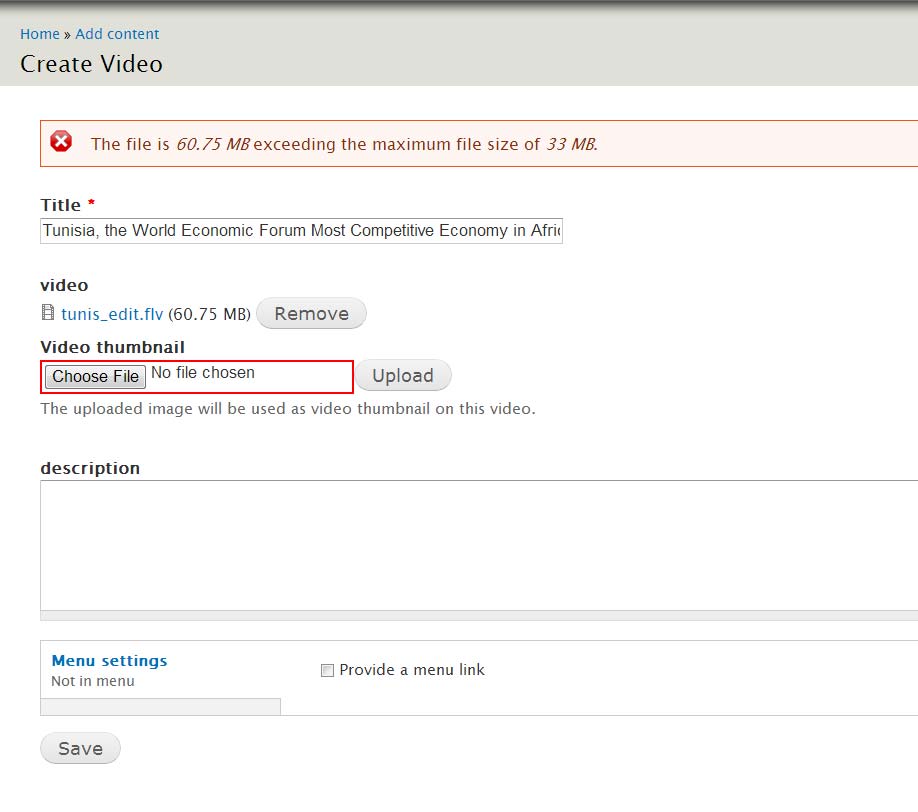
claude commentedI am getting a validation error , after I submit the page:
My steps:
- Logged in as a normal user , not the super admin
- Uploaded the file to server , under /sites/default/files/file_attach
- Create a video node
- Under my file field , Clicked on File attach
- Selected the file from the list and press Save to save the node , then the file size validation error appears .
Note :
- Logged in as a normal user , not the administrator
Comment #7
quicksketchHm, but the file saves anyway? Do you get the same error if you click on the "Attach" button instead of the "Save" button for the whole form?
In the future, it would probably be better to make a new issue for a report like this, considering the first (separate, but similar) problem appears to have already been fixed some time ago.
Comment #8
quicksketchComment #9
cousimo commentedI have the same issue, and it doesn't save node.
it seems to be a permission issue, because it does work when i log in as admin, but it doesn't work for any of our other staff.
I cant seem to find where the settings is to fix this
Comment #10
danielphenry commentedThis issue is occurring for me as well. It occurs for non super user.
It occurs when you select "save" node. I have tried selecting the attachment then selecting save node and also by selecting attach, waiting for the file to attach (which is successful) and then selecting save node.
The file is moved to the expected location but simply fails to be attached to the node.
As our primary use case for this module is to attach files too big to upload it makes this module unusable. Changing back to high priority.
Comment #11
danielphenry commentedFound the cause of this. For me at least and I assume many of the rest of you. I was using a video field. Which runs a separate validation of the file size and extensions in hook_field_validate. The function can not be overridden cleanly so we are at the mercy of the video module to fix this issue.
I created a case in the video module here: https://drupal.org/node/2175181
Comment #13
sthomen commentedIn case anyone is still using d7 and IMCE, this adds @quicksketch's fix to that reference source too.