Active
Project:
3D Views Carousel
Version:
6.x-1.2
Component:
Code
Priority:
Normal
Category:
Task
Assigned:
Unassigned
Reporter:
Created:
16 Oct 2010 at 13:45 UTC
Updated:
1 Jan 2012 at 17:23 UTC
Jump to comment: Most recent file


Is it possible to use other than Image Title and Alt, something like Node: Title or other CCK field? And how it is done?
| Comment | File | Size | Author |
|---|---|---|---|
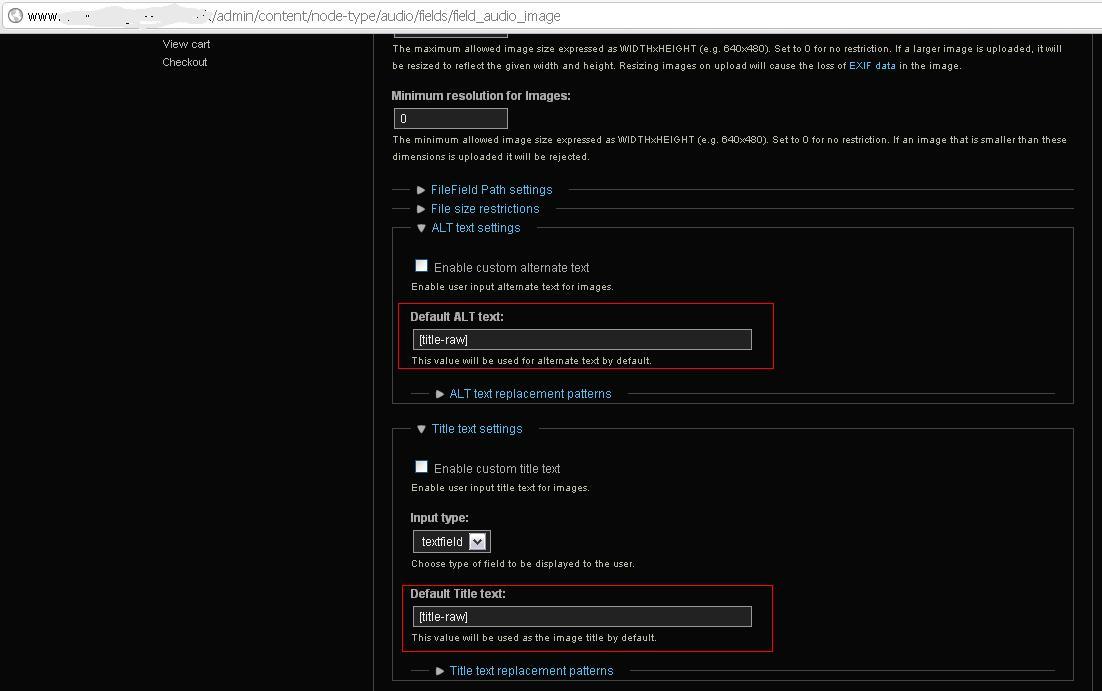
| #18 | use-node-title-in-alt-text.JPG | 70.12 KB | benchesters |
| #13 | cloud-carousel.1.0.4.min_.js_.txt | 12.42 KB | liquidcms |
| #5 | cloud-carousel.1.0.4.min_.txt | 12.94 KB | wolfdream |

Comments
Comment #1
rashad612 commentedThis feature is not implemented yet. Hopefully soon.
Comment #2
wolfdream commentedCan you please point me in wright direction how this could be done?
Comment #3
wolfdream commented1 more q...
How can I link alt and title text to their node?
Comment #4
rashad612 commentedalt and title is an
imgtag attributes.Comment #5
wolfdream commentedIf you could take a look at js that I modified to use other filds from views.
Another modification in viewscarousel3d.js add class inviz on views field: $(".views-field-title").addClass("inviz");
Js works for me: http://www.broj1.hr/2010/11/14/3d
Comment #6
liquidcms commentedsince this is just JS and looking at your code is it safe to assume you have just hard coded the specific field you want into the JS or am i missing something here.
trying this out but i 2nd the idea that being able to define which fields are used for the txt would be very nice.
Comment #7
solian commentedAdditionally,
You can quite easily customise the field you are using in a view to turn it into your desired thumbnail.
And with tokens for node [title] etc you can modify these on a per view basis.
e.g.
choose 'rewrite the output of this field'.
tokens you need must be included as fields before this one, as hidden fields perhaps.
I believe some are also using Imagfield tokens for similar workarounds.
Comment #8
liquidcms commented@solian - have you actually tried this?
i think this does work but possibly you must set the img field formatter to PATH; which then means you are not able to use imagecache (or any of the other image formatters).
Comment #9
solian commentedHey liquidcms,
Yes I have tried it with Tokens and ImageCache.
The url from [field_{your_content_type}_image_fid] is an ImageCache thumb url.
Type to choose is {your_content_type}_{Your_imagecache_preset} URL.
Cheers
Comment #10
liquidcms commentedhmm.. sounds promising.. but maybe this is Views 3? pretty sure in Views 2 that
[field_{your_content_type}_image_fid] is not the path to the imagecached version (presumably based on which preset you select as your formatter?).
and sorry; not sure what "Type to choose is {your_content_type}_{Your_imagecache_preset} URL" is referring to. but i'll play around with it a bit and see if i can get something to work.
Comment #11
liquidcms commentedahhh... use the formatter which is the URL of the preset.. doahhh.. yup, that works.. thanks.
still, however, it would be nice to be able to simply have it show the text for fields defined in the view as opposed to the title text for the image as it would allow a lot more flexibility. for example; you can add div, css, etc to pieces of the text.
Comment #12
liquidcms commentedok, not the best fix but i did a small tweak to the cloud carousel JS and combining that with solian's idea of adding views "tokens" into the re-written img field i came up with this:
inside the JS i split the title tag value on a comma separator and wrap the pieces in div's so that i can theme accordingly.
so with my image field rewritten as this:
i get this:
Comment #13
liquidcms commentedlets try that again...
Comment #14
liquidcms commentedand for my example, the result looks like this: http://screencast.com/t/X9eY8uaS
Comment #15
rashad612 commentedThis feature is coming in the next release :)
Comment #16
ranx commentedsubscribing
Comment #17
david3000 commentedsubscribing
Comment #18
benchesters commentedI was just looking for this and worked it out. These two modules are necessary:
filefield_paths
imagefield_tokens
It's now possible to use node tokens in the fields so that the ALT text and Title text grab the node title (if that's what you want) automatically. I used [title-raw] in mine, as just using [title] grabbed the html code if there was an apostrophe in any of my node titles.
I have added a screen grab so you can see what I did on the newly created image field. Hope this helps a fellow novice! This works like a dream now..;)