

 Come together with the global Drupal community in Rotterdam, 28 Sept – 1 Oct 2026. Sessions, contribution, connection, and Early Bird savings until 8 June.
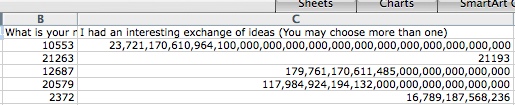
Hi, I have a select field (multiple selection/listbox). The report works fine but when I download the csv file, the values are not correct. Please look at the images, let me know if this is something that can be fixed. thanks.
| Comment | File | Size | Author |
|---|---|---|---|
| #1 | 945398.patch | 1.84 KB | jimbullington |
| data-csv.jpg | 38.69 KB | luthien | |
| data-report.jpg | 49.61 KB | luthien |


Comments
Comment #1
jimbullington commentedPlease try the attached patch - this should process multi-selects correctly.
Comment #2
jimbullington commentedComment #3
luthien commentedHi Jim, I think I was wrong. The csv file was displaying the values correctly (6.x-2.0-beta5 + patch)
Example:
12687,"17976,11706,11485,10963,16784,10964","16789,7373,16784,20811"
16789,"2372,11706,21213,10963,10568,16784","17976,11485,11798,10553,10964,22609"
10553,"2372,11706,10964,16703,11459,11798,4924,10963,16789,21204,21162","16703,11798,10963,21162"
The error was when I opened the csv file using MS Excel, the keys were all wrong like the images from my initial post. Could you please look at it using the example above? any other reports opens correctly in excel, only multi-select fields are failing. thanks.
By the way, if I specify "display value" for the format and option fields, no values are displayed. The table only displays results is I use "display key" instead. My selects were all dynamically generated but I don't think that is the problem as your results displays the values correctly with the key.
Comment #4
jimbullington commentedI don't think it was working before BETA5 + patch.
The best way to import "tricky" CSV files into Excel is to use Get External Data:
Using the above, I was able to import your example as a three column spreadsheet.
I hope this helps.
Comment #5
jimbullington commentedSorry, forgot to respond to the second part - what do you mean by My selects were all dynamically generated ?
Also, what version of Webform are you using? There may have been some changes in select handling between webform versions.
Comment #6
luthien commentedI'm using the "Load a pre-built option list" to display the multi-select list, with options that were dynamically generated using PHP.
beta5 + patch generated the right csv.
For Excel, I was using the "general" format, changing columns to "text" was the solution, thanks.
You can update the issue to fixed as the patch solved the problem.
Comment #7
jimbullington commentedThank you for the feedback.
However, I am still concerned about the other issue you raised:
By the way, if I specify "display value" for the format and option
fields, no values are displayed. The table only displays results is I
use "display key" instead. My selects were all dynamically generated but
I don't think that is the problem as your results displays the values
correctly with the key.
Is this still a problem? Can you provide more information? What version of Webform are you using?
Comment #8
luthien commentedoh yes, that is still an issue for me. I'm using the following:
Webform 6.x-3.4
webform report 6.x-2.0-beta5
I'm looking at the webform-results/table and I'm noticing that sometimes the key is displayed and others the value. Maybe that is causing the problem with the display of the values for webform report. If I select "values" for another form, it either displays nothing or displays the key. For this post's example, it displays just commas, empty fields. Maybe my form is so unique that I'm introducing some new scenarios that were not planned when the modules were created.
For example, one of the dynamic select was created based on dates queries. Once the date is out of specified range, those previous values won't be part of the select options; although any submissions using those values should be saved. Please send me an email and I will show you an example if you need to look at this particular web form.
Comment #9
jimbullington commentedLooks like select handling in webform 3.x has changed. Can you try the following in webform_report.inc? It should be at line 230.
Comment #10
luthien commentedThanks a lot for the prompt replies and solutions to the problems. The code from #9 fixed the problem partially. The values are now correctly displayed for one of the selects but the other one only works with the keys. If I select values for all, I get the "There are no submissions that match the criteria for the selected webform. ", maybe there is a conflict with the patch for the search filter?
Note: Your module is generating the reports perfectly fine, while I'm getting errors using the webform-results/table functionality from the webform module itself (http://drupal.org/node/975000).
If you add chart capabilities plus other minor features to the module that will be extremely useful for all. Thanks again!
Comment #11
jimbullington commentedI would like to revisit this when you have time:
... The code from #9 fixed the problem partially. The values are now correctly displayed for one of the selects but the other one only works with the keys. If I select values for all, I get the "There are no submissions that match the criteria for the selected webform. ", maybe there is a conflict with the patch for the search filter?
There should not be a conflict with the search filter.
Can you clarify or post some examples of: "but, the other one only works with the keys" and "If I select values for all, I get..."
Thank you for your continued feedback.
Comment #12
luthien commentedHi, I just tested and it works fine, you might close the issue. Thanks!
*out of topic but something to think about it: it will be great to be able to filter reports and to assign permissions per role to see certain part of the report, kind of granularity support for the search results. Instead of creating several reports, one for each user, where the search term is a specific key; imagine creating a single report and by passing the key via url to be able to obtain results for that particular user. One user sees only part of the report, the one related to his key; while another user can only access his part of the report.
an example I just made up:
Report #1: List all people that belongs to a club and order by country.
Report #2: List only those who are from US
Report #3: List only those who are from Mexico
Report #4: List only those who are from UK
etc...
instead of creating many reports, one for each country for example, and assigning permission to users to see only the report for their respective country; what about using report #1 for everybody and somehow filtering the key to display the report to that particular user or role? user1 can not see report for user2 or user3, only his assigned report. This feature is good for sensitive info that only certain users can see. Having reporting tool that reduces maintenance time by designing a single report instead of more than x number of reports, to achieve the same goal, will be nice to have. I will think about it but perhaps you have already considered this possibility.
Comment #13
jimbullington commentedThank you for the review.
As far as the other request, you might look here - we have been working on token support for module.