

 The 2026 Drupal Business Survey is open. Your response will help shape the future of the Drupal business ecosystem.
First off I still think this Module should have been built into 7 core seeming the high number of people who still download this module as it is still the quickest way to navigate without using Drush.
Looked around everywhere but couldn't find a simple solution.
How do I disable the original navigation menu?
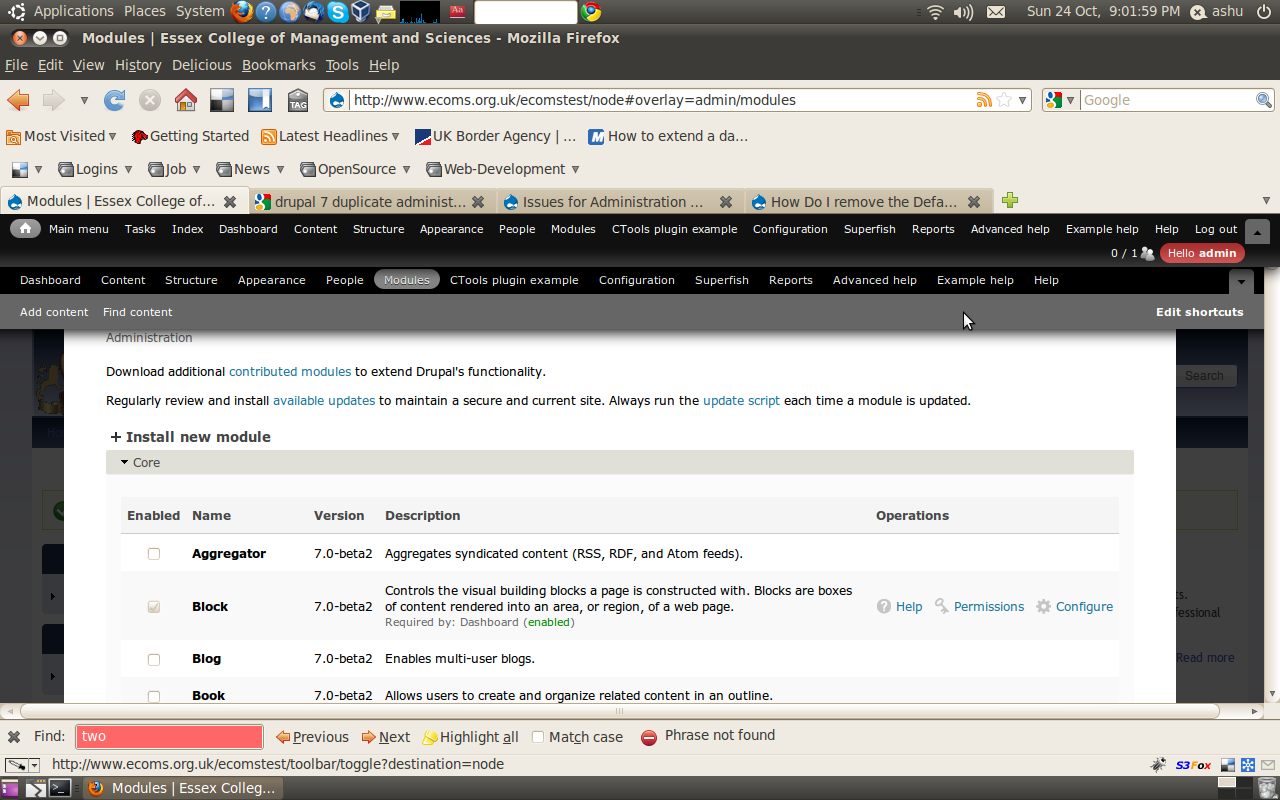
I am logged in as the administrator and right now I have two menu's at the top of the page.
One feature in the default admin menu I like is the add shortcuts.
Is there a way to just add the drop down capabilities to the original menu so that the shortcut feature is still visible?
Thanks
| Comment | File | Size | Author |
|---|---|---|---|
| #22 | admin_menu_tweak.jpg | 324.84 KB | elgandoz |
| #13 | drupal core modules.jpg | 37.93 KB | expertalmost |
| #13 | drupal core optional.jpg | 91.63 KB | expertalmost |
| #4 | admin_menu.jpg | 190.48 KB | kclarkson |
| #1 | admin_menu.png | 164.85 KB | aanjaneyam |



Comments
Comment #1
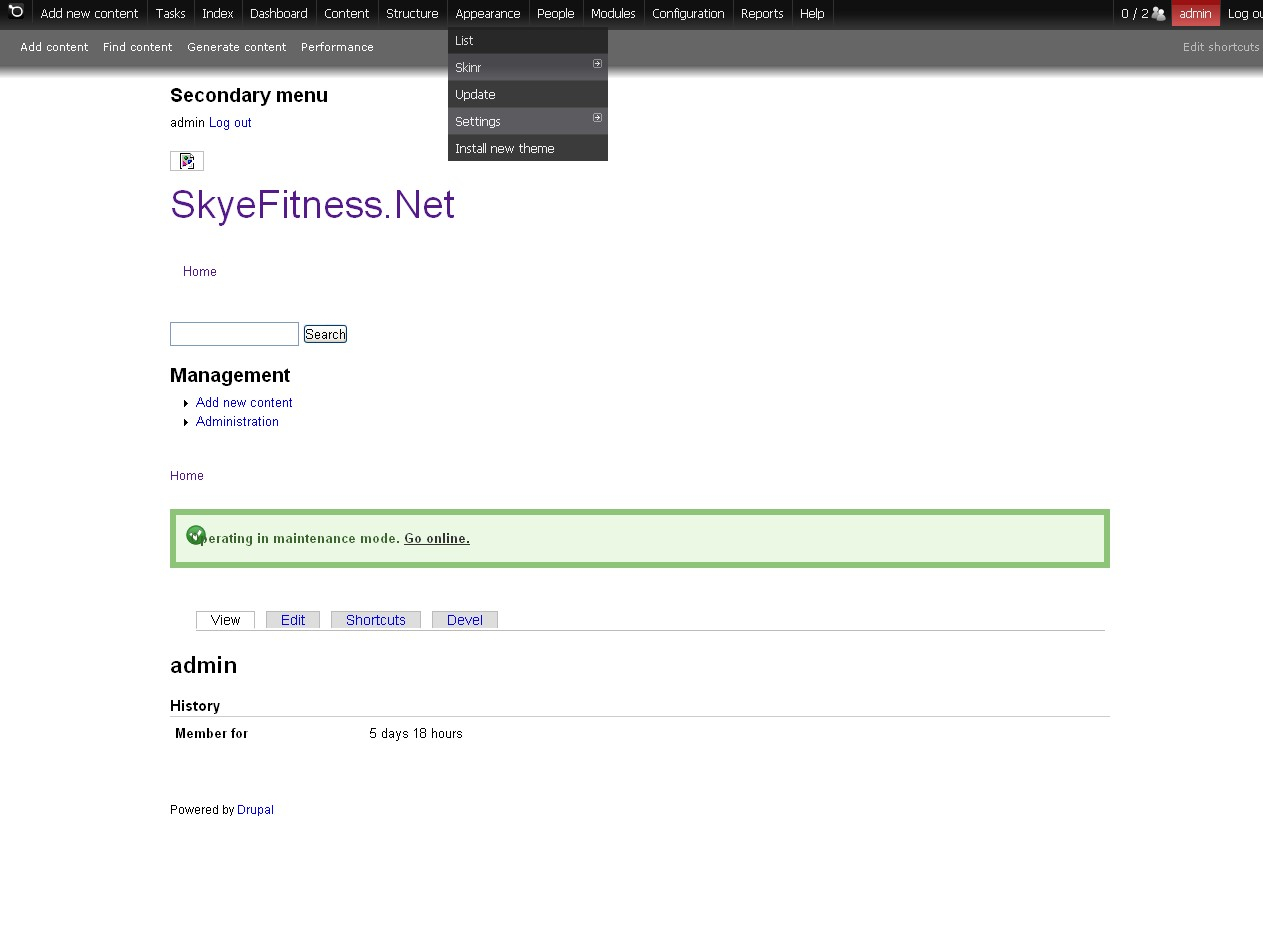
aanjaneyam commentedI aslo have the save problem. When logged in as administrator I have two administration menu's at the top of the page- one default and the one which appeared after installing Administration menu 7.x-3.x. I have attached a screenshot. How to get rid of the default admin menu. It disappeared for a while but appeared again after installing Ctools and panels. In fact it was randomly appearing and disappearing before.
Comment #2
dave reidGo to admin/modules and disable the 'Toolbar' module under the 'Drupal core' fieldset.
Comment #3
aanjaneyam commentedThank you very much Dave. Oh! I cannot believe I was missing such a simple thing.
Comment #4
kclarkson commentedDave,
Thanks sir. I also adjusted the admin css height and font size to make the bar larger and to still be able to see the shortcuts bar.
Comment #6
bendiy commentedCan this go in the Readme.txt and on the module home page at drupal.org? If you don't know how to do this, it's hard to fine the solution. With the Toolbar enabled by default, the Admin Menu isn't showing anything except a grey bar.
Comment #7
bendiy commentedAdding documentation tag.
Comment #8
sunThanks for reporting, reviewing, and testing! Committed fix for this to README.txt.
A new development snapshot will be available within the next 12 hours. This improvement will be available in the next official release.
Comment #9
martijn de witFrom usability perspective:
Can't there be a feature that is disabling the toolbar module when installing the administration menu?
that would life make 1 step easier ;)
Comment #10
sunI completely understand that wish, but it may not be what everyone wants. Developers may want to use admin_menu only for themselves, while exposing the core Toolbar for regular users, and similar advanced configurations.
Comment #11
vIQleS commentedIs there a way of using both?
At the moment the default appears on top of the new one and the drop downs are hidden...
Comment #12
vIQleS commentedNever mind. I had "Administration menu Toolbar style" turned on.
If you just use "Administration menu" and the default toolbar, they both play nicely together.
Comment #13
expertalmost commentedI've read the README, I've spent an hour doing drupal searches based on text in the README, I've read all the posts here. I've played with it for another hour. I'm new to Drupal and apparently both blind and totally stupid ;-)
I love your module but I STILL cannot get rid of the second version of the admin menu. Attached is an image of my drupal core modules, none of which I seem to be able to change, and my drupal core optional modules. Neither of which seem to have the > 'Toolbar' module under the 'Drupal core' fieldset < What am I missing?
I am running the latest version of drupal 6.
Please please please...Free my mind!
thanks
alexander
Comment #14
dave reid@expertalmost: Toolbar is not a D6 core module, only for D7. You'll have to look in the non-core sections of the module pages.
Comment #15
bendiy commentedComment #16
yan commentedI needed some time to find this option, too. How about adding a message after enabling the module? It would make life easier a lot..
Comment #18
yan commentedI guess that would be the feature request, wouldn't it?
Comment #19
sunNot everyone wants to disable the core Toolbar.
Comment #20
yan commentedWell, of course not. But I suppose many do and obviously it is a setting that many people didn't find easily. Is there any argument against facilitating it?
Comment #21
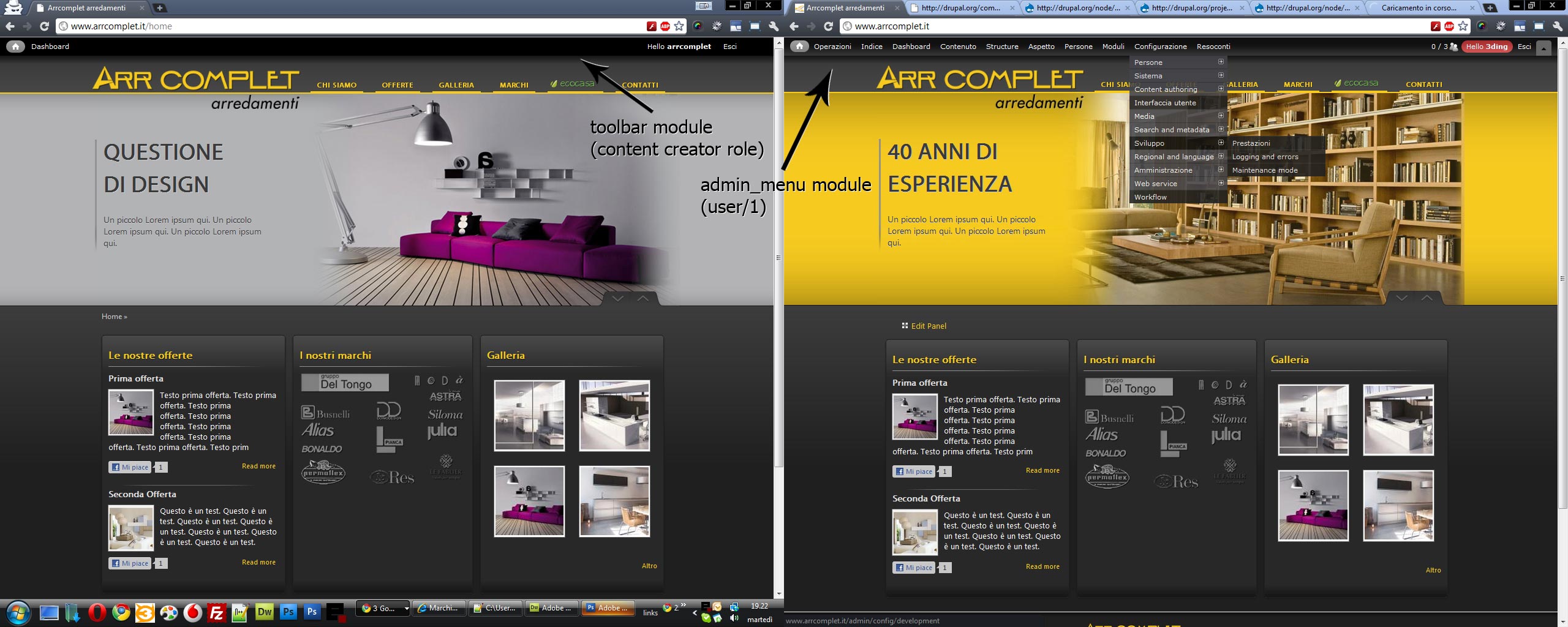
Anonymous (not verified) commentedI've been able to disable the toolbar for the role of administrator and so avoid a double-up of the admin menu and toolbar for that role.
However I haven't found a way to disable the toolbar for user/1, so the double-up remains. I regularly login as user/1 and find the double-up a bit inconvenient.
Anyone know of a way to disable the toolbar for user/1?
Regards
Comment #22
elgandoz commentedHi guys! I had the same need, and I found a workaround:
I put in module/admin_menu/admin_menu.css
In this way admin_menu, when loaded, hide "Toolbar" menu (needed for other users, which they have not admin_menu permission) through css. This is helpful overall for user/1, who can't disable toolbar through permissions.
I know there are better ways to do that (with Drupal API, so toolbar module is not loaded) but I'm not able to do that. I will learn further, but now this is easy and it just works.
Ciaooo!
PS: Perhaps something like
in admin_menu.module?
Comment #23
elgandoz commentedComment #24
bendiy commentedThis shouldn't be set to fixed until a maintainer commits a patch.
You could use "Reviewed and Tested by the Community", but there is no patch to test and no tests have been done by anyone else yet.
Comment #25
s.daniel commented@bendiy: Sun is the maintainer. See #19
But yeah, having admin menu for user 1 and toolbar for normal users would be nice.
Anyhow I would have appreciated a notice after the admin menu installation as well.
@sun: Please consider that most people insalling the admin menu module do not know where that toolbar ontop comes from and why they don't see the module just installed. Displaying a message would really save a lot of people time. Something like this:
Some native speaker should probably fix this up.
Comment #26
headstartcmsI am beginners in drupal. I want to ask advise how can i install new module ?
THis is the problem that i recieved
Unable to create directory 'temporary://update-extraction/ecommerce/' ?
Comment #27
aanjaneyam commented@ jazclick You cannot just change the title, purpose and meaning of an issue. You should open a new issue for each of your request. The must also be in the relevant module. You should not open a general Drupal support question in an issue queue for admin_menu module. I would advice you to first search drupal website for your answer. The starting for for your research can be http://drupal.org/support.
Comment #28
sorensong commentedIs there a way to remove admin toolbar per page or per content type?
Comment #29
drupalbabaji commentedthanxxxxxx
Comment #30
twiik commentedA simple way to hide the toolbar for user 1 is to just override the access check:
I feel the admin menu is a bit to advanced for my end users, but the toolbar is to simplistic for myself, thus this was the best solution.
Edit: This is done in a custom module of course, mine being named "template_settings" as you can see above. Can probably be done in a theme in template.php as well.
Comment #31
headstartcmsThaNKS!
Comment #32
sunREADME.txt was enhanced in #8 already.
All later follow-ups were actually about #1440040: Admin_Menu and Toolbar coexistence without an additional module
Reverting status.
Comment #33
oups commentedI lost access to my Admin-n Menu/panel/bar and the editing mode after installation of some themes and modules (on my local server). Even after my superAdmin login I don't see the Admin-n menu and all attempts to edit a block are ended with a blank screen. Does it mean I have to recreate my website from scratch? Thank you!
Comment #34
vm commentedplease don't open old closed issues and support requests aren't critical.
Comment #35
vandana commented#30 hook implementation helped
Comment #36
bohus ulrychFor people who are still looking for solution like me:
toolbar_admin_menu (http://drupal.org/project/toolbar_admin_menu)
Comment #37
arruk commentedDrupal 7 if you are using the Admin Menu module and getting two admin toolbars, but cannot turn off the default toolbar because of dependencies: you can uncheck Use the administration toolbar in toolbar permissions. Turning this off will hide the default admin toolbar, but still allow the Admin Menu to work.
Comment #38
jcovington commentedThanks arruk, all I needed to do was disable toolbar.
Comment #40
srikanth.g commentedwhy drupal 7 is NOT providing the default toolbar as a Drop Down menu? so that we can avoid number of clicks to go to a specific page.
Then there is no need of developing Administration menu module for D7 here:https://www.drupal.org/project/admin_menu
Comment #41
navaneethakrishnan commentedThe Drupal 8 will have all the necessary modules like admin menu, menu_target, attractive menu configuration, image uploaders, editor built-in. I hope the next version will simplify the administrators work.
www.quakesa.in
Comment #42
samsterlin commentedThank you very much.
Comment #43
mohammad faisal commentedgo to module and disable toolbar module
Comment #44
henryhu commentedDisable the module: Navbar (navbar)
Comment #45
francewhoaAnother easier option is the Administration Menu select module at https://www.drupal.org/project/admin_select
admin_selectmodule. Go to the user page at/admin/peopleClick on theeditlink next to the appropriate user.Administration menu moduleoptionComment #46
5418ryadav commentedThank you very much Dave.
Comment #47
surendra77c commentedDisable 2 core drupal 7 module to remove the error showing two menu .
1. Overlay
2. Toolbar
Comment #48
yusuf_khan commentedsimple go to modules>toolbar-disable
Comment #49
samsterlin commented1) Install Administration menu module
2) Enable Administration Development tools, Administration menu and Administration menu Toolbar style
3) Disable Toolbar module in core list
Enjoy :)