

Closed (won't fix)
Project:
Menu Minipanels
Version:
6.x-1.0
Component:
Documentation
Priority:
Normal
Category:
Support request
Assigned:
Reporter:
Created:
22 Oct 2010 at 15:24 UTC
Updated:
8 Jan 2011 at 11:02 UTC
Jump to comment: Most recent file



Comments
Comment #1
KirstenLangholz commentedHello everybody,
I could figure out how to display the dropdown menu with the mini-panels - I had to clear the cache AND run the cron job. Maybe this helps others.
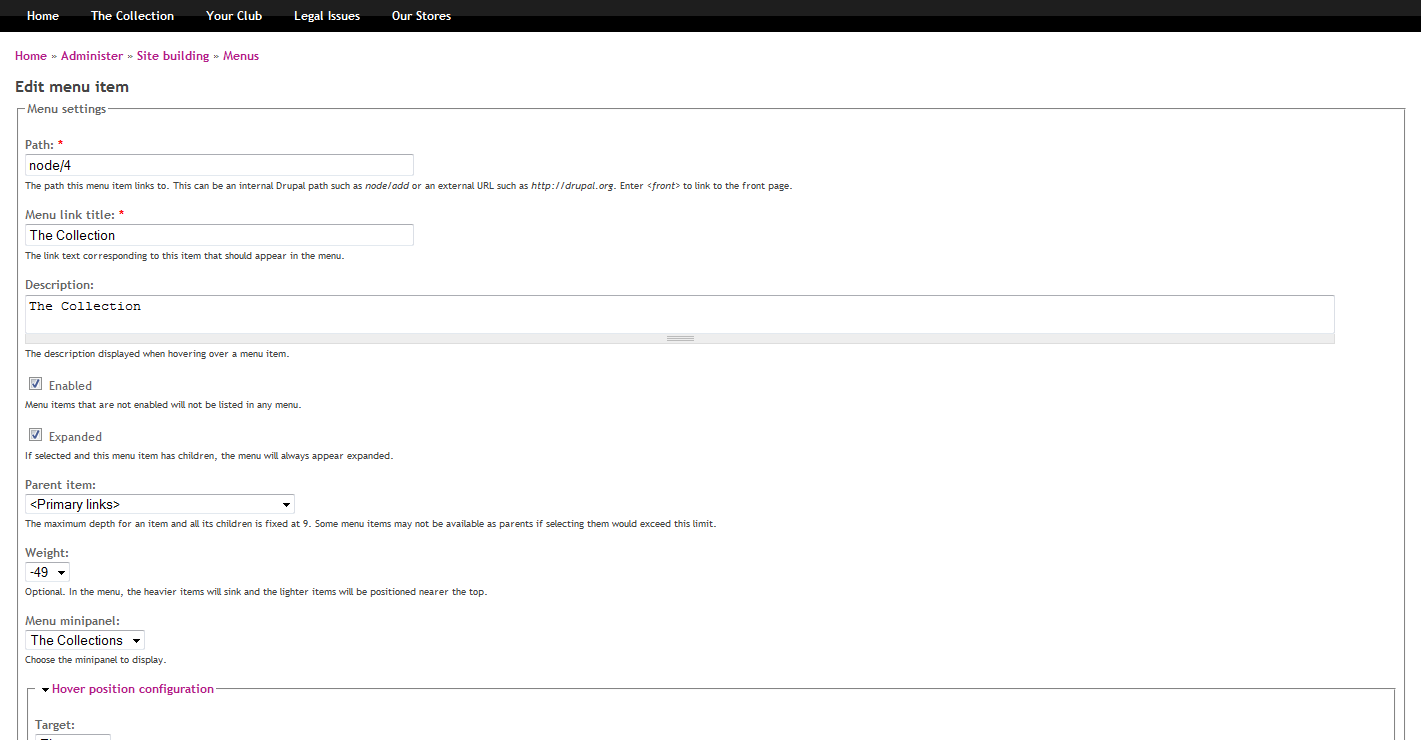
It turns out, that the README.txt file is not extensive enough - at least for me. I have set up four links as first level of the primary menu. Then I have set up other menus to display as mega menu instead of the second level. I've combined three of them in the three columns layout as mini-panel. So in order to relate them to the first level I've made the following adjustments (see screenshot).
Where am I going wrong now?
Kirsten
Comment #2
KirstenLangholz commentedSome more information on this issue:
This code is displayed in the header, so I assume the module is implemented correctly.
In the body tag though you can only find the first level of the menu and not the mini-panel.
Maybe this helps to solve the issue.
Comment #3
willieseabrook commented1. Can you give me a link to the site?
2. I'm assuming the minipanel that is showing "The Collections", is not the test minipanel you want to select?
3. Is there, by chance, other options in the select box, but are just blank text?
Comment #4
KirstenLangholz commented1. I am developing it on a local machine. If you are using TeamViewer we can make up an appointment for you to test it, if you think this is really necessary.
2. Okay, I did not specify it clearly enough. Sorry.
3. So far there is only one option that I can choose, as I only created this one mini-panel.
Comment #5
KirstenLangholz commentedI just found out, that it is obviously a theme related problem... I checked it out with my administration theme, here the menu is shown. So I wonder where I need to change something.....
Comment #6
willieseabrook commented@KirstenLangholz
If it's theme based, I suspect your theme settings.
In your theme settings, is the toggle primary links enabled? Try that if it's not.
There's currently a bug on drupal.org where image attachments are currently dead, so I can't check your screenshots.
Comment #7
KirstenLangholz commentedHello,
I've tried this, but it was already set properly. Unfortunately still couldn't get it to work. This site is now set up except for this - most important - feature and I start to panic a little bit.
Maybe the problem is located in the template.php, but my knowledge is not good enough to figure it out. I already contacted the theme creator, but don't get any support there. So I am bothering you again. Please forgive me.
Kirsten
Comment #8
willieseabrook commentedHi @KirstenLangholz did you manage to figure this out?
You might try updating to the latest dev version and latest versions of panels etc.
If you're still having issues please open a new support request.