

 Come together with the global Drupal community in Rotterdam, 28 Sept – 1 Oct 2026. Sessions, contribution, connection, and Early Bird savings until 8 June.
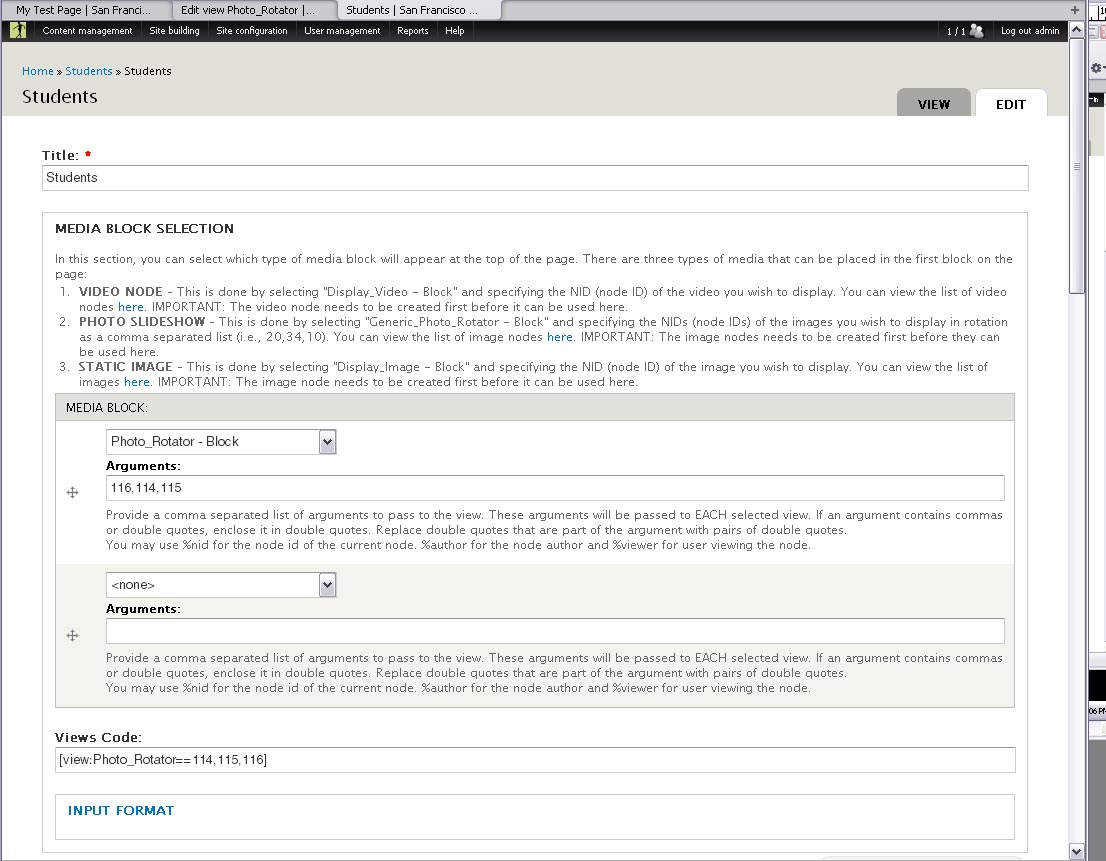
Seems that I cannot pass multiple arguments from viewfield in my node to my view for some reason. Am I missing something here? I should be able to specify comma delimited arguments in the node where use this field. I only get a single value passed.
I tested the same node and view setup by using a insert_view tag and it displays as expected. So my view is working.
Thanks for any help on this!
| Comment | File | Size | Author |
|---|---|---|---|
| #1 | content_fields.jpg | 176.72 KB | gary.betz |
| #1 | page_results.jpg | 136.38 KB | gary.betz |


Comments
Comment #1
gary.betz commentedI have attached some screen dumps of the form information and the resulting page rendering.
Comment #2
alemadleiHi!
Were you passing arguments trough the node add/edit form?
I had a similar problem. When I was using arguments the view didn't display any data, but when I removed them it worked as expected.
I pointed the location of the error at the theme/viewfield.theme.inc file. On line 17 there is this line.
$view_args = _viewfield_get_view_args($element['#item']['token_enabled'], $element['#item']['vargs'], $element['#node']);After debugging all the way to the views module, it seems the format the arguments are used differs from the way the module passes them to the function.
Long story short, I added this line below the previous line ( assuming diferent arguments are separated by a slash )
After this change, the view was loading correctly.
Since this is a themable function, I coded an override in my theme's template.php file, in order not to modify the module's source.
Let me know if it works for you.
Comment #3
gary.betz commentedAlejandro,
Thanks for the update! It's been a while since I worked on this issue so I had to rewind my brain a little. Yes, I was passing multiple arguments through the node edit form to the view where I was selecting media nodes to display on a page. I was only able to use viewfield in cases where I had one argument, like when I needed to display only one media file. The problem was when I wanted to pass multiple NIDs as arguments to a view utilizing views_slideshow.
Ultimately, I ended up just using the view_filter module which enabled me to add a text field on my content type where I simply used a views filter tag in the field (i.e., [view:Photo_Rotator==nid,nid,nid...]). This allowed me to pass multiple nids to my view. Not an ideal solution but nevertheless, workable.
That said, I'd like to give this a try though. My solution was a little "hacky" and required me to create a rather silly set of steps for my client to select one of three different types of media on their pages (video, static image and views slideshow). I'd like to consolidate the selection process into a single option to simplify things.
I'll have to try it on my staging server. I'll let you know if this solves the issue.
Thanks again for the delayed response.
Gary
Comment #4
giessler commentedHave the same issue that viewfield does not process multiple comma separated arguments but only accepts the first argument. I tried the above workaround #2 and inserted the suggested code below line 17, so it is now looking like this:
But that solution still makes no change. Viewfield still uses just the first argument and ignores a second argument. I'm assuming that the slash separation should provide an AND conjuction as the 'insert view' filter does. Is there anybody having success with that or has another solution for this issue?
Comment #5
alemadleiHi giessler,
Maybe the way we are passing arguments is different.
The view that I had set received several arguments like this %country/%section, both were taxonomy ids.
I didn't test with multiple values for the same argument because my project didn't require to.
However, you could try and see if the process I followed to fix my issue works for you.
Go all the way to view.inc and look for function set_arguments(), around line 90.
Add momentarely a print_r() call of the args variable. Now, if your view works correctly on the edit view form, try to preview the data. You sould probably get an error but it should display the format the arguments should be correctly sent. Then, go back to the function you created or modified and check if the arguments are in the same format.
When I did this, I realized that, for my case, the arguments were sents as an array [ 0 ] = arg1, [ 1 ] = arg2, and the viewfield module was sending it as arg1/arg2. Thats the reason why I had to split the values.
Maybe there is a chance that comma separated values are being handled differently.
Let me know if it works for you.
Regards,
Comment #6
alemadleiHi. Today I was working into another project and ran into a different issue. This time I was using a default display and it was not loading the data.
It was working for other displays.
So, I rechecked the code that that was overriden.
On this line
When I checked the value of the $display var, it returned 'def'.
Then I added this below that line.
After this the code continued working for all cases, at least in what I needed to do.
Let me know if this is something that work for you too.
Comment #7
keithm commentedThere are too many different issues being discussed here.
@gary.betz in #1: this doesn't look like the viewfield form.
@alemadlei in #2: if you had to parse the arguments that way, the arguments aren't being given to viewfield correctly. The correct syntax is "arg1, arg2", even if the view accepts arguments as "arg1/arg2". For example, to pass the node id and author, you would enter
or
in the viewfield arguments field.
@alemadlei in #6: it looks like the display for your viewfield somehow got saved as "def". If your view display is named "default", you should be able to save the node containing the viewfield and the problem will correct itself without any code modifications. In the future, if you have another problem that doesn't fit the title of the current issue ("multiple arguments are not being passed") you should open a separate issue for that.
Comment #8
jerdavisClosing as Drupal 6 is no longer supported.