

 The 2026 Drupal Business Survey is open. Your response will help shape the future of the Drupal business ecosystem.
When I checked "Trim this field to a maximum length" I get no output.
My field was the bodyfield and the maxlength 110.
| Comment | File | Size | Author |
|---|---|---|---|
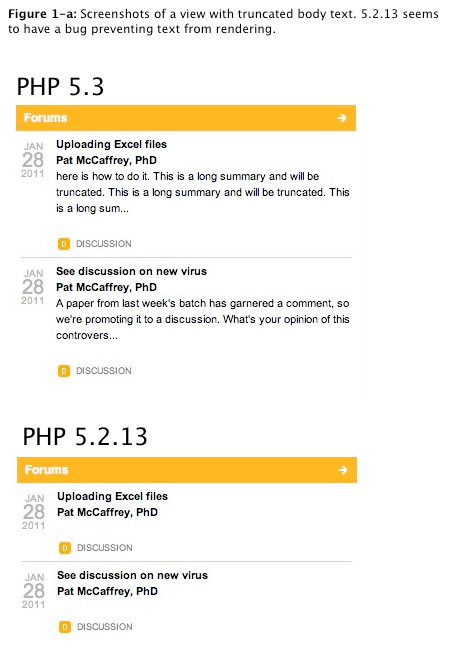
| #16 | view_bug.png | 125.34 KB | ngmaloney |

Comments
Comment #1
Letharion commentedPlease read the issue submission guidelines.
I can't reproduce problems without a view and the data you run the view on.
Comment #2
klaus66 commentedHere is the view. My system local is a WAMP.
Comment #3
merlinofchaos commentedDoes the value you're trimming contain HTML? This is the leading cause of the problem you are seeing.
Comment #4
didox commentedI have had the same problem and I ticked (provisionally) 'Strip HTML tags' and is ok. (I didn't use any html tag inside post) - strangely
my source html:
Comment #5
Letharion commented@merlin
Could you please elaborate on "Is the leading cause"? I assume that trimming is supposed to be supported even with HTML, is it not?
Will this be fixed later, or is this "as designed"?
Comment #6
klaus66 commentedIn drupal 6 views it was no problem to trim the body. With or without html.
I think the body field is the most important field to trim.
Comment #7
klaus66 commentedNo I set the field to plain text and I control it with firebug and there was no html inside the body field.
Comment #8
merlinofchaos commentedOften times you'll see stuff like this:
some long link text
And if it gets cut in the URL, the entire thing ends up cut because malformed tags are removed.
However, from the sound of this, it appears that there may be a bug in D7. Kicking this over to dereine to take a look at.
Comment #9
klaus66 commentedWhen you check "Strip HTML tags " in the Views UI then it works.
Comment #10
dawehnerAs you see
This is just html without any content. This html is ~400 long, so truncating just returns html, without content.
So i guess the status should be "works as designed".
Comment #11
dawehnerChange the status is right.
Comment #12
Argus commentedForgive me for re-opening when there's probably tuns of important stuff for you to attend to, but why do you consider HTML output to be part of the field's content?
Shouldn't the trimming happen only on the text that is in the field?
Comment #13
Argus commentedsee above
Comment #14
bojanz commentedIn Drupal 7, Views doesn't render the field, that is done by Drupal 7 itself, and Views just passes it along.
So, the "trim" option is kinda useless for fields, since that should be done by the field formatter itself (Views allows you to select an appropriate formatter and change it's settings when adding a field. In this case it's the "Trimmed" formatter).
Comment #15
bojanz commentedHere's a suggestion:
Remove the:
1. Trim this field to a maximum length
2. Strip HTML tags (actually, no real reason to remove this one)
options for Field API fields. This is already done by formatters, and duplicating it only causes confusion like above.
I know that a Field might not have a Trimmed formatter or whatever, but the point is that Views should leave these things to formatters.
A field tells us how it wants or can be rendered, we pass the choice to the user, without guessing anything.
Separation of concerns, nothing more or less.
Will roll a patch in the next 24h, giving you all time to disagree (and merlinofchaos and dereine to "won't fix" it if they think I'm insane)
Comment #16
ngmaloney commentedI was having the same issue; adding a text field and trimming length would display empty text when rendered. The catch was this was only happening on our development server, not my local MAMP install. Upon further inspection I discovered that when running php 5.3 truncation worked fine but when running php 5.2.x it would not work at all.
Running:
Drupal: 7.0
Views: 7.x-3.0-alpha1
Ctools: 7.x-1.0-alpha2
View code is here. Attached is a screen shot of the blocks to illustrate bug.
Comment #17
dawehnerMh. It's a common use for many users.
So you force every formatter for any kind of field to have the trim functionality.
For example if there would be a formatter for image description, you would need trim there, which really is kind of interesting.
Makes this sense? Perhaps you was just in the "oh fieldapi integration is totally broken"-mode :)
Comment #18
Sunlight Studios commentedExactly the same symptoms here, everything working perfectly on my laptop running 5.3, empty output on live server running 5.2 - I managed to track the problem down to PHP's own mb_substr() function but have yet to figure out why it's acting this way or how to get around it.
Basically the Views handler calls views_trim_text() which calls drupal_substr() which calls mb_substr(). I'm new to developing for D7 so I don't know how feasible it is to pull out the full length of content with Views and then use custom code to trim it, perhaps in template.php or in a field template file somewhere... am looking into it today as I need a quick fix!
Comment #19
merlinofchaos commentedInteresting. I'm not having a problem trimming fields with the latest code, running PHP 5.2.something.
Comment #20
merlinofchaos commentedIf you've got a PHP with a broken mb_substr() there really isn't anything we can do about that anyway, except urge you to get a non-broken PHP version. :)
To address earlier comments: We can't parse the HTML to see what is content and what isn't and trim only that content. That's a level of intelligence that we're simply not going to code up and not going to force on users who don't need it, wasting CPU cycles.
Comment #21
johnpitcairn commentedIf you do want to waste CPU cycles parsing the html to trim only user-visible content, I've been having some initial success with code from http://snippets.dzone.com/posts/show/7125, used in hook_views_pre_render() on the appropriate text field's ['rendered']['#markup'].