So that it stays in my system and nobody can change it, even the original author.
My example is..
I am using a node reference field (with a view that allows the author to select information that only they created). Author saves node.
Next, I want a user to edit this node but leave that field alone. But because it's a node reference field using a specified view, the information inputted earlier is erased.
Thus, I need it to save and not be allowed to edit. Access Control and Permissions has no ability to keep this field saved.
I have actually tried to do this with Content Levels, but it seems the field doesn't lock. I click off "editable" but the node reference field still is refreshed.



Comments
Comment #1
jamsilver commentedInteresting question. All content Levels does when you turn off the 'editable'-ness of a field, is to hide that form element from the node edit form (sets #access => FALSE on the element on in a hook_form_alter to be specific).
Ideally, in your case, this module *should* preserve the value of a field it's hidden regardless, but perhaps you've found an example of a situation where it does not.
Probably what needs to happen is this module needs to be updated to use the cck content_field_access hook to hide a field which is supplied by cck. This would probably make it more robust. It would almost certainly solve your problem too.
Changing to use this hook should certainly happen anyway, because strange things happen frequently with validation if a cck field is hidden with #access. So it should go into the next release for sure.
Comment #2
calefilm commented"but perhaps you've found an example of a situation where it does not."
Yes. This is for sure one example. I was thinking about it earlier and though I cannot help due to my lack of programming experience, this will be a very critical component needed for Drupal going forward. We should have the capabilities of locking a field so that it is absolute. Would be great to see you accomplish this in the future. Thanks for your quick response and hard work!
Comment #3
calefilm commentedComment #4
jamsilver commentedOK, I've made a new release the biggest change in which is the update to use the hook_field_access. Could you give this a go and confirm that it fixes your issue?
Comment #5
calefilm commentedHmm, well I'll try a little more. As of now I just go this error: Fatal error: Cannot access empty property in /Users/my_name/Sites/acquia-drupal/sites/all/modules/content_levels/content_levels.module on line 372
RESLOVED: realized the permissions weren't set right. So that's my error.
MY SETTINGS:
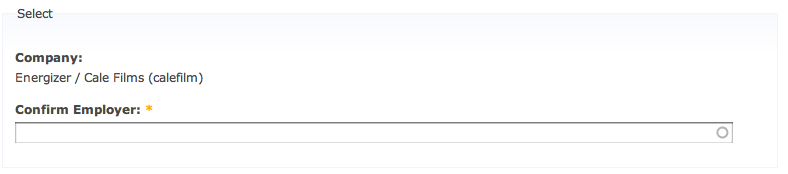
I created a content level field type, left all fields selected under "view" and "edit" but the one field I want to lock I clicked "edit" off. So if all goes well, I'd like the second author to be able to view the field within the node edit page but not be able to edit this field. I provided a picture of my example below.
My suggestion now is, can you make a module "Field Lock Module" and just have one simple permission in Permissions for each role--and call this permission Field Lock?
As for field permissions, I already use content permissions to make fields on and off or editable or not for each role? Because I'd rather just use your module for field lock. And Field Lock seems to be a critical component missing in Drupal. And you seem to be the only one willing to save the day!
Comment #6
calefilm commentedComment #7
calefilm commentedIs this the result you are intending to implement?
This jpeg is an example of what I would consider a locked field: "Company". "Company" is a locked field where the original author selected "Cale Films" and thus, any new editors cannot edit this field anymore. The input is locked in the database.