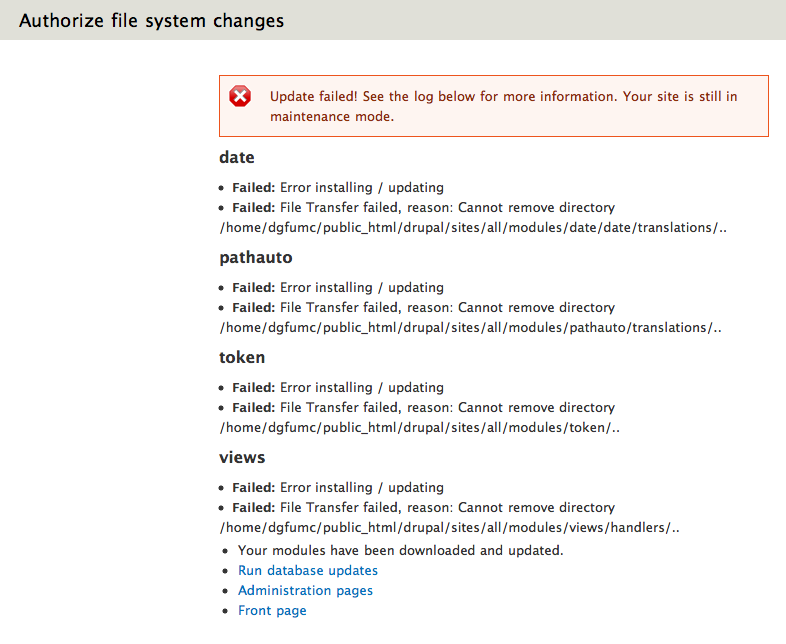
When updating any module in 7.0-beta2, i get a failure in a page entitled "Authorize file system changes" with the following text (see attached PDF):
----
Update failed! See the log below for more information. Your site is still in maintenance mode.
wysiwyg
Failed: Error installing / updating
Failed: File Transfer failed, reason: Cannot remove directory /home/dgfumc/public_html/drupal/sites/all/modules/wysiwyg/translations/..
Your modules have been downloaded and updated.
Run database updates Administration pages Front page
----
There are a few bugs:
1) There is presumably some problem with file permissions, although I had no problem installing the module using the Drupal menu system
2) The site was not in maintenance mode in the first place and is not in maintenance mode now, so the message is incorrect
3) The message says that the modules have been "dowloaded and updated" so it is unclear to the user if they can safely ignore the message or what action they should take. In fact, as a Drupal newbie, I'm not sure if I should just manually delete the original files in /sites/all/modules and replace them with the new ones. More helpful advice would be useful.
Also, shouldn't there be a log entry somewhere? There is nothing in the "Recent log messages".
I am running Apache 2.0.63 PHP 5.3.3 MySQL 5.1.51. I started with a fresh 7.0-beta1 installation and upgraded to 7.0-beta2 without problem.


Comments
Comment #1
rosborn commentedI should have mentioned in my original report that this happens with all my updates, not just this module.
Comment #2
jason89s commentedI'm having identical problems with my installation. The initial installation of modules and themes run smoothly, but updating them displays these messages. When I investigated further, the folders that it claimed could not be deleted were in fact still present on the system and usually a file or two were still present in each folder and were not updated, but the rest of the update applied successfully leading to broken modules and themes due to the incomplete update.
Comment #3
rosborn commentedThanks for the confirmation. I've got around this by using drush, which doesn't seem to have this issue. I am a little worried that most of the more experienced Drupal users use drush regularly, and somehow this is slipping under their radar. Of course, it might be a quirk of my setup, but I'm using a standard Cpanel installation, with a fairly up-to-date installation, and I'm worried that if this is a bug that makes it into the final release, there are going to be quite a few complaints from the first round of new users. If I confirm the bug with the next module updates, I will probably upgrade the priority to "major".
Comment #4
rosborn commentedThis is just to confirm that the module update system does not work, with the same symptoms as when I first reported it on October 28. I am running on a Linux Apache server with a standard Cpanel installation (Apache 2.0.63 PHP 5.3.3 MySQL 5.1.51), using Drupal 7.0-beta2. The first install of nearly all these modules was done using the administration menus, and I was able to update them all using drush pm-update (although I ended up manually deleting and then downloading token, because it claimed that no code needed updating - that might be another bug), so I don't think I did anything non-standard to get to the current state of my installation. I am happy to provide other information if you let me know what to look for. I have elevated the priority to "major" because, if it is a real bug and not unique to my setup, then it makes the administration update system useless.
Comment #5
int commentedComment #6
rosborn commentedJust tested the bug in drupal-7.0-beta3, and it's still there, i.e., I tried to use the administration menus to update 'Date' and got an error, but was able to update using drush without problem. Since I gather that the maintainers are now sifting through all the remaining major bugs, I thought I would post a few more screenshots showing (a) the error page, (b) the subsequent drush dialog, and (c) my status report after the successful drush output. I hope it's helpful in finding out what's going on.
Comment #7
rosborn commentedThe system wouldn't let me upload more than one file at a time, so I'll post them here separately.
Comment #8
rosborn commentedAnd the final one.
Comment #9
rosborn commentedJust wanted to make sure this issues had the right component name to link it to http://drupal.org/node/971546.
Comment #10
int commentedIt's the same issue that this.
#935036: File exists in FileTransferFTPExtension->createDirectoryJailed()
Comment #11
rosborn commentedI wasn't sure they were identical, but I'll take your word for it. I'll test the patch and report back.
Comment #12
rosborn commentedI tried both patches in #935036: File exists in FileTransferFTPExtension->createDirectoryJailed() and they made no difference. They are clearly related issues; my error message says it cannot remove a directory ending in '..', whereas the patch adds a check before creating a directory ending in '.' or '..'. I have applied the equivalent change to the 'removeDirectory' function of filetransfer.inc as the patch applies to 'createDirectory' and will test it as soon as I can.
Comment #13
int commented@rosborn, the bug is the same.. the fixes is the same, but applied to both function.
So we have to fix the patch in the other issue.