

 Come together with the global Drupal community in Rotterdam, 28 Sept – 1 Oct 2026. Sessions, contribution, connection, and Early Bird savings until 8 June.
This module is awesome! The only problem is that it creates new thumbnails in addition to all the ones that are already created by imagecache.
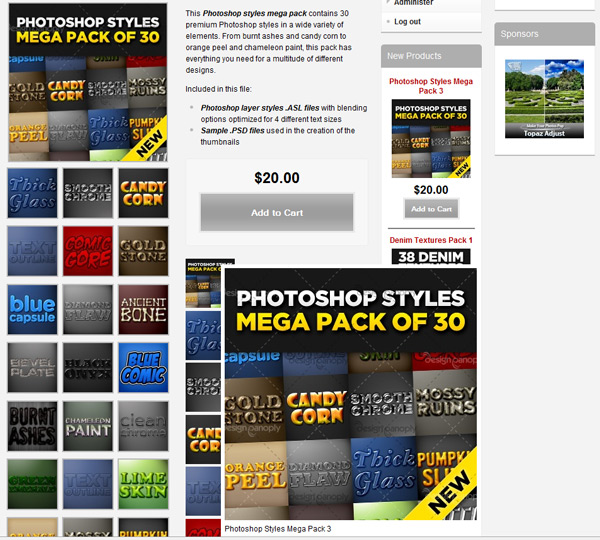
I'm attaching a screenshot. You'll see that it works awesome and the hover effect is exactly what I want, however, I want the imagecache thumbnails that come standard to have the hover effect and not create new ones.
| Comment | File | Size | Author |
|---|---|---|---|
| hover-problem.jpg | 130.98 KB | haysuess |

Comments
Comment #1
rjbrown99 commentedThis module does not create any images - imagecache does it. All this is doing is outputting whatever imagecache settings you configure it with (i.e. imagecache setting #1 should hover to imagecache setting #2.) Just change the imagecache from/to in your view or at the theme level, wherever you configured it.
Comment #2
haysuess commentedI know it doesn't create any images, but as you can see in the screenshot, it makes the imagecache setting display twice.
Comment #3
rjbrown99 commentedYou will have to provide significantly more information for assistance. How are you using the module? How do you have it setup? Is it a view? Theme function? What are the formatters set to?
Comment #4
haysuess commentedAll I did was enable the module, and followed the directions by going to content type > view fields > and set the imagecache uc_thumbnail to preview the imagecache full size image when hovered over. It created duplicated thumbnails on all the product pages for some reason. I figured it'd just add the hover effect to the default imagecache uc_thumbnails on the product pages. I'm using the default Ubercart product pages.
I found a better solution in Magic Zoom so it is irrelevant now. Thanks for trying to help though.
Comment #5
rjbrown99 commented