

 The 2026 Drupal Business Survey is open. Your response will help shape the future of the Drupal business ecosystem.
Hia, creating this support request to maybe be able to shed some light over an issue. I've gotten quite a few SCORM-files that throws these javascript errors at me:
Unable to find an API adapter
and further:
Unable to locate the LMS's API Implementation.
LMSSetValue was not successful.
These come from the attached javascript that is a part of every SCO, which stated purpose is to "provide a consistent means of finding the LMS API implementation within the window hierarchy and (2) to validate that the data being exchanged via the API conforms to the defined CMI data types." I get the error several times per pageview, but everything seems to work fine other than. If I simply remove the file the SCO layout is broken, but the SCO works..
So, any idea what this scripts tries to find? Is there a standardized way to find (and provide) an "LMS's API implementation", or is this something added by this specific SCO creating software because that software might be too closely tied to a specific LMS? I can't recall seeing it before, and I also got the same error trying to launch the SCOs through the ATutor SCO player.. All clues appreciated!
| Comment | File | Size | Author |
|---|---|---|---|
| #17 | rd.patch | 1.37 KB | borgewarvik |
| #13 | sco-entity.png | 68.36 KB | vegardjo |
| #13 | player.php_.txt | 17.35 KB | vegardjo |
| #11 | player.php_.txt | 17.78 KB | dirk.westrup |
| #6 | sco_js.png | 319.75 KB | vegardjo |


Comments
Comment #1
vegardjo commentedBTW, SCOs are made with: Lectora Enterprise Edition v.2007(4297)
Comment #2
dirk.westrup commentedHi, I'm not an expert for the content creation process, but one problem could be, that the javascript code does not work with the used browser (or something similar).
During module tests we used Adobe Captivate, Articulate and Hot Potatoes. In an Adobe Captivate package I've found the attached javascript file. The methodes findAPI, getAPI and setAPI exists, too. But the implementation is different. Perhaps, if you switch only the detection methods, your problem is solved.
Have you tried to export in different SCORM versions? Authoring tools could implement each standard differently.
Comment #3
dirk.westrup commentedsorry, I forgot the file
Comment #4
dirk.westrup commentedscorm_support.txt
Comment #5
vegardjo commentedHi Dirk, thanks a lot for chipping in! I've now tried the SCO in latest Safari, Chrome, Firefox and Opera on OS/X and found the following:
Your browser does not support dynamic html. Please download a current version of either Microsoft Internet Explorer or Netscape Navigator and try visiting our site again. Thank You.- more than indicating that this is an old SCO....so, have you tried this with js compression on? Does the Adobe Captivate package work then? I'd be happy to send you one of my SCOs to test with, but I don't think I can't attach them here in public as I don't "own" them. If you'd like to test please send me an e-mail at [my username here] @ gmail.com or through the contact form on my profile.
BTW: I'm not the one who have made the SCOs, or the one who use authoring tools, I just get the finished SCOs that people want to show. In other words I can't export them in different versions (this was 1.2, though) :)
Comment #6
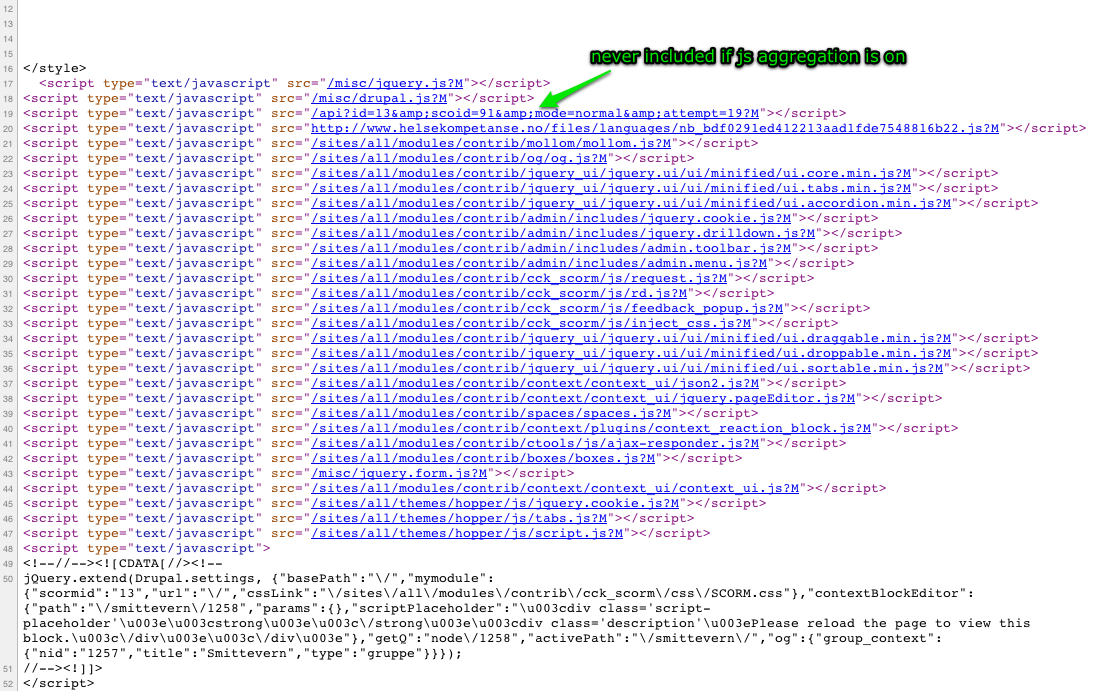
vegardjo commentedChanging category, because I think this actually is an issue with the module. I've experimented a bit and found that the js referenced to in my first screenshot here is never included if javascript aggregation is on. The other files from the module (request.js, rd.js, feedback_popup.js, inject_css.js) are.
The js is included in player.php, line 117:
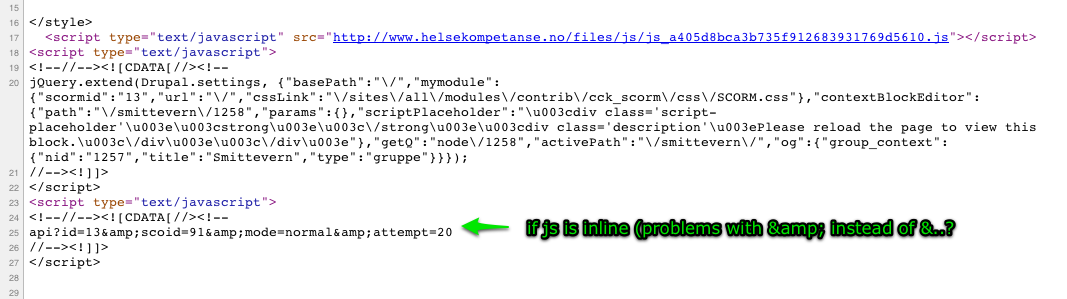
drupal_add_js('api?id='.$cm->id.$scoidstr.$modestr.$attemptstr, 'core');I have tried to set 'inline' as an argument instead of 'core', which I believe should solve this, but it doesn't. See second screenshot for the result (now with js aggregation enabled).
However, if you examine both screenshots you will see that it uses
&instead of&- could it be that using the entity works if you reference the file through the script tag, but not if you use it inline? If I click the link to the js in the first screenshot I get an error in the browser, but if I change all html entitites (&) to plain &-s I get to see the contents of the file (which in this case is the datamodels/scorm_12.js.php).Comment #7
vegardjo commentedHm, it's actually only adding the reference to the file inline, not the script itself, so no wonder it doesn't work.. :)
Comment #8
vegardjo commentedSo, tried this one too as a replacement of the original line 117:
drupal_set_html_head('<script type="text/javascript" src="/api?id='.$cm->id.$scoidstr.$modestr.$attemptstr.'"></script>');(allthough I believe it is considered very bad practice..)
I get the desired output (the link to the file, also with js aggregation enabled), but it still doesn't work. Maybe because of the entities, but then again I don't understand why the same reference works when js aggragation is disabled..?
Comment #9
dirk.westrup commentedHello vegardjo,
I have sent you an e-mail :-)
Perhaps we can already work on your issue tomorrow, but this depends on some other tasks which need to be done first.
Comment #10
dirk.westrup commentedHello Vegard,
I think, that I solved the problem. (player.php file is attached)
The original line 117:
drupal_add_js('api?id='.$cm->id.$scoidstr.$modestr.$attemptstr, 'core');
The added Javascript code load the SCORM API. This is done dynamically and the Javascript file does not really exists, because we have to detect which API has to be loaded first (e.g. SCORM 1.2 or 1.3). So, if this Javascript code is aggregated some parameters are lost and the process cannot be executed successfully. But we can bypass this easily:
New line 117:
drupal_add_js('api?id='.$cm->id.$scoidstr.$modestr.$attemptstr, 'core', 'header', FALSE, FALSE, FALSE);
This change will forbid Drupal to cache or preprocess this single Javascript line. I was able to test some of your SCOs successfully. Could you please verify it and report your result? Just dowload and rename the attached file and flush all caches in your test environment. If erverythings works fine, we will publish this in beta10, including some other bug fixes.
Comment #11
dirk.westrup commentedComment #12
dirk.westrup commentedComment #13
vegardjo commentedAh, we are getting there - thanks a lot for taking the time to look at this! :)
After your change to line 117 the js is indeed loaded even with aggregation on, however I still get the same error message as the reference is wrong due to the
&entities in the URL, see screenshot.This line:
<script type="text/javascript" src="/api?id=13&scoid=91&mode=normal&attempt=50?1290598665"></script>should be:<script type="text/javascript" src="/api?id=13&scoid=91&mode=normal&attempt=50?1290598665"></script>To fix this I had to change the following lines in player.php accordingly:
line 60:
$attemptstr = '&attempt=' . $attempt;should be$attemptstr = '&attempt=' . $attempt;line 83:
$scoidstr = '&scoid='.$sco->id;should be$scoidstr = '&scoid='.$sco->id;line 85:
$modestr = '&mode='.$mode;should be$modestr = '&mode='.$mode;..and with those additional changes the error is completely gone! I have tested on some other pages with some other SCOs too, and I can't see any immediate side effects.
I've tested this in Firefox, Opera, Safari and Chrome with the same result. I don't quite understand why you do not get the same error, but I'm thinking it must be a browser issue, where your browser reads the
&as a&, but mine doesn't..Here's my player.php attached, where all these changes are done, and everything is working.
Comment #14
dirk.westrup commentedOk, nice, bug is fixed.
Comment #15
vegardjo commented..we are experiencing this again, so setting to active, will investigate more and update here when I find something.
Comment #16
vegardjo commented..we are experiencing this again, so setting to active, will investigate more and update here when I find something.
Comment #17
borgewarvik commentedHi,
here is a patch for some of the errors. This one fixes one issue when javascript aggregation is turned on. It also fixes some issues in javascript/rd.js: I've added checks to see if an element really exists before performing operations on it.
Comment #18
borgewarvik commentedChanging priority, we need this fix patched. We hope you can have a look at this soon. Thanks :)
Comment #19
dirk.westrup commentedWe will use the patch in the next version (will be released next week -> tuesday or wednesday).
Comment #20
pgerling commentedThe patch has been used in beta17.
Thanks a lot for your help! :)