

Needs work
Project:
Bartik
Version:
1.0.2
Component:
Functionality
Priority:
Normal
Category:
Feature request
Assigned:
Unassigned
Issue tags:
Reporter:
Created:
17 Nov 2010 at 01:29 UTC
Updated:
11 Jan 2023 at 23:47 UTC
Jump to comment: Most recent, Most recent file


Comments
Comment #1
osha commentedI just spent 2 hours confused because of this issue. The footer text wasn't showing up and it took me ages to figure out that it was because the footer text color and footer background color were the same. In the GUI there is no way to change the footer text color or even to see how it is set. Another, possibly related issue: when the footer background color is changed it also seems to affect the content background color.
Comment #2
Jeff Burnz commentedAgreed, this is a silly bug and quite strait forward to fix, we need to add some color options for foreground text where the background colors can be changed.
Comment #3
Jeff Burnz commentedBumping to D8, think we should backport this also. I've been building tonnes of colorable themes this year with D7 and seriously this not that much work - mainly because we have the default colors already, we just need to shift them from being hard coded to colors.css and add them to color.inc.
First step is to identify all the places this can happen.
Comment #4
davycw commented+1
Comment #5
falkendk commentedI added the following color options:
and changed the default text color in sidebar from #3b3b3b to #3b3b3a so color module don't change the the body text color if you change the sidebar text color.
Comment #6
falkendk commentedPatch for 7.x, same as above just for 7.x
Comment #8
mgiffordI added some truly vile colors when playing with this.
Thanks @falkendk for the D8 patch in #5.
The patch looks pretty simple and it works. I don't know what else would be required to mark it RTBC.
Well, more testing. Can someone test this in Windows? Hopefully we can get this in Core.
Comment #9
Jeff Burnz commentedThe problem with the footer is that it substantially changes the design. I think I can live with the sidebar having a non-neutral grey, not sure if that will impact anyone unless they are doing something really radical with color shift and are very anal, but the footer uses rgba.
That said there is no way out of this, color module only supports hex, so we either do this and use hex or stick with status quo of unchangeable footer text and link colors. My vote goes for a change, however this will alter the design of every bartik site that has a non-standard footer background. A small price to pay I think for much greater flexibility.
Regarding the patch:
- I cant see that it removes the colors from style.css (both hex and rgba, the hex is there for non supporting browsers), it should
- footer links have a hover state, this is no longer supported, a regression?
- patch uses background property, should use background-color, most if not all others do in colors.css
- footer wrapper contains a legion of other things that use rgba - how is this working out - could this be handled by adding a "footer borders color" to the color schemes and applying the hex values to those other elements currently using rgba?
Comment #10
wooody commentedHi,
Thats nice its work fine... But what if I want to add like ..
headerlinksidebarfirstlinksidebarsecondlink.. or some more custom ... I dont understand ...is these keys inside color module code.. or its ID or Class ..
Comment #11
RogerHarris commentedIs it advisable just to change the CSS file that specifies the footer text color? Not sure with this is yet. (Need to check w/Firebug). I'm assuming a theme update would override the CSS, but if it's just one change then it shouldn't be a problem. Should it?
Comment #12
mgiffordI wonder if we should have a patch just for the sidebar?
We might be able to address the footer issue when this gets in #1763040: Accumulative patch of fixes and enhancements as we might be able to use RGBa.
Comment #15
mgiffordReroll of #6.
Comment #16
emma.mariaComment #17
mgiffordNeeds re-roll.
Comment #19
emma.mariaComment #20
talhaparacha commentedPatch from 6 applies cleanly to 7.x (commit #1990861) so there's no need for a re-roll there.
Patch from 15 has been re-rolled to 8.2.x (commit #463d844). I haven't worked with JS before so might have made a mistake. Please review that section of the patch with more diligence.
Comment #21
talhaparacha commentedSame as #20, forgot previously to forward it for testing...
Comment #31
komalk commentedPatch #21 failed to apply on 9.2.x.
Re-rolled the patch.
Comment #32
vsujeetkumar commentedAdded unknown word to "dictionary.txt"
Comment #33
vsujeetkumar commentedFixed the "properties-order" issue in css file.
Comment #34
vsujeetkumar commentedUpdated "preview.es6.js" file according to "preview.js"
Comment #35
vsujeetkumar commentedFixed the issue (error Insert `,` prettier/prettier).
Comment #36
djsagar commentedHi,
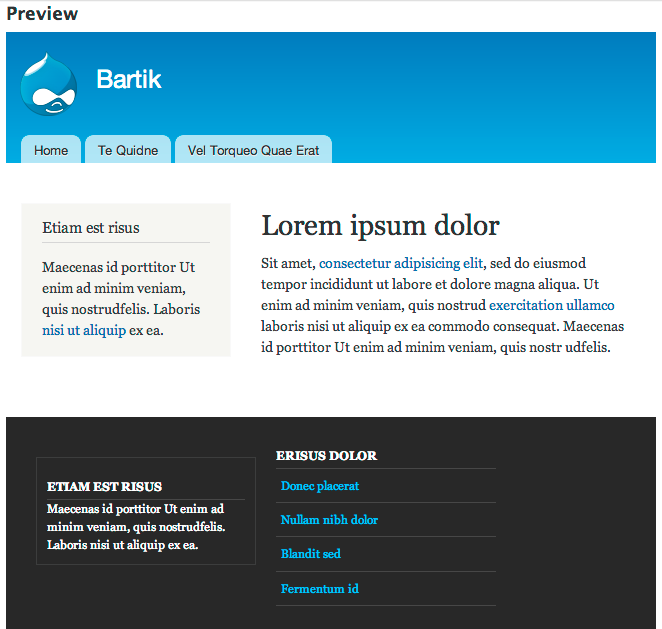
The patch #35 working fine and Add color options for foreground text where background colors.
I attach the attachment as prove.
Thanks!
Comment #39
catchRestoring status after HEAD was broken.
Comment #40
lauriiiI believe we need a change record that explains the changes and how they impact our users.
Comment #44
pameeela commented