

Closed (fixed)
Project:
EPSA Crop - Image Cropping
Version:
6.x-1.x-dev
Component:
Miscellaneous
Priority:
Normal
Category:
Support request
Assigned:
Unassigned
Reporter:
Created:
17 Nov 2010 at 13:33 UTC
Updated:
23 Dec 2011 at 15:04 UTC
Jump to comment: Most recent file


Comments
Comment #1
jonteriele commentedComment #2
konradesko commentedI have same issue. If you check in firebug or similar tool you'll see a info from firebug console:
$("#EPSACropDialog").dialog is not a function
Comment #3
zeutyTry to create imagecache preset with an ordinary crop (IMPORTANT: just crop and nothing more).
Comment #4
zeutyThis problem occurs because of following function in modalframe module's child.js
Just override this js function in your theme js (for example):
With this code all links that use javascript in href would stay the same - target="_new" will not be added.
Comment #5
palamida commentedHello,
I had the same problem - did you clear your cache ?
I disabled "Optimize Javascript files" in Preferences, and the popup dialog was there
and yes, I heard that having the "libraries" folder in the site/all/ directory could cause some problems too
Comment #6
kongoji commentedThe trick is to add the class "modalframe-exclude" to the "Manage image crops" link.
I attach a patch for the current stable version, but it would be the same also for the dev release.
Comment #7
kongoji commentedSorry, I inverted the files... I attach the working patch here
Comment #8
yvmarques commentedHello,
Commited in 6-1.x-dev, thanks for the patch.
-- Yvan
Comment #9
joran lafleuriel commentedHi all
Thanks for this great module.
I have this problem WITH 6.x-1.x-dev even if I DO NOT use modalframe...
No way to open crop dialog box !
Here is the message in console :
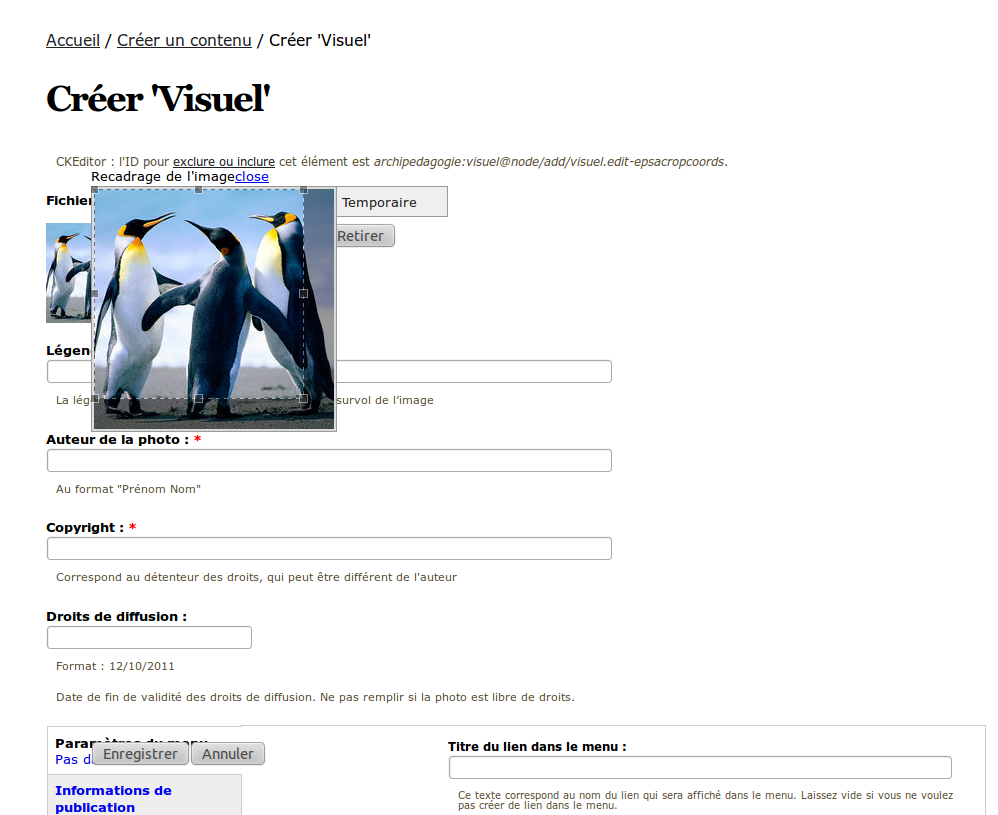
$("#EPSACropDialog").dialog is not a functionMy config : jquery update 6.x-2.0-alpha1 + jquery 1.8.4 on Drupal 6.20.
I use the Libraries Module so Jcrop and json2 are in the
/sites/all/librariesfolder...I have deactivated javascript aggregation and compression... I have flushed cache about 200 times...
No way to fix-it.
It was running perfectly but I can't identify which upgrade made it crash.
Should I downgrade Jquery ?
Please help ! Thanks !
Comment #10
joran lafleuriel commentedOK... help yourself !
I have downgraded jquery ui to 1.7.3 and it's looks much better ! : the EPSA crop windows appears...
Got some little problems with background opacity and save button...
...but the solution seems to be her : must use an appropiate version of jquery ui.
Sorry for the post if I should have know this before... It may help some other "newbie" like me ;-)
Comment #11
yvmarques commentedHello,
I tried the module with the latest versions of jQuery Update and jQuery UI modules. I can't manage fix the module for higher version if these modules (jQuery Update and jQuery UI) doens't support it.
I already knew that EPSACrop doesn't work with this version of jQuery UI, the only one way to fix it, is to have the rights versions.
Regards,
Comment #12
yvmarques commentedComment #14
gaëlg@ratjaune (#10)
Yes, I have some little problems too with background opacity and save button. How did you fix it? Couldn't this be commited without breaking the display in previous jquery versions?
Thanks !
Comment #15
yvmarques commentedHi GaëlG,
Can you send me a screenshot with the problem and tell me which jQuery UI and jQuery Update version you're using ?
Thanks,
-- Yvan
Comment #16
gaëlgOf course ! Nice to see such a fast maintainer. Thanks !
Drupal 6.22
jQuery UI 1.7.3
jQuery Update 1.3.2
with following modules enabled :
jQuery UI 6.x-1.5
jQuery Update 6.x-2.0-alpha1
Modal Frame API 6.x-1.7
Node Relationships 6.x-1.6
Libraries 6.x-1.0
Comment #17
yvmarques commentedOk thanks, I see more or less the problem I will check it and come back to you soon as an idea :)
-- Yvan
Comment #18
gaëlgThank YOU!
Comment #19
yvmarques commentedHi GaëlG,
I found the problem and fixed it in the last 6.x-1.x-dev release (maybe not yet build). Actually the problem was that the structure of jQuery UI 1.7.x folder is different from jQuery UI 1.6.
So I fixed it and here is the patch that was committed.
Comment #20
gaëlgPerfect. I had to apply the patch manually to my 6.x-1.2 version, but it makes epsacrop work for both versions of jQuery. Thanks again.
Comment #21
yvmarques commented