

 Come together with the global Drupal community in Rotterdam, 28 Sept – 1 Oct 2026. Sessions, contribution, connection, and Early Bird savings until 8 June.
I'm running CCK 2.8 and the latest dev version of UC CCK Currency, have tried installing the undeclared dependency on Numbers but when I try to add a field to the product content type (decimal, float, integer, whatever), I have no option to select or even see any 'Multiple currency field settings'.
I do see the price handler in in admin/store/settings/price-handlers and have set that up as directed.
Any suggestions?
| Comment | File | Size | Author |
|---|---|---|---|
| #7 | Multiple_Currency_Group.png | 31.62 KB | Rj-dupe-1 |
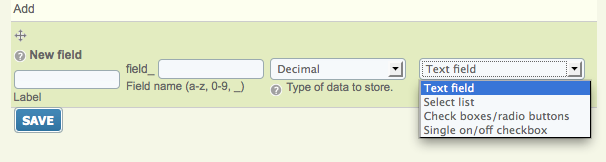
| #7 | Widget_Selection.png | 30.65 KB | Rj-dupe-1 |


Comments
Comment #1
d0r0ttya commentedModul "currency cck" and "currency" are installed?
Comment #2
Rj-dupe-1 commentedYes. I didn't realise there was a dependency on currency cck initially (haven't seen it documented anywhere) so first installed without it but now have both.
Comment #3
yannick menard commentedsame problem, all modules installed but still no widget
UPDATE : ok, was looking for a new widget in currency but found it in decimal
Comment #4
Rj-dupe-1 commentedIt's still not hiding in decimal over here.
Comment #5
amitaibu1) UC CCK currency has no dependency on curreny or cck currency.
2) The field type you should create is a number/ decimal provided by cck.
Please send a screenshot of the field edit page
Comment #6
Rj-dupe-1 commentedOkay, I think it's just a documentation issue; I was looking for a widget to be added to the widget selection drop-down on field creation but there is nothing there. However, when I selected text field as the entry widget, on the next field configuration screen there is a group that allows me to enter details for the currency.
I think this is what was intended... but we probably need to fix the documentation.
Comment #7
Rj-dupe-1 commentedOverview
The way to use this module is to create a series of fields, one each for the currencies that you want to support on your site. These currency fields are then hidden using the standard CCK capabilities and you can use a specially crafted link to switch the standard Ubercart price field to display any of the currencies you have entered.
Creating a Currency Field
There is no "currency" widget to select when creating the field. Instead, once you have enabled the module, simply create a field with type "decimal" and use any of the data entry widgets that are available for decimal fields on your system, as shown in Widget_Selection.png, attached. It's probably a good idea to name the fields with the currency code that they represent, it will make life easier later. I used "field_price_" + eg field_price_aud for the Australian Dollar price.
Once you have created the field, on the next page there is a "Multiple Currency Field Settings" group that is closed by default. Open it by clicking on it and you will see the internals as displayed in Multiple_Currency_Group.png as attached. The details are pretty self explanatory, so go ahead and set up the currency details for this field.
Fill out the remaining details on this form as necessary but note that there is no need to enter anything in the "prefix" or "suffix" fields near the bottom of the form, they have no bearing on currency.
Rinse, Repeat
Create a field for each currency that you wish to support in your site.
Hide the Foreign Pricing
Unless you have some reason to display foreign pricing to all of your users, you can hide all of the fields that you created above. Go into "Display Fields" and exclude these fields from display. Be careful to not set the standard UC Price field to hidden here or in your theme settings; the standard price field is where all of your multi-currency pricing information will be appearing.
Set Your Price
Make sure to set a price in that currency for all of your products that you wish to sell internationally.
Set Active Currency
By default, UC will display the default currency that you entered into your "Price" fields. To switch to a foreign currency, simply go to a link similar to mydrupalsite.com/uc_cck_currency/set/field_foo where "field_foo" is replaced by the field name for the currency that you would like to display. As per my example above, if I wanted to display the price in Australian Dollars, I send the vistor to mydrupalsite.com/uc_cck_currency/set/field_price_aud which switches the active currency for this session to AUD and redirects them to the Home page. From then on, every price that they view until they clear their cookies will be drawn from the field_price_aud entry.
Cleaner Links
If you want your URLs to be cleaner than this, simply create an alias for each of the appropriate fields. I set up an alias for /aud to /uc_cck_currency/set/field_price_aud so if I send customers to mydrupalsite.org/aud they will then view the entire site in AUD. I'm sure you can come up with better URLs.
Comment #8
rikki_iki commentedIs there any way to set the currency without redirecting them from the page they are on? Can it just refresh the page??
Comment #9
jensvoigt commentedYes, if you specify the ?destination in the URL. See an example here: http://drupal.org/node/982446#comment-4101762