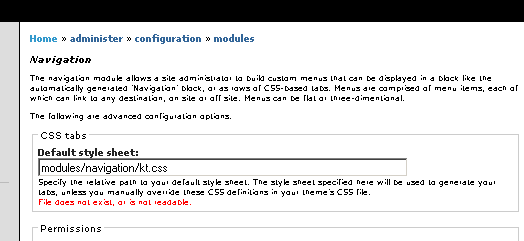
I've followed the instructions for installation, copied the needed files into the modules/navigation folder (where the modules directory is in the webroot), and tried to use the 'default' template to start building a more CSS-driven tabbed menu, but the admin UI continually reports:
Specify the relative path to your default style sheet.
The style sheet specified here will be used to generate your tabs,
unless you manually override these CSS definitions in your theme's CSS file.

File does not exist, or is not readable.
i've checked file permissions (even performing the security no-no of chmod 777 to test it out ), but the core can't find the style sheet.
am i missing a core setting somewhere?


Comments
Comment #1
jeremy commentedFor example, I have a file called 'kt.css' in the modules/navigation directory. Thus, at "administer » configuration » modules" I set the "Default style sheet" to "modules/navigation/kt.css".
What path are you setting? It needs to be relative from the top Drupal directory, and readable by your web server.
Comment #2
ComradeBurnout commentedthe path setting is relative to the webroot.
i'm attaching a screenshot ....
Comment #3
(not verified) commentedOkay, it sounds like you're configured properly. Take a look in your web server error log -- it will tell you why the file is unreadable...
(There may also be something in the watchdog log)
Comment #4
ComradeBurnout commentednope, nothing in the server error log ... and i don't have anything in the cron log ... so i'm not sure where else to go.
Comment #5
jeremy commentedWhat are you using for a web server? The Drupal error 'File does not exist, or is not readable.' should result in an error being written in your web server log. (ie, if using apache, look in the 'error_log') Be sure your web server is properly configured to log errors.
Comment #6
ricabrantes commentedThis topic this closed because of the time without answers