Closed (won't fix)
Project:
UC Worldpay
Version:
6.x-1.0-rc1
Component:
Code
Priority:
Normal
Category:
Bug report
Assigned:
Unassigned
Reporter:
Created:
2 Dec 2010 at 17:38 UTC
Updated:
8 Nov 2011 at 21:58 UTC


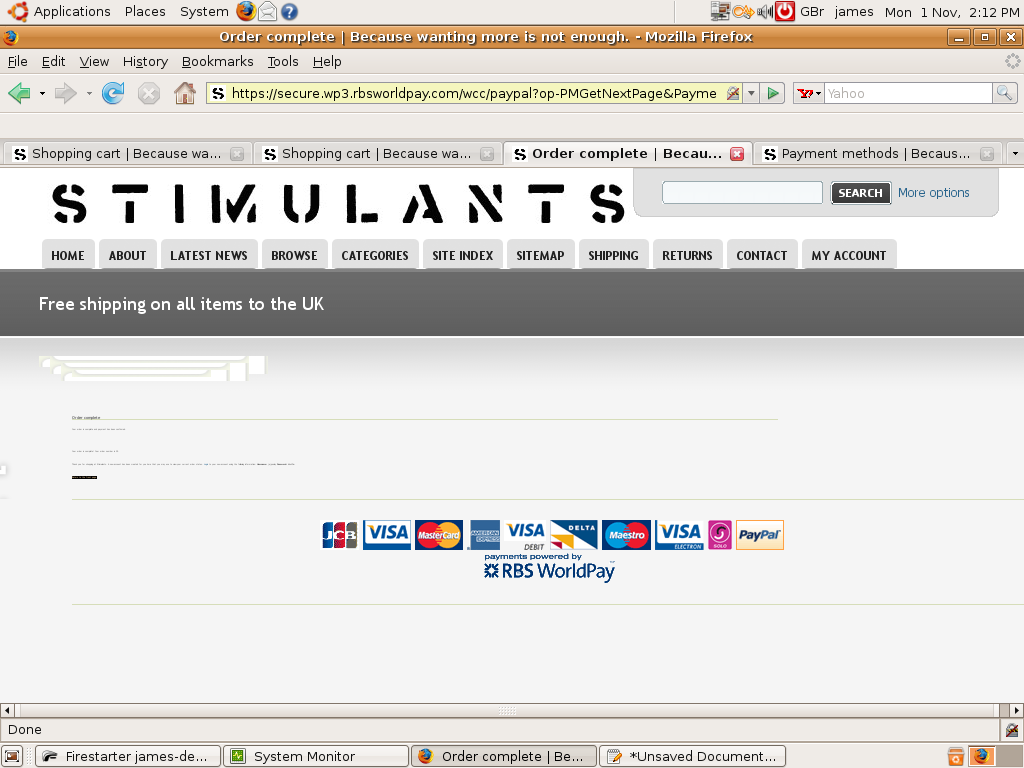
UC worldpay module seems to be working fine but text on order completion screen is so small as to be unreadable (see attached png). Any ideas what could be causing this?
| Comment | File | Size | Author |
|---|---|---|---|
| SmallText.png | 120.88 KB | darren p |

Comments
Comment #1
nathanjo commentedThe messages is even hardcoded - can't we use the checkout message from ubercart in admin/store/settings/checkout/edit/messages? in that way we can easily format or change text.
@darren I guess its your css/theme.
Comment #2
jens peter commentedI had a similar problem with wordpay where it simply ruined my layout on the return page.
In my situation it was an empty div.
As soon as I added a space to that div, it all worked.
If you have sloved the problem please let us know how.
Comment #3
mttjn commented@jenspeter: same here - worldpay is destroying styling on the cart/worldpay/complete page (the return page) :(
can you elaborate on how you solved it please? when you say "empty" you mean it had no other elements inside it, and you just put a   in there and it fixed the broken style for the entire page? did the div have any styling on it? any details/advice/suggestions would be much appreciated... thank you.
Comment #4
matason commentedHi, @jenspeter is spot on, I contacted RBS a long time ago about this, have a look at their response - http://drupal.org/node/369096#comment-3425360
Comment #5
mttjn commented@Matason: **Thank you** Was driving me crazy..
Comment #6
jens peter commentedsorry, I forgot all about this post and did not see the reply and question to me. I wish we could use RSS feeds on here :-)
An answer to mttjn: Yes, I used the DIV for adding a graphic through the CSS so it was empty. I simply added a space and somehow Worldpay found the div and all was styled perfectly.
I just had the exact same issue with another shop system so I feel very confident that this is a Worldpay issue - I had not seen the reply from Worldpay as Matason pointed to. Thank you for that, Matason.
Sorry for being this lazy in getting back - I simply didn't see your questions.
Cheers, Jens Peter