

Closed (fixed)
Project:
Content Construction Kit (CCK)
Version:
5.x-1.0-beta
Component:
content.module
Priority:
Normal
Category:
Feature request
Assigned:
Unassigned
Reporter:
Created:
25 Nov 2006 at 14:36 UTC
Updated:
3 Jan 2007 at 05:46 UTC
Jump to comment: Most recent file


Comments
Comment #1
yched commentedYou're right, this should be added.
Currently the 'core' body field behaves as if he has weight 0.
Forms currently acknowledge that, but node views currently do not, so we have to fix this first.
I have submitted a patch for this here : http://drupal.org/node/99713
I did not commit it for now because I'd like to have Karen's advice.
Once this get fixed, we can add the body (pseudo)-field to the overview in a breeze.
Comment #2
yched commentedComment #3
yched commentedFixed in 5.0 and HEAD branches.
Body is now listed in the fields overview.
I guess the next step would be to order the whole list according to the weigths.
cck fields already are ordered, body should probably be as well - not sure about the title : its weight makes sense only for forms, not for node view.
Side note : With the new node render system, there will probably be requests for an 'all fields overview' feature (including 'fields' added by other contrib modules). I'm not sure the field overview in CCK has a vocation to do this.
Its is probably OK for title and body, since they are core - I'm not even sure about what to do with taxonomy.
Comment #4
fagoah great.
I would like to see that they can be edited like any other field, so that weight, label, and description can be customized.
The configured data could be set through hook_form_alter(), but the question is: How shall we integrate these features into the CCK module?
Add an extra module for this or extend content.module and content_admin.inc to do it?
Furthermore I would support this fields with the fieldgroup module, so that they can be moved into groups too.
Comment #5
yched commentedNot that easy at first sight:
- labels for body and title are managed in core, they can be edited in (core) admin/content/types/your_content_type, I'm not sure CCK should provide its own interface to duplicate / bypass this.
- even so, node_type does not have any column to store body and title weights - where would we store these ? Those are not "fields" (as in "CCK fields"), so they don't belong in node_field_instance (without complicating our lives messing with 'pseudo fields', I mean).
'type_name'_body_weight/'type_name'_title_weightvariables, then ? not very nice...I agree it would be nice to include them in fieldgroups, but ... well cck (and fieldgroup) deal with cck fields. We should be very cautious about adding things about external fields.
I don't mean to shut the door, though, suggestions welcome :-)
Comment #6
karens commentedI have an idea to make field weights easier to work with and (hopefully) avoid some of the confusion about where fields fit into the page among other elements. I have put together a patch that does the following:
1) Removes the weight selector from the individual field settings page by making it a hidden field. I did this because setting the value there where you can't see other weight values is pretty hard to use.
2) Weight selectors are added to the field overview table. Weights for title, body, and taxonomy are shown, too, but disabled to reflect the fact that you can't edit them from this module (we can change that in the future if we do want to allow people to edit them from here).
3) The whole table, including the body and title fields, is sorted into weight order to make it very easy to see how the fields will fit into the page.
4) You can select weights for any or all of your fields on this page and save them all at once.
5) After you save the weights, the table is re-sorted to reflect the new sort order.
This doesn't yet take into account fieldgroups, and I haven't yet attempted to do the same thing in 4.7 (which will be a bit harder). If it looks good to others, I'll try to expand on it to add those things in.
I think this will be a more intuitive way to select field weights.
Comment #7
yched commentedThis was much awaited I think - thanks for doing this :-)
This seems to be working perfectly.
I just have a few minor comments :
- "Save weight" should probably be "Save weights"
- the _content_admin_field_overview() can be dropped and the callback in content_menu set to 'content_admin_field_overview_form'
(this includes content.module in the patch, that's probably why you left that out for now)
- for the hidden 'weight' fields on field settings page, the '#description' can be dropped, and '#default_value' replaced with '#value'
BTW, what makes you think it will be tricky in 4.7 ?
Comment #8
yched commented(next step is body / teaser checkboxes ? ;-) )
Comment #9
yched commentedEr, late idea :
Another UI possibility for this would be the top-up-down-bottom arrow icons that Earl uses in all his modules (Views, Panels, Nodequeue - I think the code in Nodequeue would be the easiest to grab)
Given the popularity of Earl modules, this tends to be quite common in drupal UI now.
I'm not sure what would be considered more handy - the arrows are more visual, you don't have to build a mental scale for weights, but they mean a page reload on each op.
The "unmovable" items might cause problems, too ?
Comment #10
karens commentedI thought about that, but it would add quite a bit of complexity. The drop-down selects are consistent with the UI in the admin blocks menu, which was what I was (sort of) modeling this on, and it's much easier to do, so I'll probably just do it this way for now. However, I wouldn't be at all upset if someone wanted to try to take what I have and push it in that direction. To tell you the truth, what I *really* wanted to do was incorporate jQuery drag and drop to slide things around, but I decided that's just more than I can figure out right now. Plus, as you said, the fact that some things cannot be moved makes it a lot more complicated.
Anyway, I'm close to getting fieldgroups blended in, and I also figured out a nice trick to pick up other page elements that have been added by other modules so I can show their weights, too, which gives you a nice overview of how the fields will fit into the page as a whole. It's getting close, but I'm quitting for the night and I'll work on it a bit more tomorrow.
Comment #11
karens commentedChanging the name so others can see this is being worked on...
Comment #12
yched commentedOf course, JS drag-n-drop reordering would be the ideal thing here. But there are so many other places in core and other contribs where this would be needed that it makes little sense IMO to provide a CCK-only implementation of the feature.
Ideally there would be a core js "drag-reorder' construct, just like there are collapsible fieldsets. With jQuery on board now, I would be surprised if someone did not came out with a contrib / core candidate module to do this. Then we could see to plug on it - and then maybe "arrows" would be more suitable than dropdowns for non-JS users. Until then, you're right, this is just fine. great feature for 1.1 release.
+ hurray for fieldgroups, and much intrigued about "other contrib fields".
Comment #13
karens commentedHere's a screenshot so you can see where I'm going. The errors are because the fieldgroup integration is not working right yet.
Comment #14
yched commentedWow - isn't that too much info ? The filters fieldsets, the core publishing fieldsets, the buttons ?
Plus we might hit a conflict between view weights and form weights. This overview currently aims at both, I'm not sure we will be able to keep that (not very comfortable) position when we add more stuff to it.
Comment #15
karens commentedWe can choose to display or not any of these items if we want, and probably would not display the stuff at the bottom of the form, I just have it there now to show what is available. Even though it looks like a lot, I am not showing everything on the form, only top-level fields and fieldsets, since those are the ones that control where exactly your fields will fit into the form. This method will also show event fields, location fields, the upload attachments fieldset, etc, if you have those things enabled for this content type, so you can select exactly where among all these fields your CCK fields should show up. The fields you see in the screen shot are not in groups, they are top-level fields where the field weight represents their position on the form. Grouped fields will show up inside their group, but that is the part I don't have working yet.
Let me finish it up and let's see how it looks. I really think you need most of this context to be able to properly assign weights to fields and get the results you want. And we need to provide more context or we're going to keep getting people reporting that CCK is 'broken' because their fields are not in the places they expected to see them.
Comment #16
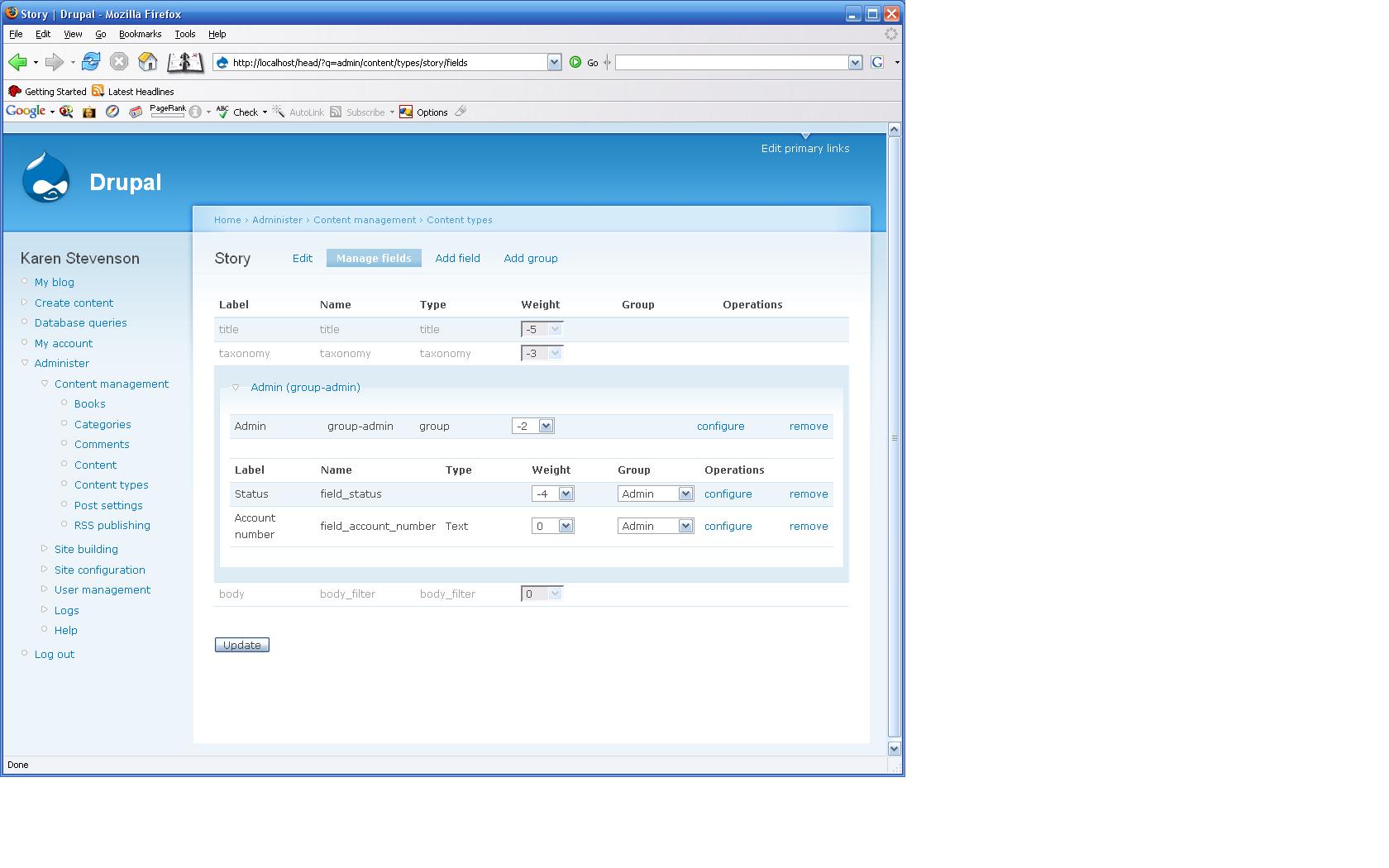
karens commentedOK, I have something working pretty well now that incorporates both fields and groups. It displays grouped fields within their groups and ungrouped fields separately, all sorted by weight. I added the group selection widget to the page as well as the weight selection, so you can select both weights and groups for each element right on the 'Manage Fields' screen.
I altered the fieldgroup module a bit to remove the 'Manage Groups' page, since groups can be managed from the 'Manage Fields' page. I also had to make a small adjustment to one of the fieldgroup submit functions so I could pass values in as form values instead of getting them from arg(3) and arg(5).
This patch is for 5.x. I already started a version for 4.7 and I think I'm going to be able to get that working, too, fairly easily.
Comment #17
karens commentedAnd here is a screenshot showing two fields that are in a fieldgroup, along with disabled indicators showing where the title, taxonomy, and body are in the page.
Comment #18
karens commentedAnd here's the patch for 4.7
Comment #19
karens commentedAnd here's a screenshot in 4.7 of a content type with lots of grouped fields
Comment #20
karens commentedOne last file, here is a css file that won't go in the patch since it isn't already in the repository. This evens out the table columns and dims the rows that you can't update.
Comment #21
karens commentedOops. Forgot to attach the screenshot mentioned above.
Comment #22
karens commentedOK, I give up on the screenshot. It's not uploading for some reason, but you get the idea...
Comment #23
fagocool, really great work!
this interface makes building the content-types a lot easier! assigning fields to groups is really intuitive, great!
I tested the 5.0 version of the patch, it worked great except one tiny thing.
If one disables the fieldgroup modul the page doesn't work any more. You forgot a module_exists() call before using fieldgroup_get_group() in line 151 of content_admin.inc.
This patch also makes the UI to extend fieldgroup to take title, body or perhaps every form field into account.
So let's get this in asap.. !
Comment #24
karens commentedI went ahead and committed this. I think everything is fixed (thanks for catching that problem fago).
Comment #25
moshe weitzman commentedbless you, for you have saved many clicks.
Comment #26
ChrisKennedy commentedlol (literally) @ moshe
Comment #27
(not verified) commented