Active
Project:
GMap Module
Version:
6.x-1.1
Component:
Miscellaneous
Priority:
Major
Category:
Support request
Assigned:
Unassigned
Reporter:
Created:
14 Dec 2010 at 15:55 UTC
Updated:
9 Nov 2011 at 13:48 UTC


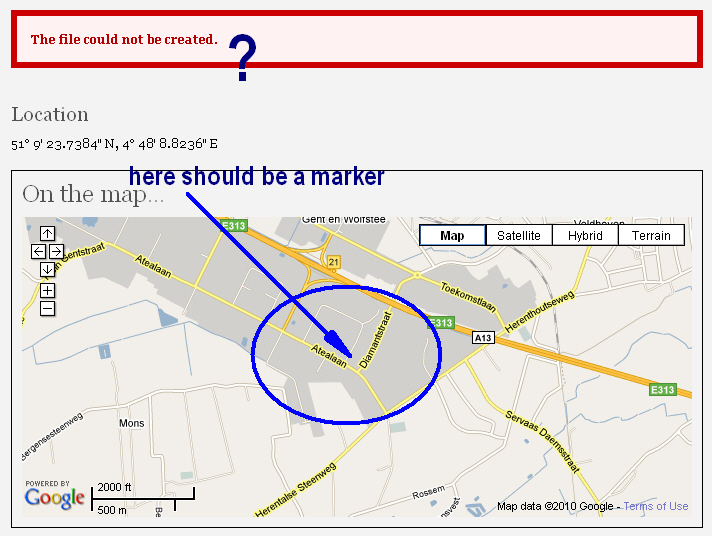
This message is generated when opening the page with a gmap reference and an intended marker on it, except for the fact that the marker is not present on the map.
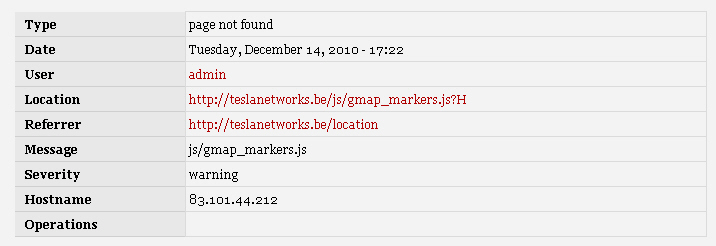
I checked trough the recent log entries (...admin/reports/dblog) and saw something strange.
As the site which I'm speaking of is currently standing in a datacentre, the log of the error showed me a field with title "hostname" and fille din my Ip address of my home (development) server.
On which I first created the website. that's quite strange... and might be at the source of the problem. Anyway I do not have any clue where that came from or howto alter/influence this.
Maybe I'm all wrong in my approach of the reason why the marker is not showing and the error message comes up, but maybe not...
No googling for hours gave me anything close to this problem.
Oh, a little note, on my development server @home, this issue does not occur and my marker gets displayed "a-ok".
Access permissions to the "gmap_markers.js" file are all set and already taken into account.
In attach I'll give you the image shot of the error log and message.
Thanks
| Comment | File | Size | Author |
|---|---|---|---|
| error-message.jpg | 205.47 KB | massyboy | |
| error-log.jpg | 58.18 KB | massyboy |

Comments
Comment #1
morpheusghost commentedhi guys!!!
I have the exact same problem as massyboy and i can not figure out why this is happening.
I 've searched for a solution but nothing came up!!
The issue occurred when we moved the site to another server.
Any hints/ideas about it??
Thnx in advance!!