Footnotes module can be used to easily create automatically numbered footnote citations to references into any formatted text with full CK Editor 5 support.
🇺🇦 |
This module is maintained by Ukrainian developers. Please consider supporting Ukraine in a fight for their freedom and safety of Europe. |
About footnotes (and 4.x branch)
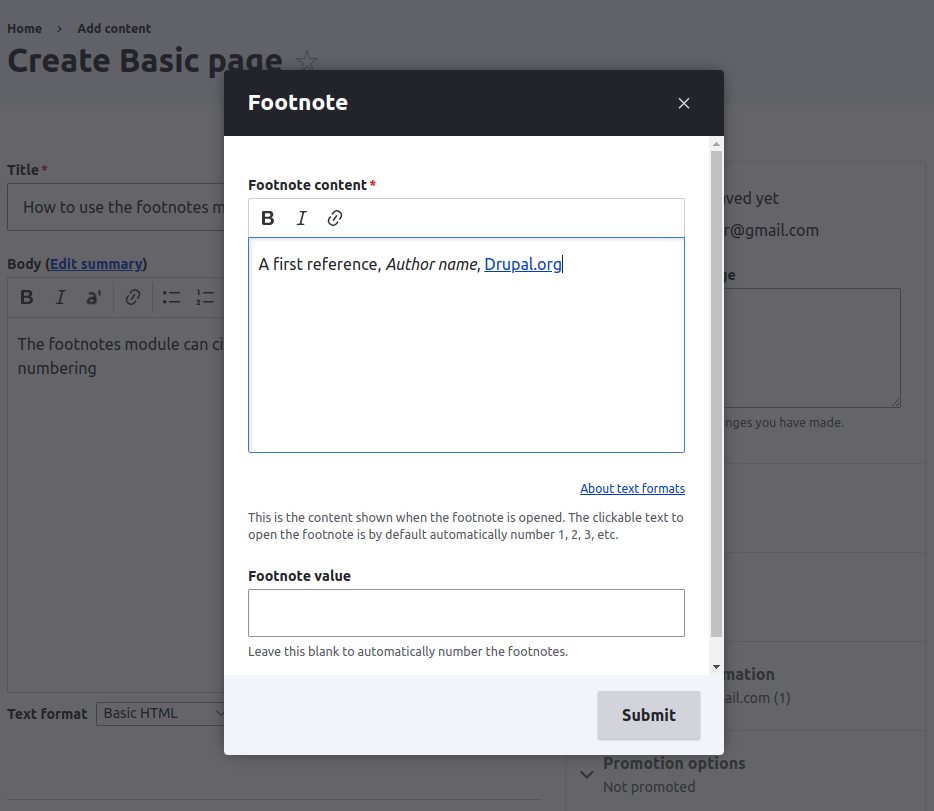
The footnotes 4.x branch is a rework of the module to support WYSIWYG content within the footnote reference itself (eg, bold, links, italics) like a typical reference area needs. It does this by loading a modal window when clicking the footnotes toolbar icon (like media does) instead of using the balloon (like a simple link does).
 Screenshot of the CK Editor 5 modal |
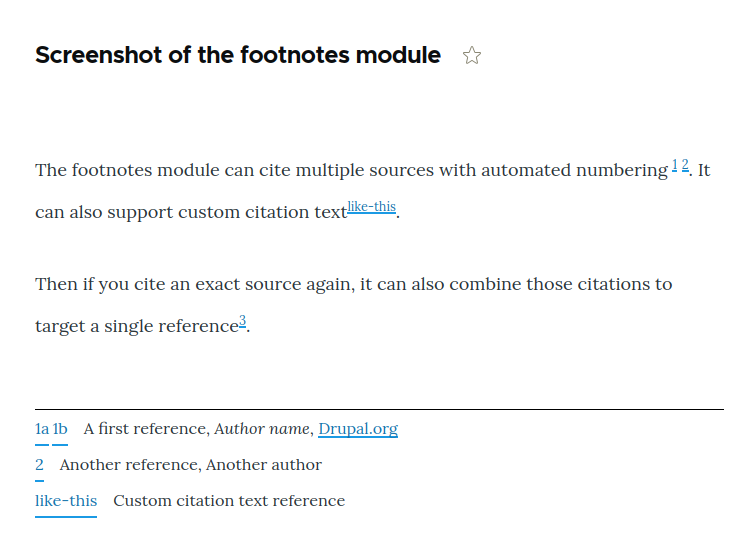
 Screenshot of sample front-end output |
Terminology
- Citation
The link within the text like [1] [2] [3] [custom link] that takes the user down to the full reference source
- Reference
The text output typically at the bottom of the page containing the source details, eg author information, external link, etc
- Backlink
The link from within the references that takes the user back to the citation
Features
- Automated number
Automatically number citations, including across multiple formatted text blocks (optional). It is also possible to manually set specific citation text (or a combination of the two).
- Automated combining same references
Automatically set a citation number to an existing number if the reference is an exact match (optional)
- Adjacent citation theming
Automatically group multiple citations directly next to each other into a theme-able template to support different reference styles
- Reference backlinks to citations
Automatically backlink to the citations from within the references, including multiple backlinks if the reference is cited more than once
- Multiple formatted texts on a page
Decide whether to output the footnote references after each formatted text block, or group them and output all references in a block (eg, useful when there are multiple Paragraphs or Layout Builder blocks containing citations).
- Support for ajax loaded citations
Separate footnote references block (optional) to output the citations via JavaScript instead of PHP in the case that footnotes may be loaded via ajax (eg, BigPipe, Views Ajax, etc)
- Formatted text within the references
Modify the formatting options allowed within the footnote reference: See the 'Footnotes' text format that gets installed (note that Drupal Core does not support modals within modals, so Media Library for example is not supported, but balloons like links are fine)
- References shown in pop-ups
Optionally progressively enhance the reference functionality to have the reference appear in a dialog when a citation is clicked instead of jumping the user down the page.
- Automatic conversion from pasted content (Word, LibreOffice)
Pasting content from Word or LibreOffice now auto-converts the footnotes into footnotes compatible with this module. See the note below if you have cases that do not support this yet.
- Test coverage
Automated test coverage for all of the above
Using footnotes without CK Editor 5 (hand-coding html)
<footnotes data-value="" data-text=""></footnotes> is the default markup; however, if you are hand-coding your HTML, writing nested HTML within the data attribute is extremely painful. Therefore it is possible to do <footnotes data-value="">Reference text <strong>here</strong></footnotes> to make that easier.
Note that there is currently no conversion path between the two options so it is strongly recommended to stick to either all CK Editor 5 or none and not allow the user to switch back and forth.
Pending features
Paste from Word is close but needs work #3413998: Handle paste from office for footnotes. Paste from Word is now in place, but do raise follow-up issues along with the markup you are pasting as there can be a wide range of source formats. We have covered a basic Word and LibreOffice paste auto-conversion to footnotes. You can add 'debug' to your query string variables to get console output as of #3474203: Provide the ability to easily debug source input for paste from word to help us help you.
Installation instructions
General setup:
- Follow the Drupal.org instructions on how to install a module
- Edit the desired text format(s) to add the footnotes toolbar icon
- Enable the footnotes filter
- Optionally move the footnotes filter after 'Convert line breaks to HTML' to avoid line breaks within citations
Outputting the footnotes as a block combining all footnotes from multiple formatted texts:
- Disable the footnotes output via the filter configuration
- Add the Footnotes Group block
- Set the block configuration for 'Current entity context for caching' to 'Node from URL'
Outputting the footnotes as a block combing all footnotes from multiple formatted texts when some are lazy loaded:
- Disable the footnotes output via the filter configuration
- Add the Footnotes Group block
- Tick the box 'Group footnotes using JavaScript'
Theming
There are three template files which can be copied into your theme and modified:
- footnote-links.html.twig
When multiple citations in the text appear next to each other, they are wrapped in this. This is useful if you for example want to do [1-3] instead of [1] [2] [3]
- footnote-link.html.twig
The individual citation link markup
- footnote-list.html.twig
The list of references add the end of the text or outputted in a separate block depending on your configuration
Many Footnotes users don't want the footnotes to show in teasers (such as the front page listing). The correct way to prevent that is by using CSS.
Upgrading from 3.x
Footnotes 4.x uses a new element <footnotes> within CK Editor 5 to allow for WYSIWYG support within it (without having to manually write html tags). It does this by using a completely new plugin which opens in a modal window like Drupal's media library does. This means your existing [fn] or <fn> or [footnotes] content needs to be converted.
First, ensure you have upgraded the module to the 4.x branch + have CK Editor 5 & footnotes added to the toolbar, then run one or more of the follow drush commands.
# Find all fields within 'node' that have text, text_long, or text_long_with_summary, checking if they have footnotes in them and converting.
drush footnotes:upgrade-3-to-4 node

# Do the same for a nested entity.
drush footnotes:upgrade-3-to-4 paragraph

# Do the same for another entity type.
drush footnotes:upgrade-3-to-4 block_content

# Do the same but where the target site is not using CK Editor 5.
drush footnotes:upgrade-3-to-4 node --use-data-text=FALSE
The upgrade path is provided as is - please test it first in a copy and back-up as there is no way to swap back. Please raise issues in the issue queue to add more features to the upgrade path. That said, the upgrade path at this time has been used on hundreds of sites.
Footnotes 4.x works with CKEditor 5, but not any older versions of CKEditor. For CKEditor 4, you will need to use an older unsupported version such as 3.1.x; however, this will not be updated nor receive support from the current maintainer (scott_euser).
Other documentation
- View the module homepage details from the 3.x branch
- View general footnotes configuration instructions
Copyright and acknowledgements
- Footnotes.module is copyrighted by Henrik Ingo and other contributors. It is licensed by the same conditions as Drupal itself. (GPL license)
- Footnotes.module was originally created by henrik.ingo@avoinelama.fi ("hingo" on drupal.org) in the summer of 2006.
- The HTML footnotes were seriously enhanced by "beginner" (on drupal.org) and later on by other users comments and code snippets.
- Footnotes was originally developed for http://openlife.cc/onlinebook
- Beginner was the second to use it on his site at http://www.reuniting.info
- From "hingo": I wish to thank all contributors for letting me experience the miracle of maintaining an Open Source module living its own life!
- Scott Euser at Soapbox has taken over development and maintenance, upgrading to the 4.x branch.
| Attachment | Size |
|---|---|
| Screenshot of the CK Editor 5 modal | 69.5 KB |
| Screenshot of the front-end output | 47.23 KB |
Project information
- Project categories: Content editing experience
 3,084 sites report using this module
- Created by hingo on , updated
 Stable releases for this project are covered by the security advisory policy.
There are currently no supported stable releases.