Jump

marcp - May 20, 2008 - 23:10
Jump menus

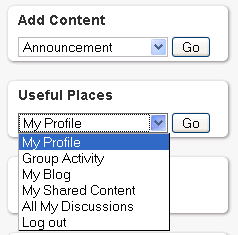
The jump module allows administrators to create a quick dropdown "Jump Menu" from any configured menu or vocabulary in the system. The module provides a block for every top-level menu and every vocabulary. Jump menu blocks are named Jump menu: vocabulary name and Jump menu: menu name.

In addition, administrators may continue to use the jump_quickly() API that was used in the Drupal 5.x version, with the exception being that menus are now referenced by name as opposed to id.

To programmatically make a jump menu appear in a block whose input format is set to "PHP code" use one of:

  1. <?php
     
    print jump_quickly(5, 'taxo');
    ?>

    Where 5 is the vocabulary with vid 5.
  2. <?php
     
    print jump_quickly('primary-links');
    ?>

    Where 'primary-links' could be the name of any menu in the system.
  3. <?php
     
    global $user;
     
    $options = array(
       
    'user/'. $user->uid => t('My User Account'),
       
    'tracker/'. $user->uid => t('My Posts'),
       
    'logout' => t('Log Out')
      );
      print
    jump_quickly($options);
    ?>
  4. Where the keys to the $options array are menu paths and the values in the array are labels that appear in the drop-down.

Note 1: At this time there is no automatic upgrade code to convert 5.x API calls using id-based menus to the 6.x name-based menus.
Note 2: If you were using the 5.x version of Jump menu, you'll need to manually enable the new Jump blocks. Aside from that hassle, things should work the same.
Note 3: The 5.x version of Jump does not provide out-of-the-box menus for vocabularies and menus. For the 5.x project description, see below.

Drupal 5.x description

The jump module allows administrators to create a quick dropdown "Jump Menu" from any configured menu or vocabulary in the system.

Administrators may also easily create jump menus by sending in an options array containing path/title associations.

Suggested use:

  1. Create a block with the input format set to "PHP code"
  2. Put the following into the block body:

    <?php
     
    print jump_quickly(1);
    ?>

    This will give you a block with a dropdown for each menu item that belongs to the menu with id 1 (usually this is the Navigation
    menu). Change the 1 to any menu id in order to have that menu's items appear in the dropdown.

  3. If you don't know what menu id you are looking for, put this in your block:

    <?php
     
    print jump_menu_item_list(0);
    ?>

    This will print out the top level menu names along with their ids. When you find the one you want, go back to step 2 and put
    in the correct id.

Another suggested use:

  1. Create a block with the input format set to "PHP code"
  2. Put the following into the block body:

    <?php
     
    print jump_quickly(5, 'taxo');
    ?>

    This will give you a dropdown containing all the terms in the vocabulary with vid 5.

Yet another suggested use:

  1. Create a block with the input format set to "PHP code"
  2. Put the following into the block body:

    <?php
     
    global $user;
     
    $options = array(
       
    'user/'. $user->uid => t('My User Account'),
       
    'tracker/'. $user->uid => t('My Posts'),
       
    'logout' => t('Log Out')
      );
      print
    jump_quickly($options);
    ?>

    This will give you a dropdown with three items in it -- My User Account, My Posts, and Log Out. This gives you the most flexibility, but requires a bit more actual PHP in your snippet.

Jump was developed by the friendly primates at FunnyMonkey.

Releases

Official releasesDateSizeLinksStatus
6.x-1.02008-Jul-117.89 KBRecommended for 6.xThis is currently the recommended release for 6.x.
5.x-1.12008-Aug-027.94 KBRecommended for 5.xThis is currently the recommended release for 5.x.
Development snapshotsDateSizeLinksStatus
6.x-1.x-dev2009-Oct-3113.47 KBDevelopment snapshotDevelopment snapshots are automatically regenerated and their contents can frequently change, so they are not recommended for production use.


Drupal is a registered trademark of Dries Buytaert.