

This module has been deprecated as other modules like Plupload do this with a lot less steps and are greatly supported. They don't scan for uploaded files like this did but there isn't a need to batch upload them since you can upload multiple files now through the form UI easily.
What this module did:
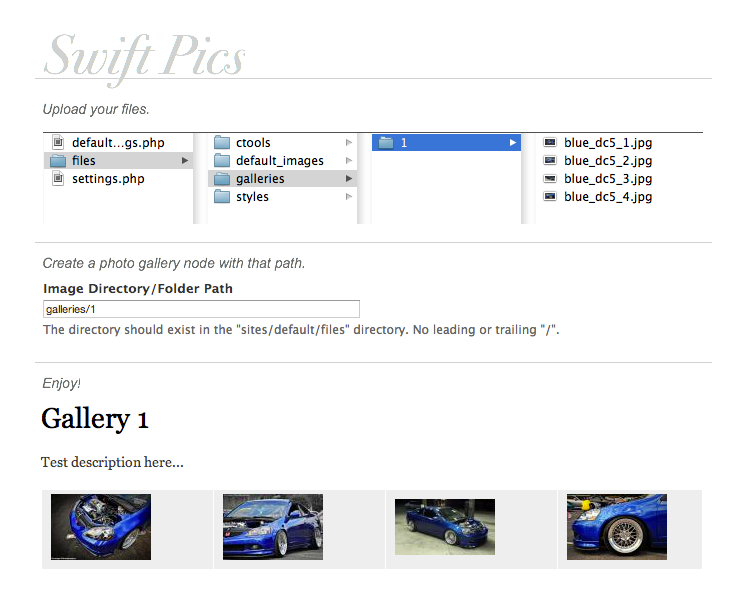
The Swift Pics module makes adding large photo galleries very fast and easy. It simply scans and imports the image files from a folder directory in sites/default/files and automatically adds them to an image field to be used as you wish.
I created this because I was simply tired of having to select/upload images one at a time for photo galleries I create which can have hundreds of photos in them. All that is required is that you have file server (FTP, SSH, etc.) access to place the files in a folder in your sites/default/files directory.
The Swift Pics module adds a Swift Pics content type which has the ability to scan a file directory in sites/default/files for any image types and adds them all to an image field in the gallery node. The images are added as true Drupal managed image/file types and to the multi-value Image field of the Swift Pics node.
Project information
 Unsupported
Not supported (i.e. abandoned), and no longer being developed. Learn more about dealing with unsupported (abandoned) projects- Obsolete
Use of this project is deprecated. - Project categories: Content editing experience, Site structure, Import and export
 1 site reports using this module
- Created by kholloway on , updated
 Stable releases for this project are covered by the security advisory policy.
There are currently no supported stable releases.

